
Apple Business Manager and Apple School Manager are excellent systems of record. They tell you exactly what devices you own, who they’re assigned to, and how they’re enrolled. For inventory, they are authoritative. For risk, they are silent.
What neither platform shows you is which devices are quietly becoming liabilities.
Warranty expiration is not surfaced. AppleCare+ status is not prioritized. Devices that are weeks away from falling out of coverage look exactly the same as devices that are fully protected. Unless you manually click into individual records, export data, or maintain a parallel spreadsheet, there is no way to understand risk across a fleet at a glance. As environments grow, that gap doesn’t just persist — it compounds.
This is the problem that led me to build ABM Warranty.
In our own organization, we needed a way to ensure company devices stayed under warranty. Not as a “nice to have,” but as a deliberate operational strategy. Many of our employees work remotely. They don’t have the luxury of walking into an office staffed with hardware technicians. When something goes wrong, the difference between being under warranty and out of warranty is the difference between a fast replacement and a costly, time-consuming disruption.
Keeping devices covered gives peace of mind. It protects the business from unexpected repair costs, and it protects employees by giving them flexibility to get service wherever they are. Out-of-warranty repairs are expensive, unpredictable, and difficult to budget for. When you manage this proactively, warranty coverage becomes a safety net instead of an afterthought.
This has become even more relevant as Apple hardware longevity has increased. The M1 through M3 generations age exceptionally well. Devices remain fast, reliable, and useful longer than traditional replacement cycles assumed. Apple itself recommends a three to four year lifecycle, but also offers renewable warranties for a reason. Many organizations can reset, redeploy, and continue using hardware with a high degree of confidence — as long as coverage is maintained.
The challenge isn’t deciding whether to renew or replace. The challenge is knowing which devices need action, and when.
Apple Business Manager and Apple School Manager were never designed to answer that question. They are inventory platforms, not lifecycle dashboards. Even if Apple eventually adds a native warranty dashboard — and it would make sense for them to do so — exporting and acting on that data would still be a real operational need. Organizations don’t just want to see information. They need to report on it, share it, and integrate it into planning workflows.
In the meantime, teams are left building fragile processes outside of Apple’s tools. Manual exports. Spreadsheets. Ad hoc scripts. Repeated logins across multiple accounts. None of this scales cleanly, especially for MSPs, school districts, or enterprises managing multiple Apple Business Manager or Apple School Manager environments.

Support Indie Development
These apps are built in my free time.
I build and maintain these tools as an indie developer outside of client work and day-to-day responsibilities. If you find these apps useful and want to help fund continued development, updates, support, and new releases, you can sponsor the work directly.
Monthly support helps me keep shipping improvements, maintain compatibility, and invest more time into building practical software for the Apple admin and consultant community.
ABM Warranty exists to bridge that gap.
It provides a focused dashboard that surfaces warranty and AppleCare+ risk immediately. Devices approaching expiration are visible without hunting. Prebuilt filters make it easy to answer questions like “what is expiring soon,” “what is already out of coverage,” and “what needs attention right now.” Data can be exported securely for reporting, budgeting, or asset tracking without scraping or workarounds.
For organizations with multiple ABM or ASM accounts, switching between environments is intentional and safe. There’s no logging in and out, no credential confusion, and no data crossover. Everything stays local, private, and under the administrator’s control.
This isn’t about replacing Apple’s platforms. It’s about completing them. Inventory tells you what you own. Warranty tracking tells you what’s at risk.
If you manage more than a few dozen Apple devices, this is worth paying attention to. Warranty coverage isn’t just a line item — it’s part of a sustainable device program. Until Apple provides a native way to surface and act on this information, administrators still need answers. ABM Warranty is how I solved that problem for our own fleet, and it’s built to solve it for others facing the same reality.
If this problem sounds familiar, I’d encourage you to try ABM Warranty in your own environment and see how it fits into your workflow. The app is available now, and the beta program is open specifically so Apple IT administrators, MSPs, and school IT teams can put it through real-world use. Your feedback directly influences how the product evolves, from how warranty risk is surfaced to how data is exported and acted on across multiple accounts. If you manage Apple devices at scale, downloading the app, testing it with your fleet, and sharing what works — and what doesn’t — is the fastest way to help shape a tool designed for the realities of modern Apple management.
Ready to take your Apple IT skills and consulting career to the next level?
I’m opening up free mentorship slots to help you navigate certifications, real-world challenges, and starting your own independent consulting business.
Let’s connect and grow together — Sign up here
AI Usage Transparency Report
AI Era · Written during widespread use of AI tools
AI Signal Composition
Score: 0.03 · Low AI Influence
Summary
Download ABM Warranty
Related Posts

Introducing Pique - The Game-Changing Quick Look Plugin for Mac Admins
As a Mac admin, I'm always on the lookout for tools that make my life easier and more efficient. Recently, I stumbled upon Pique - a brilliant Quick Look plugin created by Henry Stamerjohann that allows you to view file contents in a syntax highlighted way.

ABM Warranty 0.4.1 Walkthrough: Wrap-Up and Beta
In this final ABM Warranty 0.4.1 walkthrough, I’m wrapping up the last features I had not covered directly in the earlier videos and then focusing on support, community, and the beta program. I also want to show where the support resources live inside the app so you know where to go if you need help, documentation, or a way to send useful feedback. Additionally, I'll be covering some of the key features that were updated since the previous version, including any bug fixes or improvements made to existing functionality.
ABM Warranty 0.4.1 Walkthrough: Managed Preferences
In this part of the ABM Warranty 0.4.1 walkthrough series, I'm focusing on managed preferences and the credential packaging workflow. In the last video, I covered multiple credentials inside the app itself. In this one, I'm showing how to package those credentials so they can be deployed securely through MDM. This process is a crucial step in ensuring that your credentials are properly configured and protected within your organization's mobile device management system.

Low Profile Walkthrough and Review
Today I’m walking through Low Profile, a utility from Nindi Gill that I use when I want to inspect profiles already installed on a Mac and figure out whether those profiles contain issues I need to clean up. The value is that Low Profile gives me a straightforward way to inspect profiles installed on any Mac. This simplicity makes it easy for me to identify and address potential problems, which is especially useful when working with multiple machines or troubleshooting complex profile configurations.

ABM Warranty 0.4.1 Walkthrough: Multiple Credentials
In this part of the ABM Warranty 0.4.1 walkthrough series, I’m focusing on multiple credentials. In the first video, I showed the basic setup and how to add a single credential. Now, I want to explore what happens when I remove a credential, what changes occur when I add more than one, and how the app behaves once there are multiple contexts in play. This will help clarify any potential issues or inconsistencies that may arise with multiple credentials.
QuickPKG Walkthrough and Review
I use QuickPKG when I need to turn an application, DMG, or ZIP file into a package quickly without wasting time in a heavier packaging workflow. This post follows the same path as my video: what QuickPKG is, where to get it, how I run it, what a simple packaging example looks like, and where I think admins need to be careful about potential pitfalls that can arise from using this tool.
ABM Warranty 0.4.1 Walkthrough: Introduction
In this first ABM Warranty 0.4.1 walkthrough, I want to show you what the app actually does before I get into the more specific feature videos. This is the broad introduction. I’m walking through the dashboard, how I think about the warranty cards, how released devices are handled, how the filters work, how to add credentials, where the data is stored locally, and what the logging and security model looks like.

ABM Warranty 0.4.1
The 0.4.x release series for ABM Warranty is focused on operational scale. The earlier 0.3 releases were about trust, correctness, and stabilizing the foundation. Version 0.4.1 builds directly on that work by making the app more practical for consultants, internal IT teams, and managed service providers who need to support multiple environments without losing isolation, control, or visibility. This includes improvements to user interface and workflow, as well as enhanced reporting capabilities to help these users manage their workflows more efficiently.
Why Apple Fleet Risk Isn’t a Security Problem—Until It Is
Security and risk are often treated as interchangeable concepts in modern IT environments, but they are not the same discipline. Security focuses on controls, enforcement, and prevention. Risk management, by contrast, is concerned with likelihood, impact, and consequence across operational, financial, and organizational domains. Frameworks such as those published by NIST make this distinction explicit: risk assessment is not a technical exercise, but a business one. Technology informs risk decisions, but it does not define them.
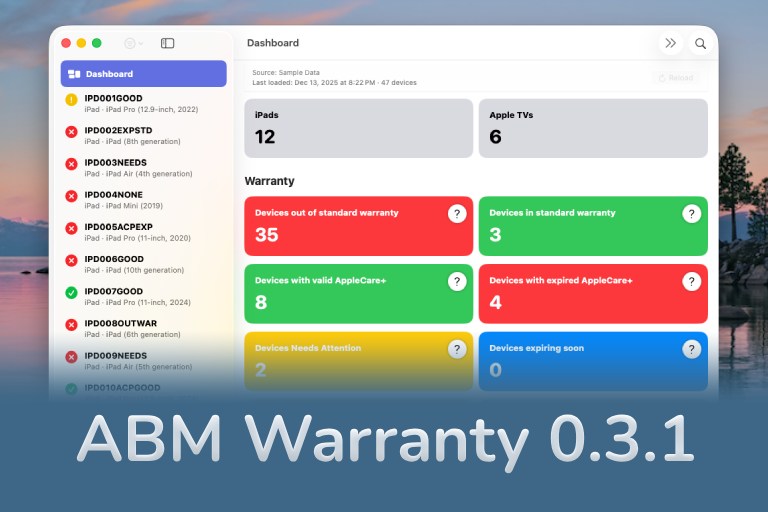
ABM Warranty 0.3.1
The 0.3.x release series for ABM Warranty is about tightening guarantees. Where earlier releases focused on surfacing data and making long-running operations observable, 0.3.x focuses on ensuring that what you see is complete, consistent, and safe to trust—particularly as the app is used in larger, slower, and more varied environments. This shift in focus aims to provide a more reliable foundation for users who require higher levels of assurance from their warranty management system.
