
The rise of local LLM-powered image generation
Local LLMs have rapidly evolved beyond text and are now capable of producing high-quality images directly on-device. For users running Apple Silicon machines—especially M-series Mac Studios and MacBook Pros—this represents a major shift in what’s possible without relying on cloud services. Just a few years ago, image generation required powerful remote GPUs, subscriptions, and long processing times. Today, thanks to optimized models and Apple’s Metal acceleration, you can generate and edit images locally with impressive speed and quality. The result is a workflow that is faster, private, and entirely under your control.
Discovering Draw Things
I recently discovered an app that many people have been using for a while: Draw Things.
Draw Things is a macOS (and iOS) application that allows you to use either cloud-based or fully local models to perform image generation. What makes it especially compelling is how accessible it makes advanced workflows like image-to-image generation, LoRA usage, and model configuration—all within a clean native interface. Instead of stitching together multiple tools, everything lives in one place: model selection, prompt entry, sampling configuration, and output management.
You can download it here: Draw Things
Looking back: my 2024 experience with Aragon.ai
In 2024, I experimented with an online service called https://www.aragon.ai/ to generate a professional headshot. The process required uploading around 10 images of myself, training a model in the cloud, and waiting for outputs. At the time, image generation was still fairly limited, and the results reflected that. Facial consistency wasn’t always reliable, lighting often looked artificial, and there was very little control once the model had been trained. You were essentially locked into whatever the model produced, and while some outputs were usable, the overall experience felt constrained and unpredictable.
Argon Reference Images 2024







Argon Final Images 2024



.jpeg)


This was the best and winner of that batch back in 2024. I paid 49.99 and got 50 images to choose from, most were duds. The image generation took about 1 full day.

Fast forward to 2026: a completely different experience
By 2026, the landscape has changed significantly. With Draw Things, we now have access to far more advanced models like Qwen Image Edit 2509, which deliver dramatically better results with far more control. Instead of training a model ahead of time, you can now take a single image, apply a prompt, and generate high-quality variations almost instantly.
At a high level, image generation models—typically diffusion-based—work by starting with structured noise and iteratively refining it into a coherent image. Each step of this refinement process moves the image closer to the intent described in your prompt while also respecting any input image you provide. These models are trained on massive datasets, often billions of images, which is why they can produce such realistic outputs.
There are a few key concepts that are worth understanding:
- Steps (Sampling Steps): The number of refinement passes the model performs. More steps can increase detail but also increase processing time.
- Guidance Scale: Controls how strongly the model follows your prompt.
- Seed: Determines randomness. Using the same seed produces the same output.
- Batch Size: Defines how many images are generated at once.
- LoRA (Low-Rank Adaptation): Lightweight model enhancements that specialize or accelerate output generation.
In this particular setup, we are using the Qwen Image Edit 2509 model along with a Lightning 4-step LoRA, which is specifically optimized to produce high-quality results with very few sampling steps.
Configuration
{"sharpness":0,"batchCount":1,"seedMode":2,"loras":[{"mode":"base","file":"qwen_image_edit_2509_lightning_4_step_v1.0_lora_f16.ckpt","weight":1}],"upscaler":"","width":768,"causalInferencePad":0,"guidanceScale":1,"controls":[],"tiledDiffusion":false,"refinerModel":"","shift":2.8339362000000001,"tiledDecoding":false,"batchSize":4,"faceRestoration":"","sampler":17,"cfgZeroInitSteps":0,"seed":1319883217,"strength":1,"hiresFix":false,"steps":4,"height":1152,"cfgZeroStar":false,"resolutionDependentShift":true,"model":"qwen_image_edit_2509_q6p.ckpt","maskBlur":1.5,"preserveOriginalAfterInpaint":true,"maskBlurOutset":0}This configuration defines the entire generation pipeline, including the model, LoRA, sampling strategy, resolution, and batching behavior. A few notable details stand out. The step count is set to just 4, which is unusually low but made possible by the Lightning LoRA. The batch size is set to 4, meaning multiple variations are generated simultaneously. The resolution is configured for portrait output, making it ideal for headshots, and the guidance scale is balanced to allow the model to follow the prompt without overfitting to it.
Step-by-step: how to use the configuration
The workflow itself is surprisingly simple once everything is configured. The first step is to copy the configuration and paste it into Draw Things using the ... → Paste Configuration option.
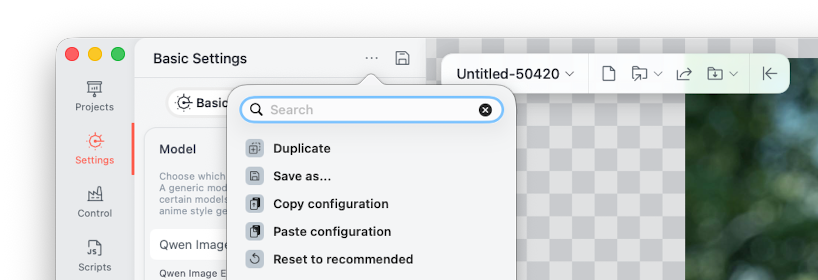
When you do this, the app parses the configuration and automatically applies all of the necessary settings, effectively recreating a fully tuned environment without requiring manual adjustments.
Once the configuration is loaded, Draw Things will begin downloading the required assets, including the Qwen base model and the Lightning LoRA. This step is important because the base model provides the general image understanding and rendering capabilities, while the LoRA enhances both speed and output quality. After these assets are downloaded, everything runs locally on your Mac using Metal acceleration, which is what enables the fast performance on Apple Silicon.
From there, you simply drag an image into the canvas and enter a prompt such as:
create a professional headshot in a modern office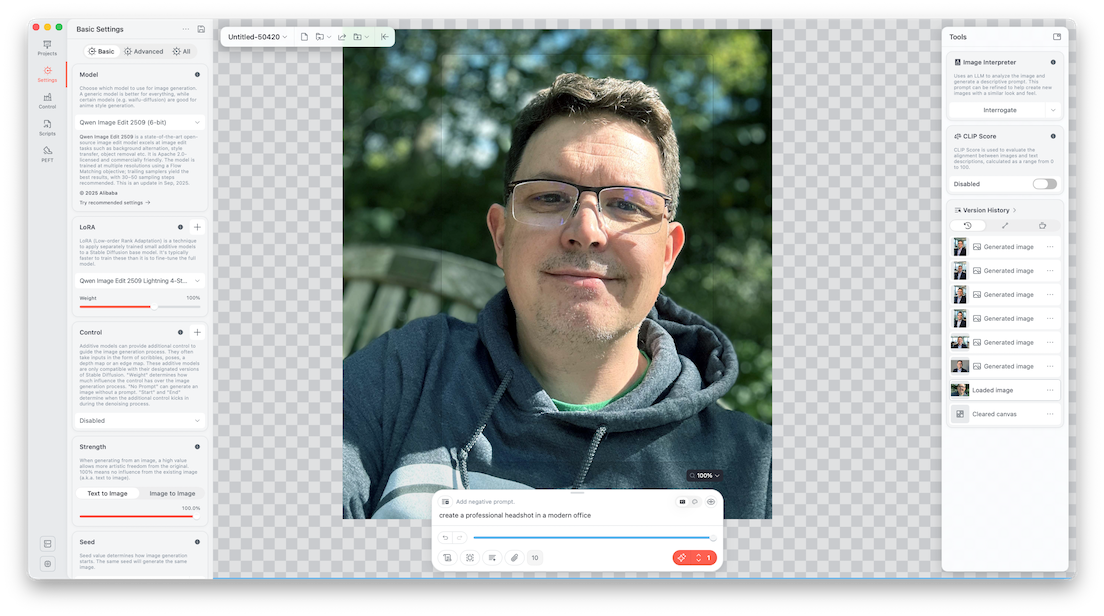
At this point, the model switches into image-to-image mode. Instead of generating something entirely from scratch, it uses your input image as a reference and transforms it. This allows it to preserve identity while improving elements like background, lighting, and overall presentation. Because the batch size is set to 4, the model generates multiple variations at once, giving you several options to choose from.
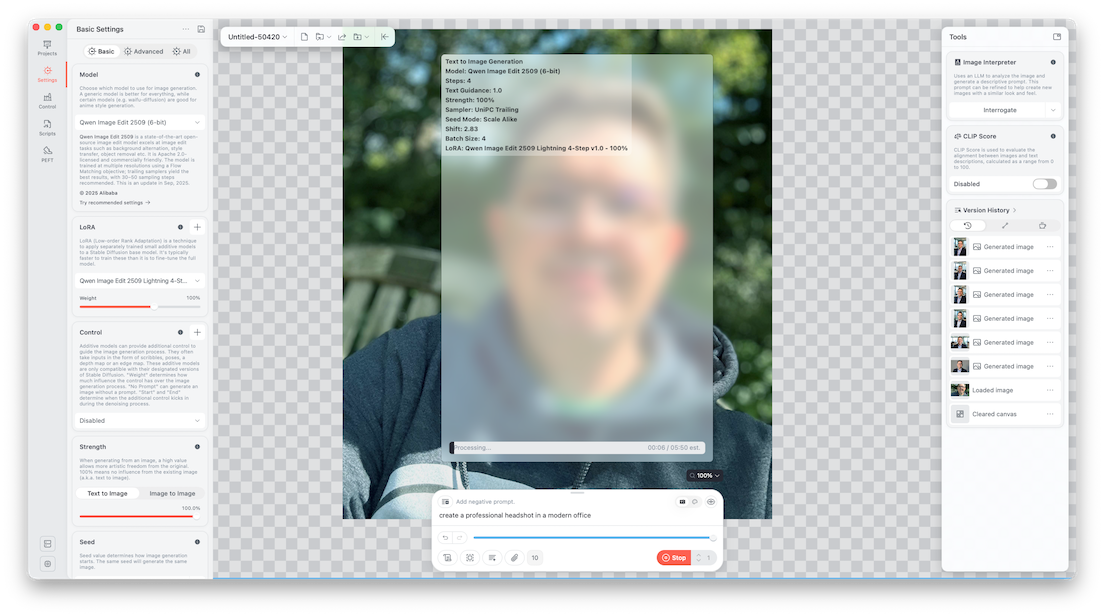
During processing, the model performs iterative sampling. It starts from a noisy representation and refines it step by step, guided by both the prompt and the input image. Even though this configuration only uses four steps, the Lightning LoRA allows the model to converge quickly, producing clean and realistic results in a fraction of the time traditional setups would require. The sampler being used (UniPC) is designed to efficiently guide this refinement process, balancing speed and quality.
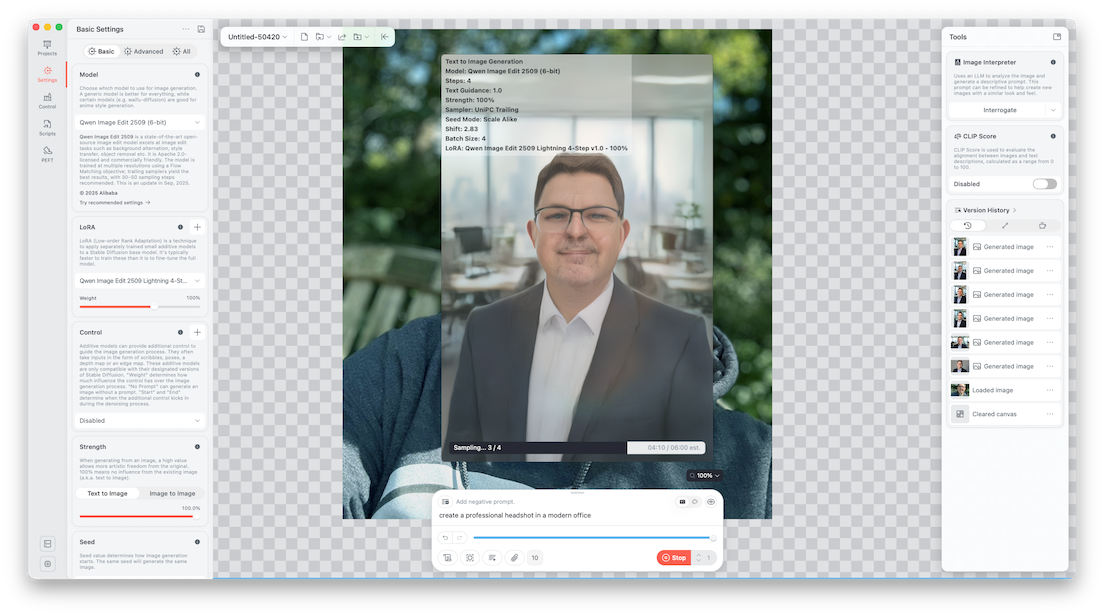
When the process completes, the final images are generated and stored locally on your machine.
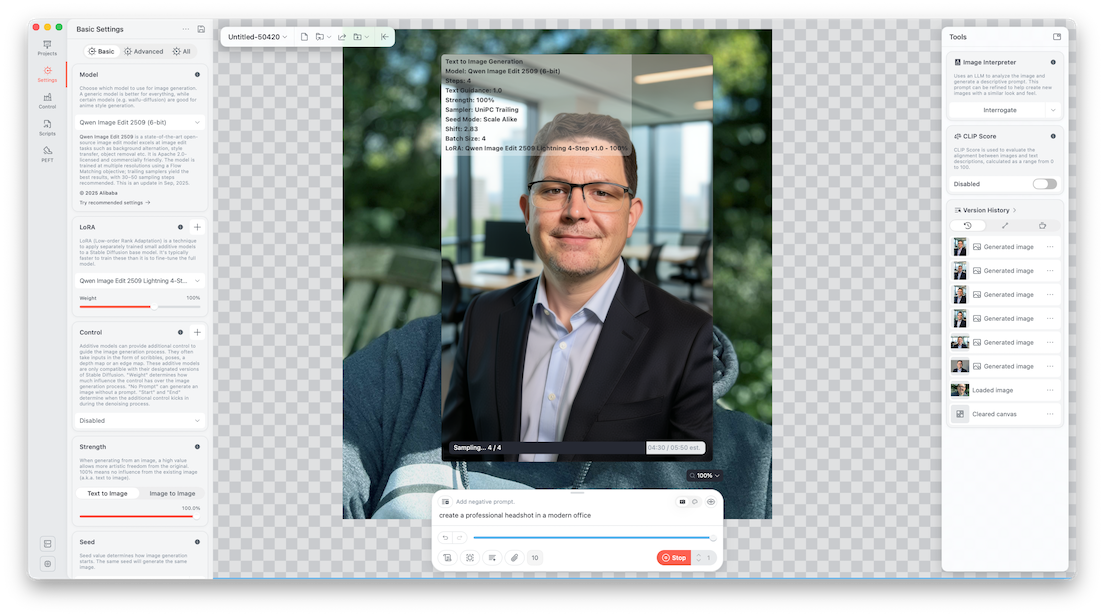
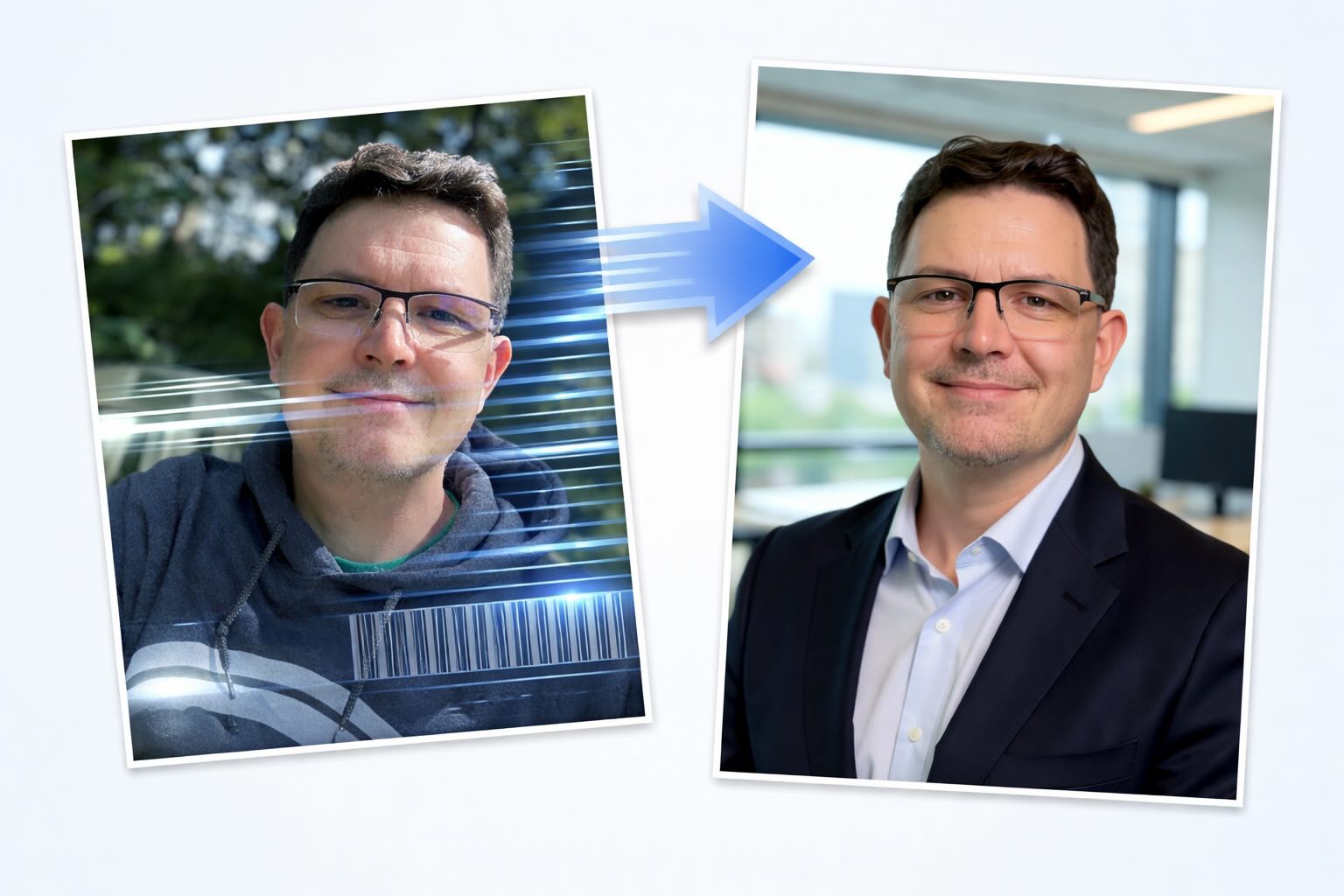
You can export them, iterate further, or tweak the prompt and settings to refine the results. The transformation from a casual outdoor photo into a professional headshot—with improved lighting, a clean office background, and consistent facial features—highlights just how far this technology has come.
Here is the source image I used in this example, I only had to use 1.

And here were the images that were output from the Draw Things app.
Local Final Images 2026





The winner is

The difference between 2024 and 2026 is dramatic. What previously required cloud services, model training, and long wait times can now be done locally in just a few seconds with significantly better results. More importantly, this entire workflow is now free, private, and fully offline.
The quality of image generation today is light years ahead of where it was just two years ago, and the pace of improvement continues to accelerate. If you’re using an M-series Mac, you already have everything you need to take advantage of it.
References
Ready to take your Apple IT skills and consulting career to the next level?
I’m opening up free mentorship slots to help you navigate certifications, real-world challenges, and starting your own independent consulting business.
Let’s connect and grow together — Sign up here
AI Usage Transparency Report
AI Era · Written during widespread use of AI tools
AI Signal Composition
Score: 0.39 · Moderate AI Influence
Summary
The rise of local LLM-powered image generation has transformed the way users can create high-quality images directly on-device, without relying on cloud services.
Related Posts

Setting up Ollama on macOS
Recently, after some bad experiences with OpenAI's ChatGPT and CODEX, I decided to look into and learn more about running local AI models. On its face it was intimidating, but I had seen a lot of people in the MacAdmins community posting examples of macOS setups, which really helped lower the bar for me both in terms of approachability and just making me more aware of the local AI community that exists out there today.
AI Agent Constraints and Security
I really feel like in this era of AI it's essential to write about and share experiences for others who are leveraging AI, especially now that AI usage seems almost ubiquitous. Specifically, when it comes to AI in development and the rapid growth of AI-driven automations in the IT landscape, I believe there's a need for open discussion and exploration.

Vibe Coding with Codex: From Fun to Frustration
So there I was, a typically day, a typical weekend. As a ChatGPT customer, I had heard good things about Codex and had not yet tried the platform. To date my experience with agentic coding was simply snippit based support with ChatGPT and Gemeni where I would ask questions, get explanations and support with squashing bugs in a few apps that I work on, for fun, on the side. There were a few core features in one of the apps I built that I wanted to try implementing but the...
Automating Script Versioning, Releases, and ChatGPT Integration with GitHub Actions
Managing and maintaining a growing collection of scripts in a GitHub repository can quickly become cumbersome without automation. Whether you're writing bash scripts for JAMF deployments, maintenance tasks, or DevOps workflows, it's critical to keep things well-documented, consistently versioned, and easy to track over time. This includes ensuring that changes are properly recorded, dependencies are up-to-date, and the overall structure remains organized.

Cleaning House in Jamf Pro: A Friendly Auditor Script for Real-World Hygiene
There’s a tipping point in every Jamf Pro environment where the policy list begins to feel like a junk drawer. Everyone means well. Nobody deletes anything. And then, months later, you’re trying to answer simple questions like: *Which policies are actually scoped? What’s no longer referenced? Why are there five versions of the same script?* This post covers a small, practical script I wrote to help you **see** what’s stale, **explain** why it’s stale, and (optionally) **park** it safely out of the way—without deleting a thing.

Turn Jamf Compliance Output into Real Audit Evidence
Most teams use Apple’s macOS Security Compliance Project (mSCP) baselines because they scale and they’re repeatable. Jamf’s tooling makes deployment straightforward and the Extension Attribute (EA) output is a convenient place to capture drift. What you don’t automatically get is the artifact an auditor will accept on a specific date—an actual document you can file that shows which endpoints are failing which items, plus a concise roll-up of failure counts you can act on. Smart Groups answer scope; they don’t produce evidence.
10 Things You Didn't Know You Could Do With Apple Configurator (That Save Mac Admins Hours)
Most of us treat Apple Configurator like a fire extinguisher: break glass, DFU, restore, move on. But it can do a lot more, and when you know the edges, you can turn a bricked morning into a ship-it afternoon. Below are ten things I regularly use (or wish I’d used sooner) that demonstrate its capabilities beyond just emergency recovery.
The Power of Scripting App Updates Without Deploying Packages
Keeping macOS environments up-to-date in a seamless, efficient, and low-maintenance way has always been a challenge for IT admins. Traditional package deployment workflows can be time-consuming, prone to versioning issues, and require extensive testing and repackaging. This can lead to frustration and wasted resources as IT teams struggle to keep pace with the latest updates and patches. But there's another way—a more elegant, nimble approach: scripting.
Detecting Invalid Characters and Long Paths in OneDrive on macOS
Microsoft OneDrive is widely used for syncing documents across devices, but on macOS, it can silently fail to sync certain files if they violate Windows filesystem rules — like overly long paths or invalid characters. This creates frustrating experiences for end users who don’t know why files aren’t syncing.
Using a script to Enable FileVault via JAMF: A Word of Caution
Enabling FileVault is a critical step in securing macOS devices, particularly in managed environments like schools, enterprises, and remote teams. For administrators using **Jamf Pro**, automating this process can simplify device onboarding and ensure compliance with disk encryption policies. This automation also helps reduce the administrative burden associated with manually configuring each device, allowing IT staff to focus on other tasks while maintaining a secure environment.
