
I really feel like in this era of AI its important to write on, and share experiences for others leveraging AI, especially now in this time when AI usage almost feels ubiquitous. Specifically when it comes to AI in development and specifically with the rise of AI automations in the IT landscape.
I have had so many mixed experiences with the use of AI in both. If you haven’t read my other post about the dangers of using AI for “vibe coding” check out my post here where I went through what I felt at the time was a pretty traumatic experience. Essentially I watched as CODEX at the time truncated the entire UI of an app I have been working on for a long time to zero bytes.
When I reflect on those experiences there were some deep and important lessons learned, lessions like… always have a good code backup strategy, never work on live code with AI, and always, always use versioning methodologies to ensure that you can easily rollback any unwanted changes. These are not AI lessons these are lessons of, ok im shifting from amateur developer to a real developer who now has to live with the consequences of my tool choices.
Thats it, tools today, can think, and thats nothing “new” but it is a shift in how we think about and perceive risk and the concept of trust. Im going to do an entire post where we deep dive the trust aspect of AI later, but to touch on it here briefly, I have been in the development and IT space for over 20 years, and I have seen the introduction of the cloud, of automation, and each one came with its own level of “trust” issues. For cloud it was uptime and reliability, for automation it was assurance of consistency.
Risk however was always grounded in the operator and nothing really has shifted here, where trust and risk are being rattled with the use of AI is the thought that AI can and is fully replacing the operator in some cases, without that trusted human who has been there at the helm managing the cloud, managing and creating automations and developing tools like platform as a service, infrastructure as a service etc.. The use of AI feels very risky because the thought of a tool running consistently, autonomously is still very much in its infancy.
On that note I want to talk about how the use of AI specifically with coding is attempting to restore some of that trust, some overall guardrails and much needed, stability in the AI space. Im looking at you CODEX. Now after my experience with CODEX, there have been some in my opinion welcomed changes to how it functions that I wanted to go over.
One benefit of my experience with Codex was that it forced me to venture into the world of local LLMs.
My thought, I can’t trust OpenAI with my code, it clearly went off the reservation with the deletion of my app and so thats it, I am done with OpenAI I have a semi-powerful computer a M2 Max Studio with 32GB of unified memory I will just use a local LLM and bypass the need for the use of ChatGPT, and Codex entirely. That just proved one thing I didn’t fully understand how AI tools work, I didnt under stand the layers, how they interact with tools and the role the agent plays in the AI relationship.
Im going to lay out what I have learned that spurred this post, and I wont go into a ton of detail but I will write a post on my experiences with local LLMs soon.
Essentially AI functions on a few different planes.
Local Lessons Learned:
- If your running an LLM locally then you must have a workstation with shared unified memory that can actually process an LLM.
- You need a tool like Ollama that can manage and activate the LLMs on your local machine.
- You need the actual LLM itself its typically a file that you download to your workstation in some cases these can be anywhere from 2-100GB in size.
- Some local LLMs can leverage tools provided the LLM and the Agent know how to use them together (this is not always the case).
- You need an agent that can interact with the LLM. OpenCode is a good one.
Cloud LLM lessions learned:
- You still need an AGENT to interact with a cloud LLMs in most cases its ChatGPT.com (web), ChatGPT app, or Codex CLI, Claude CLI etc..
- The models have strong tooling capabilities and the AGENTS act on those tool requests. Support for tools in the cloud models is much more ubiquitous.
- Agents are where guardrails exist. This is not a guarantee each agent offers different levels of protections.
LLMs themselves are trained on large data sets, that gets translated into learned patterns, you may see these referred to as parameters and in some models you will see things like 20b or 120b at the end of the local LLM name which refers to the amount of parameters, the more parameters the more accurate (with some caveats) the return of information because it can match on more patterns due to its increased storage of parameters in the LLM itself. For local LLMs this means increased file size of the LLM file, for cloud LLMs the same can be true but those models tend to be distributed across an entire network of systems to provide access to these patterns to multiple (millions) of people at the same time.
This in turn expands (in some cases) the tool capabilities of the LLM that the agent can then carry out.
The agent sends back-end instructions as well as user front-end instructions that you type to the LLM and returns a response. The agent in this case is CODEX its a CLI agent or macOS agent that you connect to cloud LLMs from Open AI. This agent is where the safeguards lie.
Agents are what display responses and can leverage tooling capability so when you say “Hey Codex please create a git repo” the LLM itself has to be able to interpret that command, and tell the agent, ok its time to run a tool, the agent which has been authorized to run that tool does and a response is returned. Tools can range from the use of git, to sed, or grep, to search through, parse and make changes to files as instructed by the operator.
Prior to recent versions of CODEX did not have the concept of a sandbox or limits on how these tools could be run, and that led to the mass deletion event that I suffered early on when I was using CODEX - the agent, not the LLM. Thats when it hit me it wasn’t the LLM that caused the issue per se it was the agents inability to see a risky event and block it, the app at the time didn’t have sandboxing and so these new Agent based changes are what I want to review now.
One change that wasn’t really a change it just seems to be happening more consistently now is the introduction of elevated and permission based actions.
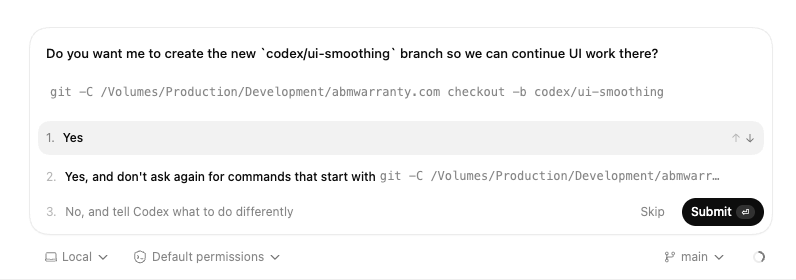
Here is an example of an elevated prompt for the creation of a branch
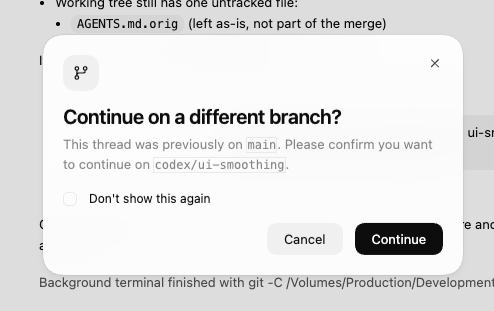
and here we see a warning that you are about to switch to a new branch. These new UI enhancements not only in the desktop version of CODEX and CLI version of CODEX is a welcome change as it aims to restore trust, and reduce risk when using the tool for something so casual as “vibe coding”. This is huge from a psychological perspective. So lets dig into it.
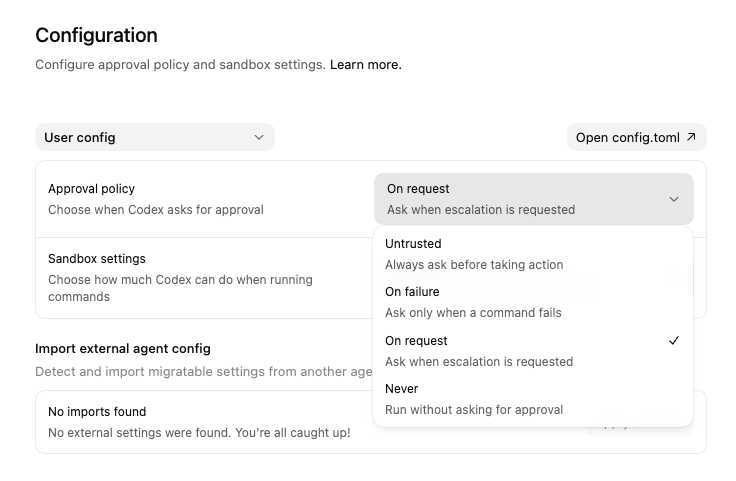
If we open CODEX we can see there is an option in Configuration for Sandbox and we can set the Sandbox level to read only, workspace write and full access. Read only “Can read files, but cannot edit them”, Workspace Write “Can edit files, but only in this workspace” and Full Access “Can edit files outside this workspace”. Full access scares me unless your in a throw-away VM, the ability for an agent to work outside of the defined folder of code or repository is scary.
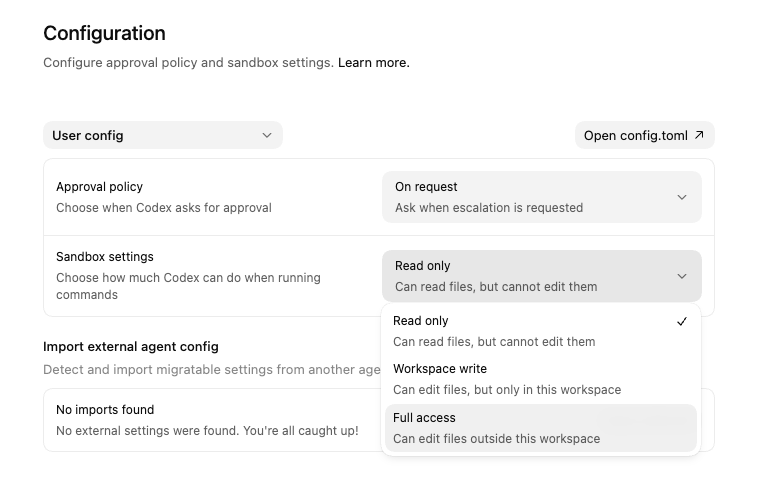
The fact though that we are seeing some transparency and hard limits to how agents of AI models can be run is refreshing. In addition there are Approval Policies which run when Codex asks for approval.
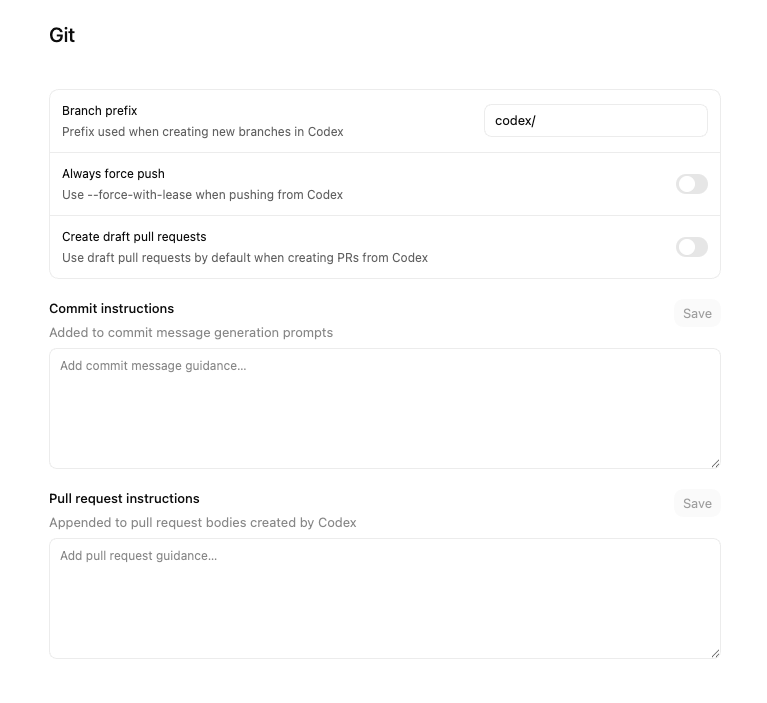
Codex also has some baked in GIT restrictions and rules that allow you to set limits on how GIT is used and additional instructions for commits and pulls which is great to see, it bakes in some important stability in how the tools are used and that consistency that we talked about earlier.
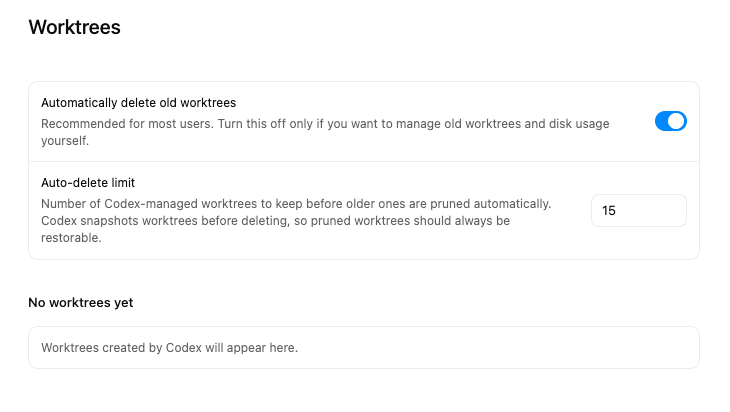
Worktrees are another place where you have control over the outcomes and how the tools work you can set worktrees to be automatically deleted or not for example.
Lets bring AI usage back to where I started, trust, and risk. No matter what the tool, what the wave, what the era these are the same two hurdles that every major change has to clear. In the past these hurdles were cleared because in my view they were people backed. Was there a scare when the cloud hit the scene, yep.. oh no we won’t need as many local server administrators. True those jobs shifted to data-centers and out of corporations. With automation and the rise of the MDM it was oh no we won’t need as many IT people and true enough the rise of the MDM engineer was born and it did reduce the need for bloated staffing.
Will AI come after every single tech job? No. Will it shift the need for them? Yes. Remember adoption of these tools is based on trust and risk, compliance is still here to stay and human backed, and human centered responsible use of AI will be what allows the use of it in IT and Development to continue as it evolves into a this new era. Its an exciting time, I challenge anyone who feels like their job is at risk or they are feeling uncertain in these times, look for ways to offer mitigations to de-risk the use of AI to garner more trust around the use of it. I fully belive that this approach will future-proof any role where AI is used. From the copywriter using it in their day to day, to a systems administrator.
That said I will conclude with I am very excited by the trend of adding in Agent based controls into the AI tools we use today, as AI matures I expect to see more guardrails and more implementations to ensure that they are used responsibly, reliably, consistently all leaning into gaining trust and reducing risk in the environments where they are used.
Ready to take your Apple IT skills and consulting career to the next level?
I’m opening up free mentorship slots to help you navigate certifications, real-world challenges, and starting your own independent consulting business.
Let’s connect and grow together — Sign up here
AI Usage Transparency Report
AI Era · Written during widespread use of AI tools
AI Signal Composition
Score: 0.25 · Moderate AI Influence
Summary
The author discusses the importance of writing and sharing experiences with AI, particularly in development and IT. They share their personal experience with CODEX, a tool that uses AI to automate coding tasks, and how it led to a traumatic event where the entire UI of an app they were working on was truncated to zero bytes. The author reflects on the lessons learned from this experience, including the importance of having a good code backup strategy, never working on live code with AI, and using versioning methodologies to ensure that changes can be easily rolled back. They also discuss the concept of trust in AI and how it is being rattled by the thought of AI fully replacing human operators. The author then goes on to talk about the use of local LLMs (Large Language Models) and cloud applications, including the need for agents to interact with these models and the importance of guardrails in ensuring that AI tools are used safely and effectively.
Related Posts
Scoring AI Influence in Jekyll Posts with Local LLMs
There’s a moment that kind of sneaks up on you when you’ve been writing for a while, especially if you’ve started using AI tools regularly. You stop asking whether AI was used at all, and instead start wondering how much it actually shaped what you’re reading. That shift is subtle, but once you notice it, you can’t really unsee it.

Running Image Generation Locally on macOS with Draw Things (2026)
Local LLMs have rapidly evolved beyond text and are now capable of producing high-quality images directly on-device. For users running Apple Silicon machines—especially M-series Mac Studios and MacBook Pros—this represents a major shift in what’s possible without relying on cloud services. Just a few years ago, image generation required powerful remote GPUs, subscriptions, and long processing times. Today, thanks to optimized models and Apple’s Metal acceleration, you can generate and edit images locally with impressive speed and quality. The result is a workflow that is faster, private, and entirely under...
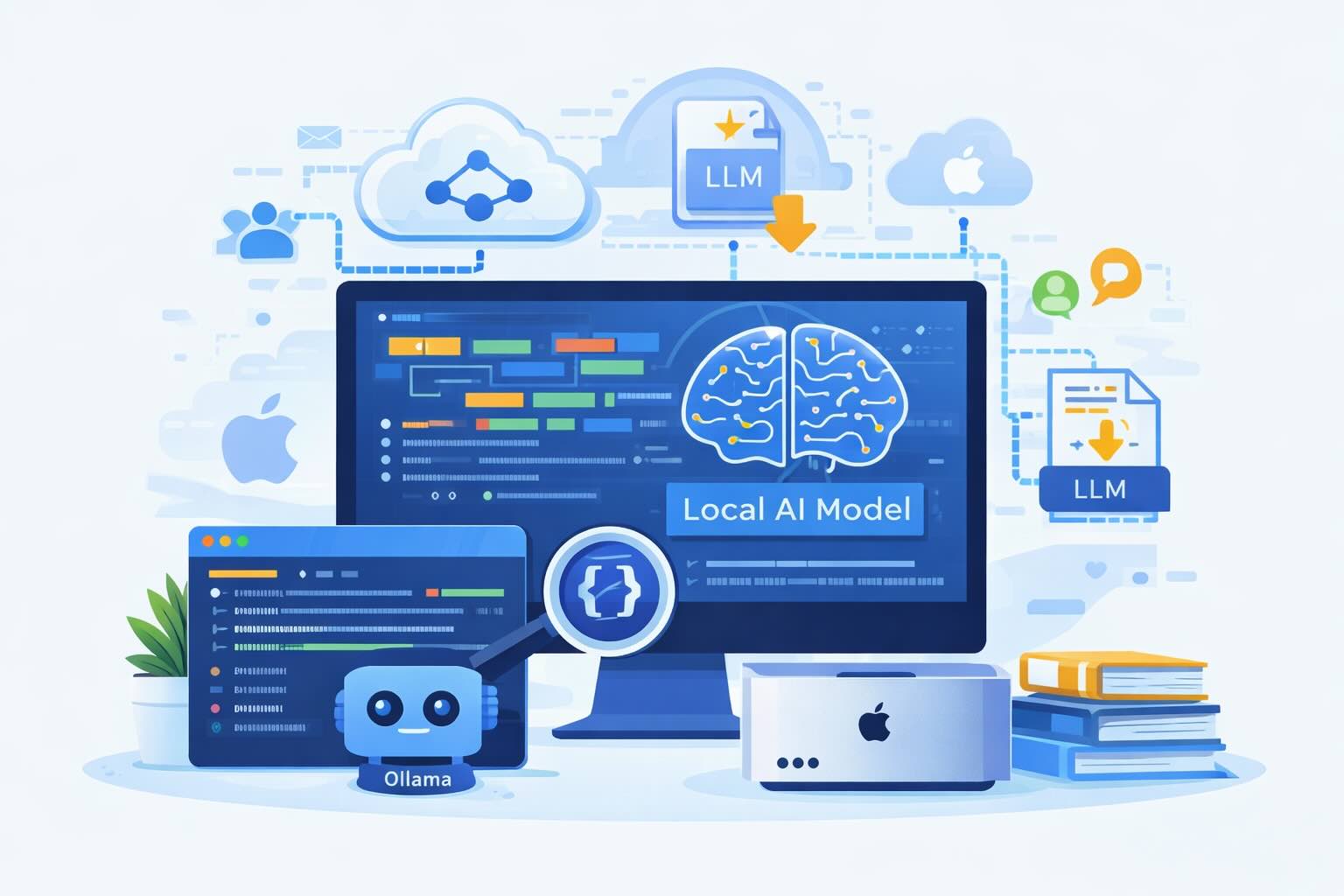
Setting up Ollama on macOS
Recently, after some bad experiences with OpenAI's ChatGPT and CODEX, I decided to look into and learn more about running local AI models. On its face it was intimidating, but I had seen a lot of people in the MacAdmins community posting examples of macOS setups, which really helped lower the bar for me both in terms of approachability and just making me more aware of the local AI community that exists out there today.

Vibe Coding with Codex: From Fun to Frustration
So there I was, a typically day, a typical weekend. As a ChatGPT customer, I had heard good things about Codex and had not yet tried the platform. To date my experience with agentic coding was simply snippit based support with ChatGPT and Gemeni where I would ask questions, get explanations and support with squashing bugs in a few apps that I work on, for fun, on the side. There were a few core features in one of the apps I built that I wanted to try implementing but the...
Automating Script Versioning, Releases, and ChatGPT Integration with GitHub Actions
Managing and maintaining a growing collection of scripts in a GitHub repository can quickly become cumbersome without automation. Whether you're writing bash scripts for JAMF deployments, maintenance tasks, or DevOps workflows, it's critical to keep things well-documented, consistently versioned, and easy to track over time. This includes ensuring that changes are properly recorded, dependencies are up-to-date, and the overall structure remains organized.

Skills You Never Meant to Learn as a Consultant (and Why They Matter Beyond Consulting)
When you run a consultancy, you think the job is about your expertise—the thing you’ve been hired to do. But very quickly, you realize the role demands a whole set of skills you never set out to master. They sneak in over time, and before you know it, you’ve become fluent in things you once thought you’d avoid. The funny part is, you don’t even notice you’re learning them until you look back and recognize how much your approach has shifted. These are the skills that never appear on your...

What Does It Really Mean to Be “Senior” in Your Job?
I have a lot of friends in the job market right now, and we’ve been having some interesting conversations about a title that comes up again and again: “Senior.” It’s one of those words that carries weight when you first hear it—implying a certain level of mastery, trust, and authority—but the more you look at how it's used in practice, the more slippery it becomes. We've been debating what exactly "senior" means in different contexts, from years of experience to specific skills or responsibilities.
What Really Makes A Great IT Support Technician?
I started thinking about what it means to be a great IT technician. As one of my now roles, IT technician was thrust upon me, among other things, by choice. Primarily because I enjoy it, and so it got me thinking, why do I love it so much? Over the years I have worn the hat of support specialist, web developer, IT manager, IT director, and CEO. I am now the information systems security officer but not matter how hard I try, the pull, and draw of troubleshooting issues pulls...
Lessons Learned: Scale without the burnout. Lessons learned from an IT Entrepreneur on how to build an ideal, converting, MSP in 2025
I’ve written about how I’d build an MSP from scratch in 2024. I followed that up with what I’d do differently in 2025 after a few more battle scars. Now, as I reflect on the way this space keeps evolving, I think it’s time to talk about scale—and more specifically, how not to lose your mind while scaling. It's an area where many MSPs struggle, and I'm no exception.

Is it time to stop getting certified in your field?
In the IT field, certifications often appear to be the golden ticket and in many cases the fast track to success. They signal expertise, validate skills, and provide a sense of accomplishment. However, the heavy reliance on certifications in the industry brings a host of challenges, and many professionals, like myself, find themselves questioning the value, timing, and necessity of these credentials. This has led to a culture where some individuals prioritize certification over hands-on experience, while others feel pressured to constantly update their credentials to remain relevant.
