
For quite a few years, Apple enabled users to download their iPhone or iPad photos to their Macs with a service called My Photo Stream. It wasn’t perfect, but it was free, and it did a decent job of ensuring that photos you took on your iPhone or iPad would end up on your Mac.
Then Apple introduced iCloud Photo Library, later renamed to iCloud Photos, which is a full-featured cloud-based photo syncing service. However, because it stores all your photos in the cloud, most people need to purchase more storage from Apple to use it.
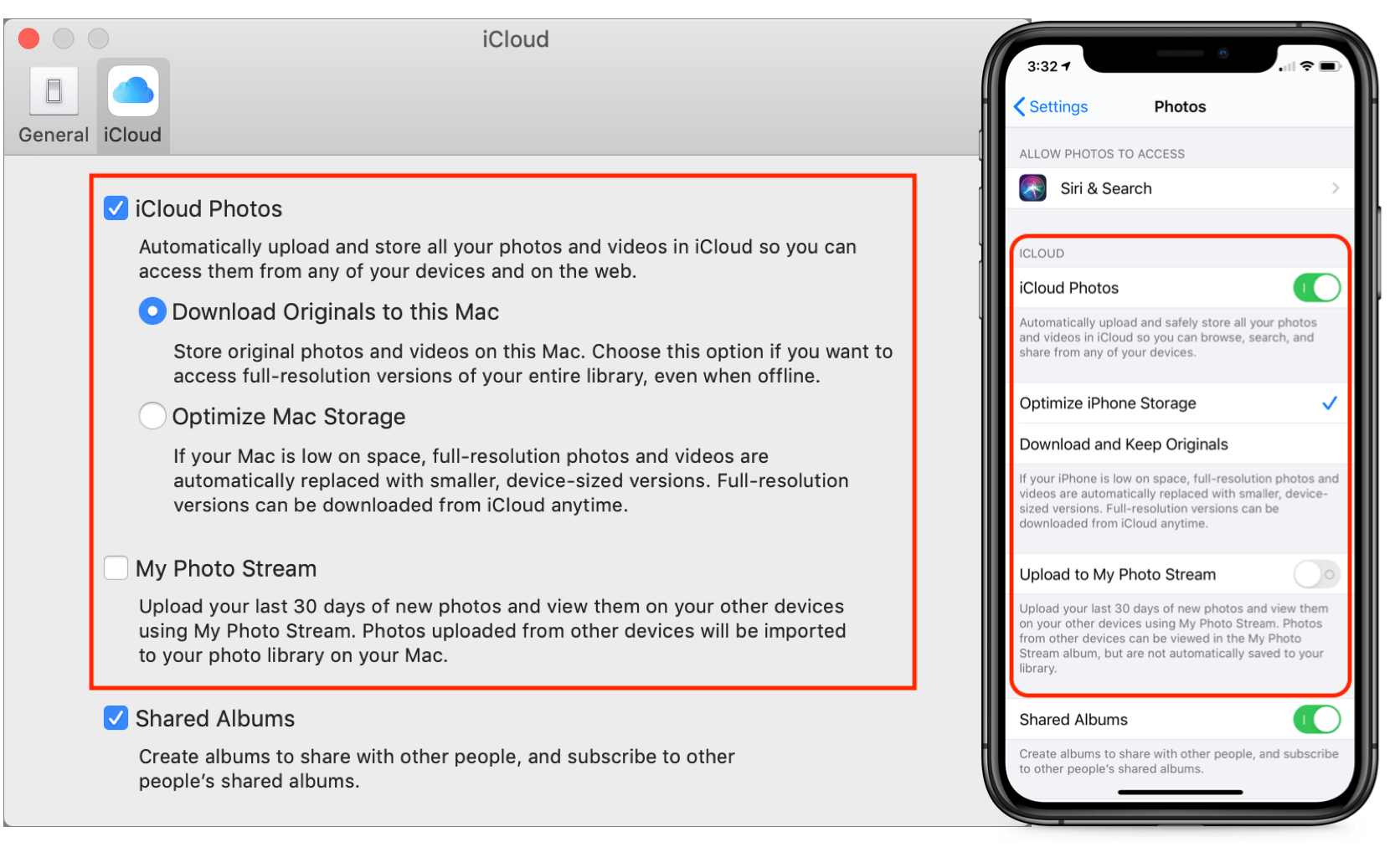
As a result, Apple has kept My Photo Stream around, at least for most existing users. (The company says, “If you recently created your Apple ID, My Photo Stream might not be available. If My Photo Stream isn’t available, use iCloud Photos to keep your photos and videos in iCloud.” Huh.) For those who have a choice, which should you use? (On the Mac, you make that choice in Photos > Preferences > iCloud; in iOS, look in Settings > Photos.)
Cost and Storage Details
The key advantages of My Photo Stream over iCloud Photos are that My Photo Stream is completely free and the storage it uses doesn’t count against your iCloud limits.
In contrast, Apple gives every iCloud user 5 GB of free storage, but that’s shared among all your iCloud services, like iCloud Drive and icloud.com email, so it disappears quickly. Most of us have more than 5 GB of photos anyway. You can purchase 50 GB for $0.99 per month, 200 GB for $2.99 per month, or 2 TB for $9.99 per month (prices vary slightly in other countries).
On a pure price basis then, My Photo Stream wins. However, it suffers from other limitations that make it less compelling:
- My Photo Stream stores your photos on your iOS devices in a lower resolution to save space and transmission time. On the Mac, however, your photos download in full resolution. In contrast, iCloud Photos lets you choose on each device whether you want original images or optimized versions to save space—full-resolution originals are always stored in iCloud itself.
- My Photo Stream manages only the last 30 days of photos and only the last 1000 photos. That’s fine for just transferring photos from your iPhone to your Mac for permanent storage, but your other devices will be able to display only your most recent photos. iCloud Photos stores all your photos as long as you have sufficient space.
- When you edit a photo while using My Photo Stream, the edits apply only to the photo you edited, not to versions synced with other devices. With iCloud Photos, all edits you make—on any of your devices—sync to all the rest of your devices.
Supported Formats
There’s another big gotcha with My Photo Stream. It supports only photos and images in JPEG, PNG, and TIFF formats, plus most raw formats. That doesn’t sound terrible until you realize that it doesn’t include Live Photos or any video formats. That’s right—My Photo Stream won’t sync your Live Photos or videos from your iPhone to your Mac at all! You’ll have to move them over manually in some other way.
In comparison, iCloud Photos supports the same still image formats as My Photo Stream and adds GIF, HEIF, and more raw formats, along with Live Photos. Plus, it supports MP4 and HEVC videos. In other words, iCloud Photos will sync all your images and videos, regardless of format.
Supported Devices
Finally, My Photo Stream works on the Mac, iPhone, iPad, iPod touch, and Apple TV, and with Windows-based PCs. iCloud Photos extends that list to include the Apple Watch and the iCloud.com Web site. Apple Watch support likely isn’t a dealbreaker for most people, but it can be useful to be able to see all your photos in a Web browser on any computer.
Making the Choice
Technically speaking, you can have both My Photo Stream and iCloud Photos turned on. However, if you’re using iCloud Photos, My Photo Stream doesn’t get you anything, so you should turn it off.
If you’re trying to save money and have more than 5 GB of photos, My Photo Stream works to bring most of your iPhone photos down to your Mac for permanent storage in the Photos app. Just beware that it won’t sync your Live Photos or videos, and any other iOS devices you have will be limited to seeing the last 30 days or 1000 photos.
For most people, though, iCloud Photos is the way to go. It’s easily worth $12 or $36 per year for 50 GB or 200 GB of storage, it syncs all your photos and videos among all your devices, and it even syncs edits.
AI Usage Transparency Report
Pre-AI Era · Written before widespread use of generative AI tools
AI Signal Composition
Score: 0.04 · Low AI Influence
Summary
iCloud Photos is the better choice for most users due to its ability to sync all photos and videos among devices, including edits.
Related Posts
Leaving Flickr: Migrating 20,000+ Photos to Synology and Taking Back Control
There’s a certain kind of friction you start to notice when you’ve been using a service for a long time. Not enough to make you leave immediately, but enough to make you pause. Flickr had been that kind of service for me. It quietly held years of photos, uploads from old phones, albums I hadn’t looked at in ages, and a massive "Auto Upload" collection that had grown into something I didn’t fully understand anymore.

How I Finally Passed the PMP Exam (After 12 Years of Waiting)
Back in 2013, I registered for a PMI membership with every intention of pursuing my PMP certification. I downloaded the handbook, bookmarked the eligibility requirements, and even told a few friends that I was going to do it "soon." At the time, I thought getting certified would be a straightforward process, but little did I know what lay ahead in terms of studying and preparation.
10 Things You Didn't Know You Could Do With Apple Configurator (That Save Mac Admins Hours)
Most of us treat Apple Configurator like a fire extinguisher: break glass, DFU, restore, move on. But it can do a lot more, and when you know the edges, you can turn a bricked morning into a ship-it afternoon. Below are ten things I regularly use (or wish I’d used sooner) that demonstrate its capabilities beyond just emergency recovery.
The Evolution of Apple Certification: A Journey Through Versions, Challenges & Growth
When I recently passed the Apple Certified Support Professional (ACSP) exam again, I paused to reflect — not just on this milestone, but on the long path I’ve walked through Apple’s certification landscape. My first certification dates back to macOS 10.5, and over the years, I’ve earned credentials across nearly every version since. In that time, the exams — and Apple itself — have transformed significantly.
Secure Software, Secure Career: How I Passed the CSSLP
After passing the CISSP earlier this year, I decided to follow it up with the **Certified Secure Software Lifecycle Professional (CSSLP)** certification. For those unfamiliar, CSSLP is an ISC2 certification that focuses specifically on secure software development practices across the full SDLC—from requirements and design to coding, testing, deployment, and maintenance. My goal in pursuing this certification was to further develop my skills in ensuring the security of software throughout its entire lifecycle.
Managing Bring Your Own Device (BYOD) for Android with Microsoft Intune
Alright, so today we're going to be talking about the management of bring your own device BYOD for Android devices. There's a lot of information out there for the management of iOS devices and you can do that with pretty much any Apple MDM on the market. We just happen to use Jamf where I work, but you could use anything from Braavos to SimpleMDM to Kanji or JumpCloud. Mosyle is also a great option.

BYO with me in 2025: iOS with User Enrollment in JAMF Pro
It really depends on your company's needs. For example, many companies need to hire 1099 contractors and in such a case they come with their own devices but not the correct security settings or enforcements. Remember BYOD is a security construct. The idea here is that you should be securing the company's sensitive data in all forms. This may involve implementing policies for contractor-owned devices, ensuring that all devices accessing company data meet minimum security standards, and regularly reviewing and updating these standards to stay ahead of emerging threats.
Securing BYOD Email Access: Exploring Strategies in Microsoft 365
In today’s mobile-first world, organizations increasingly rely on Bring Your Own Device (BYOD) programs to empower employees while optimizing costs. However, this flexibility introduces unique challenges, particularly around securing email access. To mitigate risks, we are implementing a comprehensive strategy to block email access on non-company devices by default and ensure only sanctioned apps can access organizational email accounts. This approach will help prevent unauthorized access and data breaches, aligning with our commitment to maintaining the security and integrity of company communications.
How I Conquered the CISSP Exam: 9 Months, Top Resources, and Proven Strategies
Passing the CISSP (Certified Information Systems Security Professional) exam is no small feat. It’s known for its breadth, depth, and ability to test not just your knowledge but your practical understanding of cybersecurity. After nine months of intense preparation, I’m thrilled to say I’ve joined the ranks of CISSP-certified professionals! Here's a detailed account of my experience, including the resources I used, some tips that helped me along the way, and what I learned from the process itself.
Get more out of scripting than you may expect
Expect is an extension to the Tcl scripting language written by Don Libes. The program automates interactions with programs that expose a text terminal interface. Expect, originally written in 1990 for the Unix platform, has since become available for Microsoft Windows and other systems. Its functionality allows users to interact with these programs through scripted commands, eliminating the need for manual input.
