
Password management company LastPass has announced that it suffered a security breach in which attackers stole both encrypted customer account data (which is bad) and customer vaults containing encrypted usernames and passwords (which is much, much worse). On the positive side, the data of users who abided by LastPass’s defaults and created master passwords of at least 12 characters in length will likely resist cracking attempts.
Although 1Password is the most popular password manager for Apple users, we’ve mentioned LastPass as an alternative in previous articles, so here’s what happened and how LastPass users should react. For those who don’t use LastPass, we also discuss ways your organization can improve its online security by learning from LastPass’s mistakes and misfortunes
The Breach
According to LastPass, the breach started in August 2022 when an attacker compromised a developer’s account. The attacker then leveraged information and credentials from that initial breach to target another LastPass employee’s account, where they were able to steal data from cloud-based storage that LastPass used for backup.
The main lesson here is that a dedicated attacker will probe all points of access into a company’s digital infrastructure—everyone must be mindful of security at all times. It also seems that LastPass may have been paying more attention to its on-premises production systems than its cloud-based backup storage. Any organization can learn from that error—if backups contain sensitive data, they should be equally protected
What Was Stolen
LastPass says that the stolen data included unencrypted customer account information such as names, addresses, and phone numbers, but not credit card details. In the customer vaults, LastPass did secure usernames, passwords, secure notes, and form-filled data using 256-bit AES encryption, so they can be decrypted only with a unique encryption key derived from each user’s master password. However, for inexplicable reasons, LastPass failed to encrypt website URLs associated with password entries.
Because LastPass left this information unencrypted, it’s now available for the attacker to use (or sell for others to use) in targeted phishing attacks. A forged password reset request from an unusual website you regularly use has a better chance of fooling you than a generic one for a big site that millions of people use. It’s even possible that the unencrypted website URLs could lead to extortion attempts, as in the infamous Ashley Madison data breach.
The larger lesson is that a high-value attack target like LastPass should never have stored customer data in unencrypted form. If your company handles customer data along these lines, ensure that it’s always stored in encrypted form. You may not be able to prevent attackers from accessing your network, but if all the data they can steal is encrypted, that limits the overall damage that can ensue.
Potential Problems
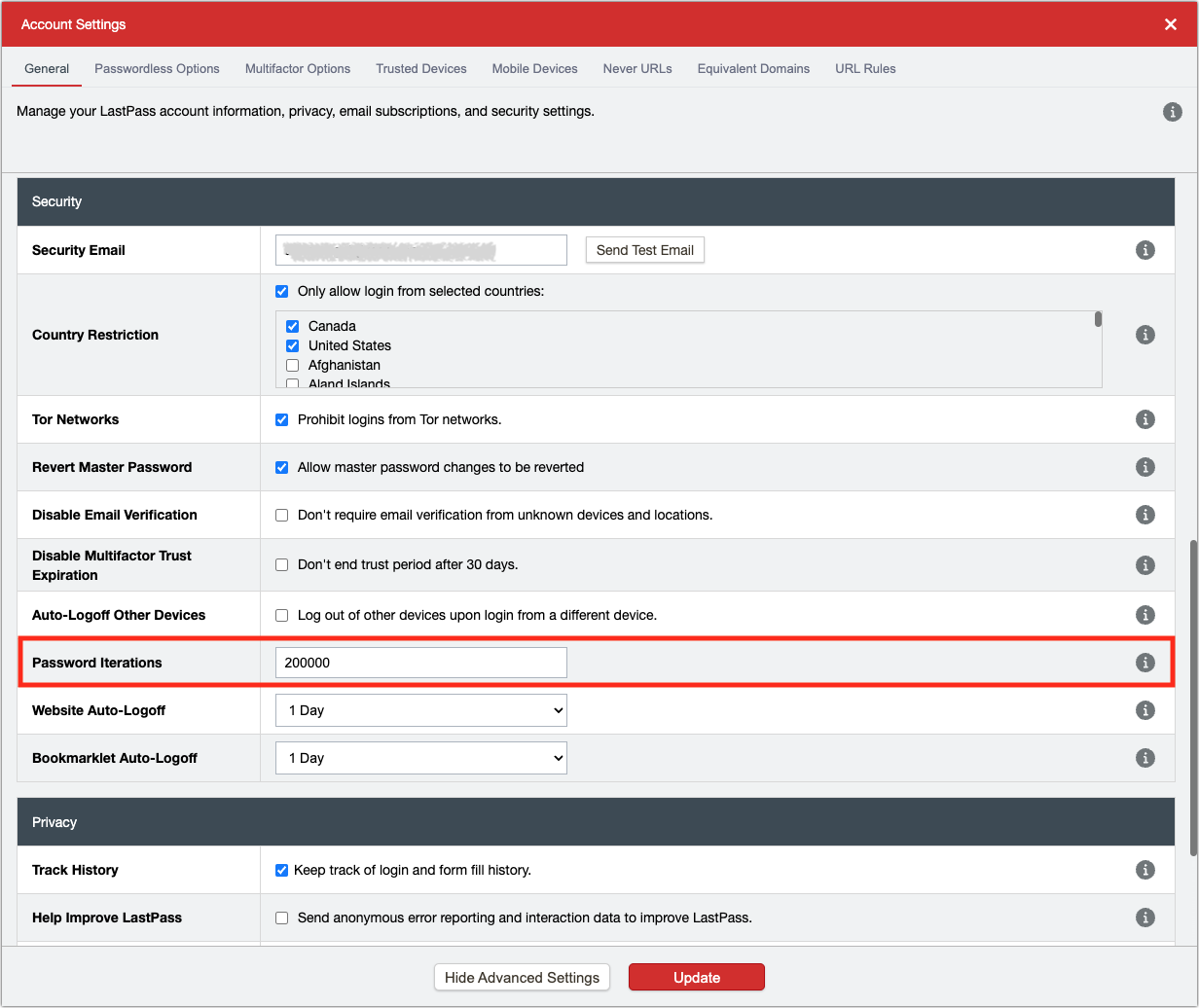
By default, LastPass requires master passwords to be at least 12 characters in length. Plus, LastPass applies 100,100 iterations of the PBKDF2 password-strengthening algorithm to make it harder for brute-force attacks to crack passwords. The company says:
If you use the default settings above, it would take millions of years to guess your master password using generally-available password-cracking technology. Your sensitive vault data, such as usernames and passwords, secure notes, attachments, and form-fill fields, remain safely encrypted based on LastPass’ Zero Knowledge architecture. There are no recommended actions that you need to take at this time.
Unfortunately, LastPass increased the master password minimum length only in 2018 and did not require users with shorter master passwords to reset them at that time. Similarly, the PBKDF2 setting now uses 100,100 iterations, but it previously used 5000, and some long-time users report it being set to 500.
LastPass was correct to increase the default level of security for new accounts as hardware cracking capabilities became faster. However, allowing users to continue using insecure master passwords that were too short and not forcing higher PBKDF2 iteration counts was a major mistake. If your organization steps up its security policies, bite the bullet and ensure that no accounts or users are grandfathered in with old, insecure options.
By not recommending any actions, LastPass missed an opportunity to encourage users to increase their security through multifactor authentication. LastPass also downplayed the concern over phishing attacks. That was likely a decision made by PR (and possibly Legal), but the company could have served users better. Should your organization ever be involved in a breach, make sure that someone involved in the transparency discussions represents the users’ best interests alongside those of the organization. And consider requiring multifactor authentication!
Finally, it’s worth noting that other companies significantly increase the security of their systems by mixing passwords with additional device-based keys. Apple does this by entangling device passcodes and passwords with the device’s unique ID, and 1Password strengthens your passwords with a secret key. LastPass has no such additional protection.
What LastPass Users Should Do
There are two types of LastPass users in this situation: those who had long, secure master passwords and 100,1000 iterations of PBKDF2 and those who didn’t:
-
Strong master password users: Despite LastPass’s claim that you don’t need to do anything, we recommend enabling multifactor authentication. (For instructions, click Features & Tools and then Multifactor Authentication in the LastPass support portal.) You could change your master password too, but that won’t affect the data that was already stolen. That horse has already left the barn, whereas enabling multifactor authentication would prevent even a cracked master password from being used in the future.
-
Weak master password users: Sorry, but you have work to do. Immediately change your master password and increase your PBKDF2 iterations to at least 100,100. We also recommend enabling multifactor authentication because LastPass is such an important account. Next, go through all your passwords and change at least those for important websites. Start with the critical accounts that could be used to impersonate you, like email, cell phone, and social media, plus those that contain financial data.
Regardless of the strength of your master password, be on high alert for phishing attacks conducted through email and text messages. Because the stolen data included both personal information and URLs to websites where you have accounts, phishing attacks may be personalized to you, making them harder to detect. In short, don’t follow links in email or texts to any website where you have to log in. Instead, navigate to the website directly in your browser and log in using links on the site. Don’t trust URL previews—it’s too easy to fake domain names in ways that are nearly impossible to identify.
Should you switch from LastPass to another service, like 1Password? It comes down to whether you believe LastPass has both a sufficiently secure architecture despite not entangling the master password with some device-based key and sufficiently robust security practices despite having been breached. It would not be irrational to switch, and we would recommend switching to 1Password. Other password managers like Bitwarden and Dashlane may be fine too. If you have to change numerous passwords and choose to switch, it may be easier to change the passwords after switching—see how the process of updating a password compares between LastPass and 1Password or whatever tool you end up using.
We realize this is an extremely worrying situation for LastPass users, particularly those with weak master passwords or too-few PBKDF2 iterations set. Only you can reset your passwords, but if you need assistance switching to another password manager, don’t hesitate to contact us.
AI Usage Transparency Report
AI Era · Written during widespread use of AI tools
AI Signal Composition
Score: 0.23 · Moderate AI Influence
Summary
LastPass suffered a security breach, attackers stole customer data and vaults containing encrypted usernames and passwords. Users with master passwords of at least 12 characters in length are likely safe. LastPass recommends enabling multifactor authentication and changing master passwords for users with weak passwords.
Related Posts
Leaving Flickr: Migrating 20,000+ Photos to Synology and Taking Back Control
There’s a certain kind of friction you start to notice when you’ve been using a service for a long time. Not enough to make you leave immediately, but enough to make you pause. Flickr had been that kind of service for me. It quietly held years of photos, uploads from old phones, albums I hadn’t looked at in ages, and a massive "Auto Upload" collection that had grown into something I didn’t fully understand anymore.
How I Finally Passed the PMP Exam (After 12 Years of Waiting)
Back in 2013, I registered for a PMI membership with every intention of pursuing my PMP certification. I downloaded the handbook, bookmarked the eligibility requirements, and even told a few friends that I was going to do it "soon." At the time, I thought getting certified would be a straightforward process, but little did I know what lay ahead in terms of studying and preparation.
10 Things You Didn't Know You Could Do With Apple Configurator (That Save Mac Admins Hours)
Most of us treat Apple Configurator like a fire extinguisher: break glass, DFU, restore, move on. But it can do a lot more, and when you know the edges, you can turn a bricked morning into a ship-it afternoon. Below are ten things I regularly use (or wish I’d used sooner) that demonstrate its capabilities beyond just emergency recovery.
The Evolution of Apple Certification: A Journey Through Versions, Challenges & Growth
When I recently passed the Apple Certified Support Professional (ACSP) exam again, I paused to reflect — not just on this milestone, but on the long path I’ve walked through Apple’s certification landscape. My first certification dates back to macOS 10.5, and over the years, I’ve earned credentials across nearly every version since. In that time, the exams — and Apple itself — have transformed significantly.
Secure Software, Secure Career: How I Passed the CSSLP
After passing the CISSP earlier this year, I decided to follow it up with the **Certified Secure Software Lifecycle Professional (CSSLP)** certification. For those unfamiliar, CSSLP is an ISC2 certification that focuses specifically on secure software development practices across the full SDLC—from requirements and design to coding, testing, deployment, and maintenance. My goal in pursuing this certification was to further develop my skills in ensuring the security of software throughout its entire lifecycle.
Managing Bring Your Own Device (BYOD) for Android with Microsoft Intune
Alright, so today we're going to be talking about the management of bring your own device BYOD for Android devices. There's a lot of information out there for the management of iOS devices and you can do that with pretty much any Apple MDM on the market. We just happen to use Jamf where I work, but you could use anything from Braavos to SimpleMDM to Kanji or JumpCloud. Mosyle is also a great option.
BYO with me in 2025: iOS with User Enrollment in JAMF Pro
It really depends on your company's needs. For example, many companies need to hire 1099 contractors and in such a case they come with their own devices but not the correct security settings or enforcements. Remember BYOD is a security construct. The idea here is that you should be securing the company's sensitive data in all forms. This may involve implementing policies for contractor-owned devices, ensuring that all devices accessing company data meet minimum security standards, and regularly reviewing and updating these standards to stay ahead of emerging threats.
Securing BYOD Email Access: Exploring Strategies in Microsoft 365
In today’s mobile-first world, organizations increasingly rely on Bring Your Own Device (BYOD) programs to empower employees while optimizing costs. However, this flexibility introduces unique challenges, particularly around securing email access. To mitigate risks, we are implementing a comprehensive strategy to block email access on non-company devices by default and ensure only sanctioned apps can access organizational email accounts. This approach will help prevent unauthorized access and data breaches, aligning with our commitment to maintaining the security and integrity of company communications.
How I Conquered the CISSP Exam: 9 Months, Top Resources, and Proven Strategies
Passing the CISSP (Certified Information Systems Security Professional) exam is no small feat. It’s known for its breadth, depth, and ability to test not just your knowledge but your practical understanding of cybersecurity. After nine months of intense preparation, I’m thrilled to say I’ve joined the ranks of CISSP-certified professionals! Here's a detailed account of my experience, including the resources I used, some tips that helped me along the way, and what I learned from the process itself.
Get more out of scripting than you may expect
Expect is an extension to the Tcl scripting language written by Don Libes. The program automates interactions with programs that expose a text terminal interface. Expect, originally written in 1990 for the Unix platform, has since become available for Microsoft Windows and other systems. Its functionality allows users to interact with these programs through scripted commands, eliminating the need for manual input.
