

Most Jamf administrators don’t need to build custom API automation for their day-to-day work.
Jamf Pro already provides a tremendous amount of functionality out of the box. Smart Groups, policies, recurring check-in, Self Service, inventory collection, dashboards, Advanced Computer Searches, and built-in reporting solve most operational problems without requiring a single line of custom code.
That’s why I don’t think the most interesting question is, “Should I automate this?”
The better question is, “What API clients already exist in my Jamf environment, and do they still need to exist?”
API clients have a habit of accumulating over time. You create one for a reporting script, another for a compliance export, another for a dashboard integration, and another while testing a proof of concept. The project finishes, the script is retired, or the integration is replaced—but the API client often remains.
Months or even years later, it’s easy to end up with credentials that nobody remembers creating, roles that haven’t been reviewed, and API clients that still have permissions long after their original purpose has disappeared.
The problem is forgotten access
Jamf API clients are not bad. They are necessary when data needs to leave Jamf for a custom report, audit artifact, integration, or evidence package.
But every API client is a standing access path into the management platform. Even if the script is read-only, the client may be able to read inventory, users, Extension Attributes, Smart Groups, policies, packages, compliance data, or other operational details.
The problem is not that someone created a client.
The problem is when nobody can answer:
- What is this client for?
- Which role is assigned to it?
- What can that role read or change?
- Does the client have write-capable privileges?
- Where is the secret stored?
- Is the integration still used?
- Should it be rotated or revoked?
That is why I wanted a report before a cleanup decision.
Native Jamf still comes first
Before I create a new API client, I still want to ask whether Jamf already solves the problem natively.
If I need a group of Macs that match criteria, that is probably a Smart Group. If I need endpoint behavior, that is probably a policy or recurring check-in. If I need a device fact in inventory, that may be an Extension Attribute. If I need a list, that may be an Advanced Computer Search or native report.
The API client is for the gaps: evidence exports, custom reports, cross-system integrations, and snapshots Jamf does not produce in the format I need.
That means API clients should be easy to explain. If they are not easy to explain, they should show up in a review.
The script I want for the review
I wrote a local audit script for that review.
The script authenticates with Jamf Pro client credentials, reads API roles and API integrations, counts role privileges, flags write-like privileges, assigns a review priority, and writes JSON and CSV reports.
It is read-only. It does not revoke, delete, rotate, disable, or modify API clients or API roles.
There is an obvious irony here: the script that audits API clients needs its own API client.
That is fine, but I do not want to reuse a broad admin client for the audit. I want a dedicated audit client with the narrowest role that can inspect API integrations and API roles.
Create the audit role first
Before running the script, create a dedicated API role for the audit itself. I would name it something obvious:
- Role name:
api-client-role-audit-readonly - Purpose: read API integrations and API roles so other API clients can be reviewed
- Write access: none
In Jamf Pro, the role should include only the privileges needed to inspect API roles and clients. The exact privilege labels can vary by Jamf Pro version, but the intent is:
- Read API Integrations
- Read API Roles
If Jamf separates read access for API clients, API integrations, and API roles in your version, grant the read-only privilege for each object the script must inspect. Do not grant create, update, delete, or broad administrator access to the audit role.
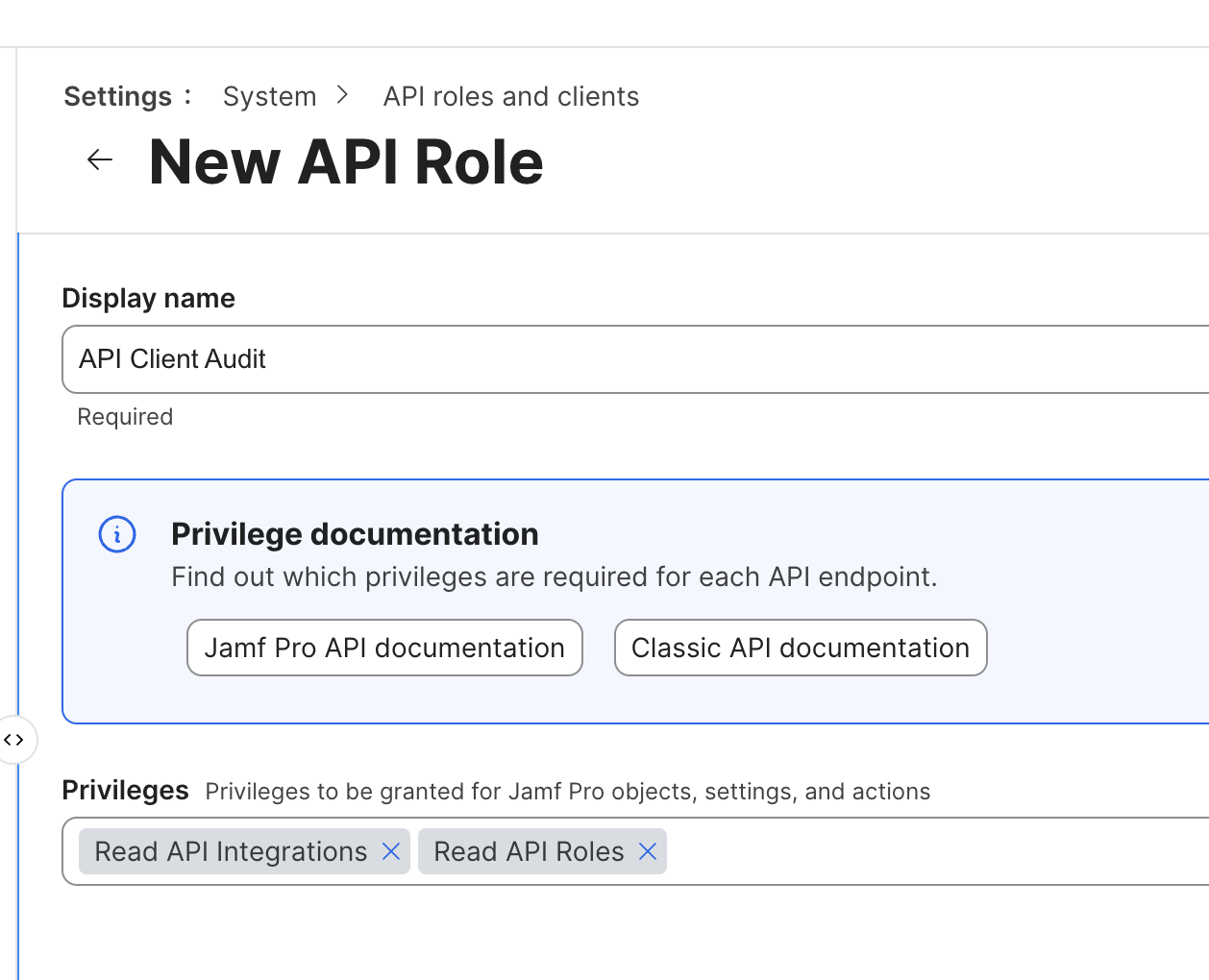
Then create the API client that uses that role:
- Client name:
api-client-role-audit-client - Assigned role:
api-client-role-audit-readonly - Secret storage: temporary local environment for manual review, or an approved secret store if scheduled
- Rotation trigger: after role changes, suspected exposure, staff change, or scheduled credential review
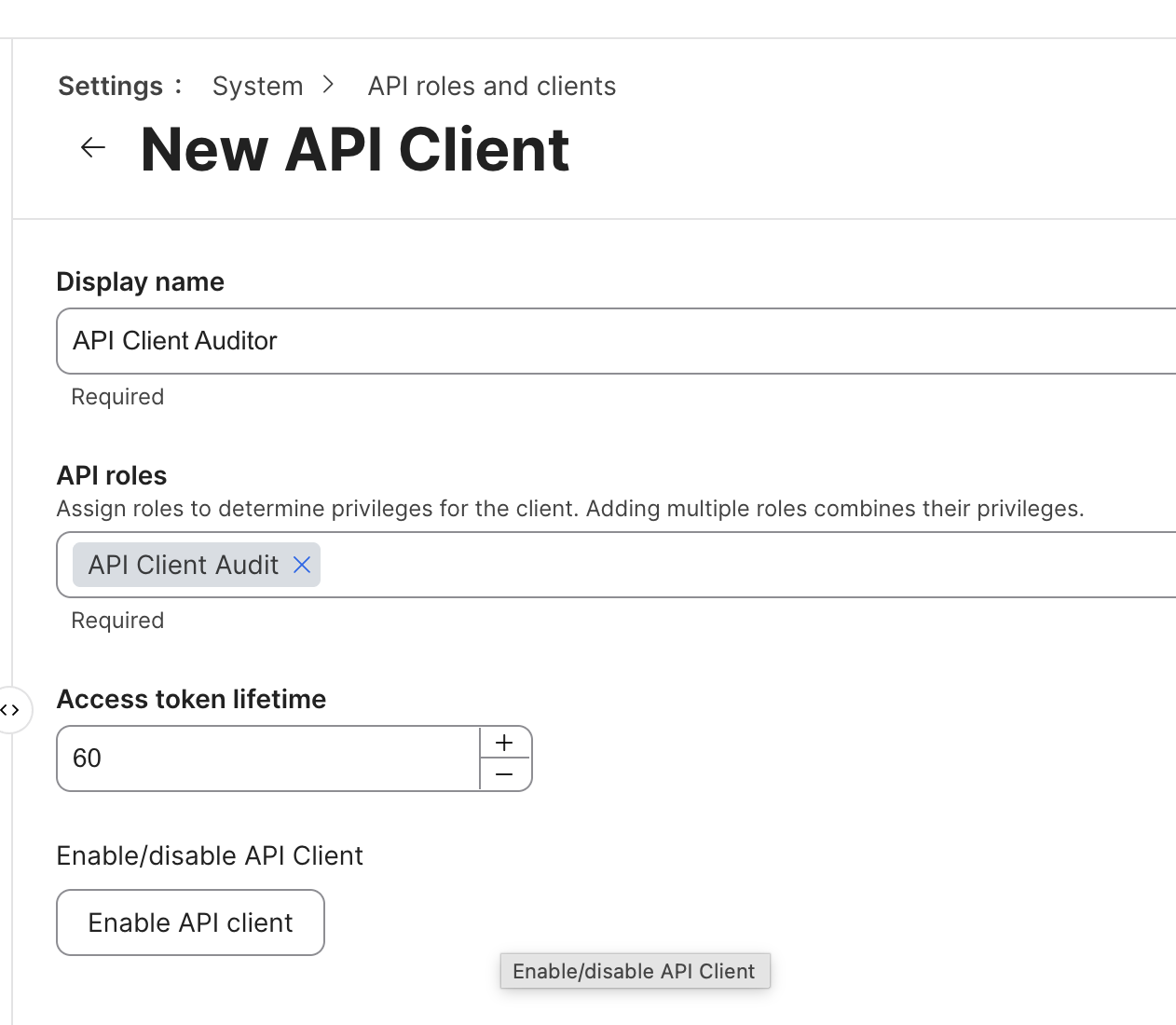
That audit client is the key that lets the script inspect the other keys. It should be treated like any other API client: named clearly, scoped narrowly, rotated when appropriate, and disabled if it is no longer needed.
If the goal is only to produce a quarterly or one-time review, I would create the client, run the report, save the evidence, and then decide whether the audit client itself should remain enabled.
The basic run looks like this:
export JAMF_URL="https://yourtenant.jamfcloud.com"
export JAMF_CLIENT_ID="your_client_id"
export JAMF_CLIENT_SECRET="your_client_secret"

python3 jamf_api_role_audit.py \
  --json-out jamf-api-client-role-audit.json \
  --csv-out jamf-api-client-role-audit.csv \
  --roles-csv-out jamf-api-role-audit.csv
If I want to hand myself a safe setup block without exposing live secrets in a shared note, I generate the command text with echo first:
echo 'export JAMF_URL="https://yourtenant.jamfcloud.com"'
echo 'export JAMF_CLIENT_ID="paste_client_id_here"'
echo 'export JAMF_CLIENT_SECRET="paste_client_secret_here"'
echo 'PYTHONDONTWRITEBYTECODE=1 python3 ./jamf_api_role_audit.py --json-out jamf-api-client-role-audit.json --csv-out jamf-api-client-role-audit.csv --roles-csv-out jamf-api-role-audit.csv'
Then I paste the generated block into my local terminal, replace the placeholders, and run it from the site repository. I do not paste a real client secret into the blog draft, a ticket, or a shared note.
The output answers the questions I care about first from the role side:
- Which API roles exist?
- How many privileges does each role have?
- Which privileges are write-like?
- Which privileges are assigned to the role?
- Which API integrations exist?
- Can Jamf expose how broadly each role is used through the tested API response?
That last item is important. If Jamf does not expose client-to-role usage through the API response, the script says usage count is unavailable instead of printing fake linkage or confusing zeroes.
The role side of the report is the useful part of the audit. A first pass against one Jamf Pro tenant returned output like this, with names sanitized:
API roles scanned: 7
Roles with write-like privileges: 4
API clients inventoried: 8
Role usage count: unavailable from tested Jamf API responses. This output ranks role privilege reach, not client assignment count.

ROLE: Security reporting connector (6)
privileges=30, write-like=18, priority=review write access
  - Create Computer Extension Attributes
  - Create iOS Configuration Profiles
  - Create macOS Configuration Profiles
  - Create Mobile Device Extension Attributes
  - Create Static Computer Groups
  - Delete Computer Extension Attributes
  - Delete Mobile Device Extension Attributes
  - Read Computer Extension Attributes
  - Read Computers
  - Read iOS Configuration Profiles
  - Read Mac Applications
  - Read Smart Computer Groups
  - Read macOS Configuration Profiles
  - Read Mobile Device Applications
  - Read Mobile Device Extension Attributes
  - Read Mobile Devices
  - Read Smart Mobile Device Groups
  - Read Static Computer Groups
  - Read Static Mobile Device Groups
  - Update Computer Extension Attributes
  - Update Computers
  - Update iOS Configuration Profiles
  - Update macOS Configuration Profiles
  - Update Mobile Device Extension Attributes
  - Update Mobile Devices
  - Update Smart Computer Groups
  - Update Smart Mobile Device Groups
  - Update Static Computer Groups
  - Update Static Mobile Device Groups
  - Update User

ROLE: Patch workflow (3)
privileges=8, write-like=4, priority=review write access
  - Create Categories
  - Create Policies
  - Create Scripts
  - Read Categories
  - Read macOS Configuration Profiles
  - Read Policies
  - Read Scripts

ROLE: Apple services workflow (9)
privileges=18, write-like=3, priority=review write access
  - Read Computer Enrollment Invitations
  - Read Computers
  - Read Device Enrollment Program Instances
  - Read Enrollment Customizations
  - Read Enrollment Profiles
  - Read iOS Configuration Profiles
  - Read macOS Configuration Profiles
  - Read Mobile Device Enrollment Invitations
  - Read Mobile Devices
  - Read PKI
  - Read Push Certificates
  - Read User
  - Read Volume Purchasing Locations
  - Read VPP Assignment
  - Read VPP Invitations
  - Update Computers
  - Update Mobile Devices
  - Update User

ROLE: Enrollment workflow (8)
privileges=3, write-like=1, priority=review write access
  - Enroll Computers
  - Read Computers
  - Send Computer Remote Command to Install Package

ROLE: API client audit role (11)
privileges=2, write-like=0, priority=lower priority
  - Read API Integrations
  - Read API Roles

ROLE: Read-only audit role (7)
privileges=6, write-like=0, priority=lower priority
  - Read macOS Configuration Profiles
  - Read Packages
  - Read Policies
  - Read Scripts
  - Read Smart Computer Groups
  - Read Static Computer Groups

ROLE: Extension attribute reader (10)
privileges=3, write-like=0, priority=lower priority
  - Read Computer Extension Attributes
  - Read Smart Computer Groups
  - Read Static Computer Groups

Wrote JSON report to jamf-api-client-role-audit.json
Wrote CSV report to jamf-api-client-role-audit.csv
Wrote role CSV report to jamf-api-role-audit.csv
That is the boundary. The script can audit roles and show which ones are broad, write-capable, or suspicious. It can also inventory the API clients that exist. If Jamf does not expose how many clients use each role, the terminal output should not show roles=0, privileges=0, or last_used=not exposed for each client because that looks like a result when it is really missing linkage.
The script lists API clients, not secret values. That is the correct behavior. A client secret should not be recoverable from Jamf Pro after creation, and an audit report should not print live secrets even if it could.
The automated report can identify over-permissioned API roles and list existing API clients. It should not pretend to prove how broadly a role is used when Jamf does not expose that relationship in the tested API response.
What the report looks for
The CSVs are meant to be reviewable, not clever.
The role audit CSV includes:
- Role ID
- Role name
- Created and updated timestamps when exposed
- Total privilege count
- Write-like privilege count
- Write-like privilege names
- Full privilege list
- Linked API client count when mappings are exposed
- Linked API client names when mappings are exposed
- Link status when mappings are not exposed
The API client inventory CSV includes:
- Integration ID
- Integration name
- Enabled or active state when exposed
- Created and updated timestamps when exposed
- Last-used value when exposed
- Role mapping status
- Assigned role names
- Total privilege count
- Write-like privilege count
- Write-like privilege names
The write-like check is intentionally simple. It looks for privilege names that include words such as create, update, delete, write, flush, or send. That is not a formal risk score. It is a triage signal.
The priority label is set from the role privileges:
review write access: the role has at least one write-like privilegereview broad read access: the role has ten or more privileges, even if none are write-likelower priority: the role has fewer than ten privileges and none of them look write-capable
That priority label tells me where to start, not what to delete. For review write access, I look at whether the role can create, update, delete, send commands, enroll devices, or otherwise change state. For review broad read access, I look for sensitive read reach: computers, mobile devices, profiles, scripts, policies, packages, users, certificates, enrollment objects, or anything that would matter if the API client secret leaked. For lower priority, I still keep the role in inventory, but I review it after the roles that can change systems or read broadly.
If a role has write-capable privileges, I want to know why.
If a role has only read access but can read sensitive operational data, I still want to know why it exists.
Download the Script
Check out the script here:
The repository includes installation instructions, required Jamf API permissions, sample output, report descriptions, and the latest version of the script.
One design decision was intentional from the beginning: this is a reporting tool. It doesn’t modify Jamf Pro, disable API clients, rotate credentials, or remove permissions. Its job is to give you a clear picture of what exists so you can make informed decisions about what should change.
Final Thoughts
Most Jamf administrators will never need to build extensive API automation, and that’s perfectly fine. Jamf Pro already provides Smart Groups, policies, inventory, Self Service, dashboards, and reporting that solve the vast majority of day-to-day management tasks.
Where the API becomes valuable is when information needs to leave Jamf. Maybe you’re generating evidence for a CMMC assessment, integrating with another platform, producing reports Jamf doesn’t generate natively, or collecting data for a security review.
Those integrations almost always require API clients.
Over time those clients accumulate. Projects end, scripts get retired, integrations change, and administrators move on, but the API clients and their assigned roles often remain. That’s why I think they’re worth reviewing on a regular basis.
This script isn’t intended to tell you what should be deleted. It’s intended to help answer a simpler question: do I understand every API client that currently has access to my Jamf environment?
If the answer is no, you’ve already found something worth investigating.
Sources
- Jamf Pro Developer Documentation: Client Credentials
- Jamf Pro Developer Documentation: Jamf Pro API Overview
- Jamf Pro Developer Documentation: Extension Attributes
AI Usage Transparency Report
AI Era · Written during widespread use of AI tools
AI Signal Composition
Score: 0.37 · Moderate AI Influence
Summary
Jamf API client audit report
Related Posts

When Chromium Mistakes Your VPN for a Local Network
Turning off Jamf Trust fixed the webinar, which normally would have sent me straight to its routing policies. This time the route was fine: Chromium was treating Jamf's ZTNA broker addresses as a local network, and an Edge and Chrome preference corrected it.
Apple Software Updates Need a Blueprint Before the MDM Commands Fade
Apple software update management is moving away from command-first MDM workflows. Jamf Blueprints and Declarative Device Management give Mac admins a better place to express update intent, scope, enforcement, and visibility.

Jamf Moves Platform SSO Into the Enrollment Gate
Jamf's attended Simplified Setup for Platform SSO changes Mac enrollment by making identity registration part of Setup Assistant before the MDM profile is installed.

Check out this new JAMF Script upload tool
Digambar Ghosalkar's Jamf Script Uploader is useful because it moves Jamf Pro script work out of manual browser copy/paste and into a repeatable API-backed workflow.

Two PPPC Tools I Would Add After the Profile Looks Right
A follow-up on two tools worth adding to a PPPC troubleshooting workflow: PPPC_Analyser for inspecting app privacy requirements and QuickJamfDeploy for forcing the Jamf management framework into place during deployment.

Review the Smart Group Before You Scope the Policy
Review your Smart Group before you ever scope a Jamf policy. Validate inventory, understand your signals, test exclusions, and prove the group works before it reaches production.
Build Jamf DDM Update Blueprints for macOS and iOS
How I set up Jamf software update blueprints for macOS and iOS using Declarative Device Management, staged scope, clear enforcement timing, and visible deployment progress.

Review the Package Before You Build the Policy
A Jamf-focused package review workflow for checking installer signing, package contents, scope, validation, and rollback before a policy reaches production Macs.
Jamf Was My Mac Evidence Layer for CMMC
How Jamf Compliance helped support the Mac portion of a CMMC assessment, and why I added a small read-only CSV summary script for auditor-ready failed-result evidence.
Adobe in Jamf: To Package or Not to Package
A Jamf Pro workflow for deciding when Adobe software should be deployed as a manual Adobe package and when the Jamf App Catalog path is the better fit.
