

Jamf Pro can now put Platform Single Sign-on registration in front of MDM enrollment on macOS 26. When the attended workflow is enabled, the user signs in with the organization’s identity provider before Jamf authorizes the MDM profile. The identity step is no longer a prompt that appears sometime after the desktop loads; it is part of Setup Assistant.
This article covers a Microsoft Entra ID deployment. The screenshots and profile come from a Jamf Pro configuration using Microsoft’s Company Portal SSO extension and Secure Enclave-backed authentication. Okta and other identity providers have their own extension identifiers, app packages, URLs, and payload requirements, so do not copy the Entra values into a different provider’s configuration.
Apple describes attended Platform SSO enrollment as a way for MDM to validate the user before enrollment and create a local account that uses the SSO identity. Jamf implements that flow through Simplified Setup for Platform SSO in a Computer PreStage enrollment.
Start with the Entra profile
The PreStage checkbox is the last part to configure, not the first. Jamf needs a working Single Sign-On Extensions profile before it can use that profile during Setup Assistant.
In Jamf Pro, create a macOS configuration profile and add the Single Sign-On Extensions payload. The profile used for this article is named Platform SSO - Entra ID.
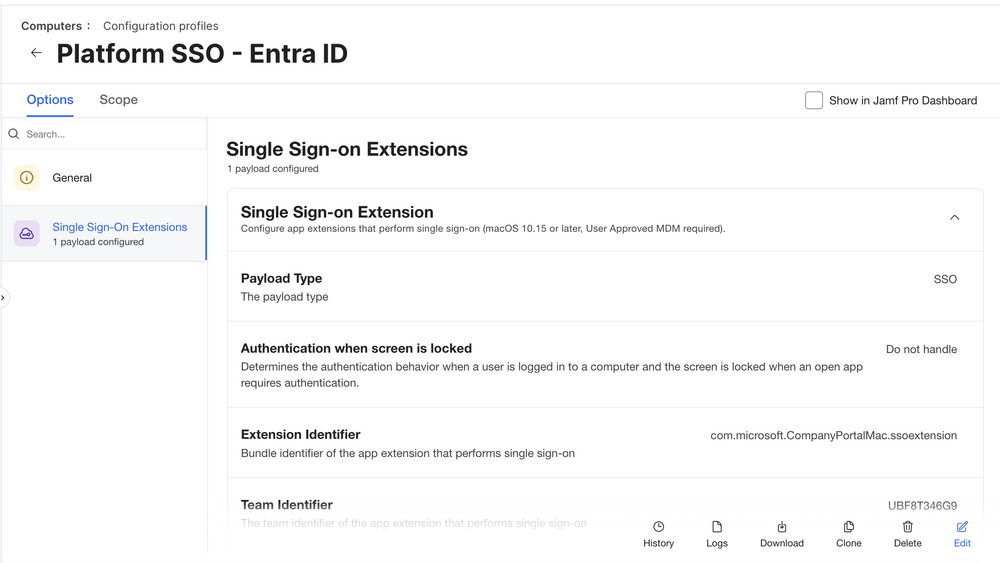
The important Microsoft identifiers are:
- Extension Identifier:
com.microsoft.CompanyPortalMac.ssoextension - Team Identifier:
UBF8T346G9 - Type:
Redirect - Authentication Method:
UserSecureEnclaveKey - Account name claim:
preferred_username - Full name claim:
name
Microsoft recommends Secure Enclave for Platform SSO. It creates a hardware-bound key for Microsoft Entra authentication while leaving the local Mac password unchanged. Password synchronization and smart card authentication are separate choices with different login behavior, so decide on the authentication method before building the profile.
The profile shown here was created with Jamf Pro’s graphical Single Sign-On Extensions payload. It was then downloaded from Jamf for review. Jamf signs exported profiles, so the downloaded .mobileconfig also contained the organization’s name, generated payload UUIDs, Jamf signing certificates, and certificate authority information. None of that belongs in a reusable example.
The XML below is a sanitized representation of the useful payload. Organization names and UUIDs are placeholders, and the Jamf signature and certificate chain have been removed. Generate new UUIDs before using a profile outside Jamf. Review the URL list and app prefix allow list against your own tenant and security requirements instead of deploying this sample unchanged.
<?xml version="1.0" encoding="UTF-8"?>
<!DOCTYPE plist PUBLIC "-//Apple//DTD PLIST 1.0//EN"
  "http://www.apple.com/DTDs/PropertyList-1.0.dtd">
<plist version="1.0">
<dict>
  <key>PayloadType</key>
  <string>Configuration</string>
  <key>PayloadVersion</key>
  <integer>1</integer>
  <key>PayloadIdentifier</key>
  <string>org.example.platform-sso.entra</string>
  <key>PayloadUUID</key>
  <string>REPLACE-WITH-UNIQUE-UUID</string>
  <key>PayloadDisplayName</key>
  <string>Platform SSO - Entra ID</string>
  <key>PayloadOrganization</key>
  <string>Example Organization</string>
  <key>PayloadScope</key>
  <string>System</string>
  <key>PayloadRemovalDisallowed</key>
  <true/>
  <key>PayloadContent</key>
  <array>
    <dict>
      <key>PayloadType</key>
      <string>com.apple.extensiblesso</string>
      <key>PayloadVersion</key>
      <integer>1</integer>
      <key>PayloadIdentifier</key>
      <string>org.example.platform-sso.entra.extension</string>
      <key>PayloadUUID</key>
      <string>REPLACE-WITH-SECOND-UNIQUE-UUID</string>
      <key>PayloadDisplayName</key>
      <string>Microsoft Entra Platform SSO</string>

      <key>ExtensionIdentifier</key>
      <string>com.microsoft.CompanyPortalMac.ssoextension</string>
      <key>TeamIdentifier</key>
      <string>UBF8T346G9</string>
      <key>Type</key>
      <string>Redirect</string>
      <key>ScreenLockedBehavior</key>
      <string>DoNotHandle</string>
      <key>URLs</key>
      <array>
        <string>https://login.microsoftonline.com</string>
        <string>https://login.microsoft.com</string>
        <string>https://sts.windows.net</string>
        <string>https://login.microsoftonline.us</string>
        <string>https://login-us.microsoftonline.com</string>
      </array>

      <key>ExtensionData</key>
      <dict>
        <key>AppPrefixAllowList</key>
        <string>com.microsoft.,com.apple.,com.jamf.</string>
        <key>browser_sso_interaction_enabled</key>
        <integer>1</integer>
        <key>disable_explicit_app_prompt</key>
        <integer>1</integer>
      </dict>

      <key>PlatformSSO</key>
      <dict>
        <key>AccountDisplayName</key>
        <string>Example Organization</string>
        <key>AuthenticationMethod</key>
        <string>UserSecureEnclaveKey</string>
        <key>EnableAuthorization</key>
        <true/>
        <key>EnableCreateUserAtLogin</key>
        <false/>
        <key>UseSharedDeviceKeys</key>
        <true/>
        <key>TokenToUserMapping</key>
        <dict>
          <key>AccountName</key>
          <string>preferred_username</string>
          <key>FullName</key>
          <string>name</string>
        </dict>
      </dict>
    </dict>
  </array>
</dict>
</plist>
The two Microsoft government-cloud URLs appeared in the reviewed profile. Microsoft lists additional sovereign-cloud domains when an environment requires them. A commercial-only tenant should review whether those entries are needed. The same applies to AppPrefixAllowList: the original profile included Microsoft, Apple, Jamf, Google, Box, and Druva prefixes. I shortened that organization-specific list in the example rather than publishing it as a universal recommendation.
Company Portal carries the SSO plug-in
The profile does not contain the Microsoft authentication code. It tells macOS which extension to call, and that extension ships inside Microsoft Company Portal for macOS. If Company Portal is missing, too old, or unavailable during Setup Assistant, the Entra Platform SSO flow cannot work.
Microsoft’s current Platform SSO requirements call for Company Portal 5.2404.0 or later and say it must be installed before users are targeted for Platform SSO. Microsoft’s configuration guide also warns that Platform SSO fails when an older Company Portal version is installed. The reason is direct: Company Portal deploys and installs the Microsoft Enterprise SSO plug-in that enables Platform SSO.
For attended Simplified Setup, package delivery is therefore part of identity infrastructure. Treat Company Portal as a required enrollment dependency:
- Obtain the current universal Company Portal package from Microsoft.
- Add it to Jamf Pro and confirm that the package installs successfully on the macOS version in the pilot.
- Keep the package current. Do not let a working pilot become a stale production package months later.
- Make sure Setup Assistant can reach every Microsoft, Jamf, and package-hosting endpoint needed by the workflow.
- Test from the same network conditions a new employee will use, not only from the IT office.
Microsoft’s Company Portal deployment documentation ties the app to Microsoft Entra registration and access to resources protected by Conditional Access. That makes a successful app install and sign-in part of the acceptance test, not a cleanup task after enrollment.
Attach the profile to the PreStage
Open the Computer PreStage enrollment in Jamf Pro and go to General. The Simplified Setup option appears below the language and region controls for supported macOS versions.
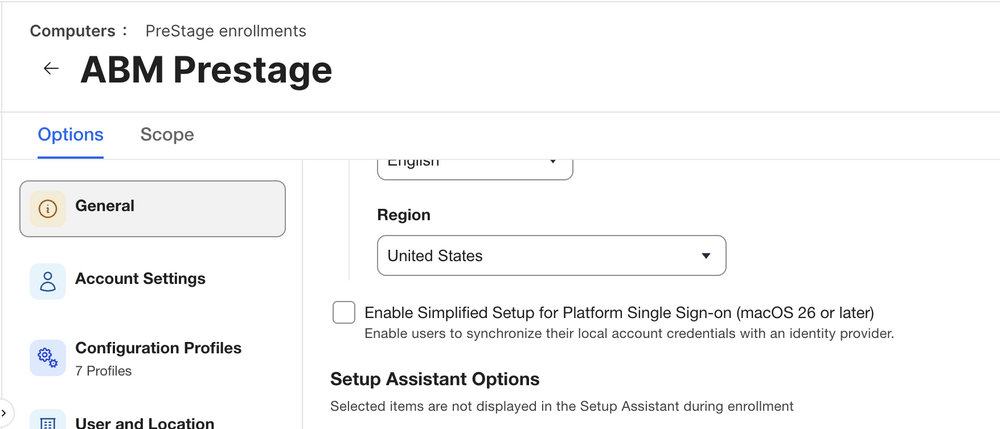
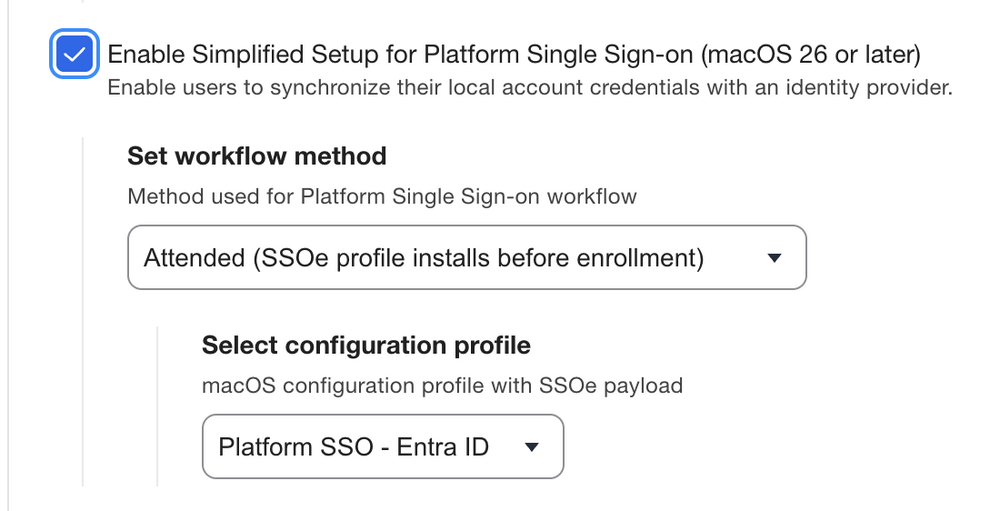
Enable Simplified Setup for Platform Single Sign-on, select Attended, and choose the Entra configuration profile created earlier.
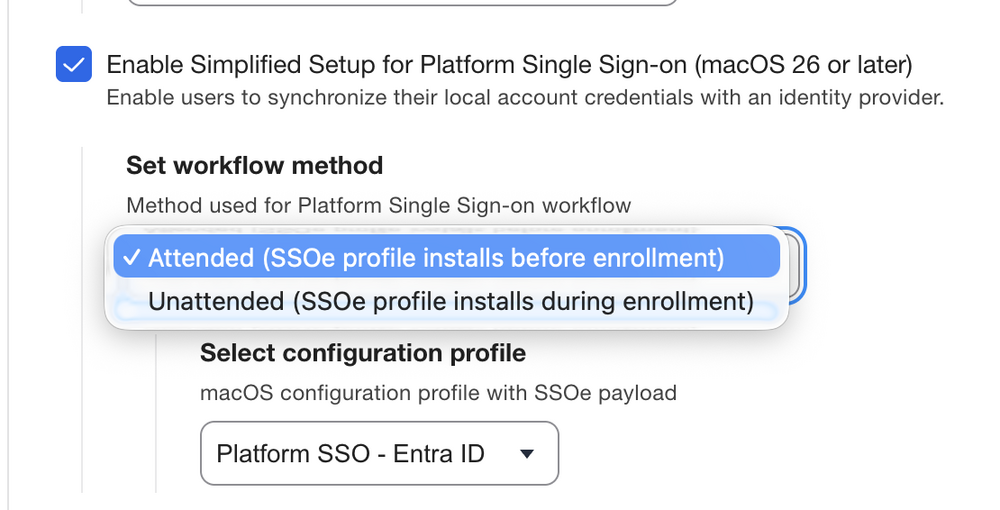
Jamf offers attended and unattended methods. The menu describes the timing clearly: attended installs the SSO extension profile before enrollment; unattended installs it during enrollment.
With attended enrollment, Jamf initially rejects the MDM enrollment request and returns secured links for the SSO extension profile and identity-provider app package. macOS installs those items, the user completes Platform SSO registration, and the Mac sends the resulting token to Jamf. Jamf validates the token through its SAML SSO configuration before authorizing the MDM profile.
The sequence is:
- Automated Device Enrollment reaches Remote Management.
- Jamf holds the enrollment request.
- macOS receives the Entra SSO profile and Company Portal package.
- Company Portal’s SSO extension handles Microsoft Entra authentication.
- The user completes any required MFA or Conditional Access challenge.
- Jamf validates the returned identity token through SAML SSO.
- Jamf authorizes installation of the MDM profile.
- Setup Assistant continues and creates the configured local account.
This is the practical difference between attended and the older enroll-first workflow. Identity registration must succeed before the Mac becomes managed. A broken profile, unavailable Company Portal package, blocked login endpoint, or SAML mismatch stops enrollment where the dependency fails instead of leaving a partly configured Mac at the desktop.
Test the profile before making it a gate
Jamf recommends proving the Platform SSO configuration with the unattended workflow before switching to attended enrollment. That is the safer order. Unattended setup gives the Mac a chance to enroll and receive management commands while you validate the profile, Company Portal package, Entra registration, and authentication policy.
On a test Mac, check Platform SSO state with:
app-sso platform -s
Confirm that Company Portal and its extension are present:
mdfind "kMDItemCFBundleIdentifier == 'com.microsoft.CompanyPortalMac'"
pluginkit -m -A -D -v | grep 'com.microsoft.CompanyPortalMac.ssoextension'
Review the installed SSO payload:
profiles show -type configuration | grep -A20 -B8 \
  'com.microsoft.CompanyPortalMac.ssoextension'
For logs collected immediately after a failed registration attempt:
log show --last 1h --style compact \
  --predicate 'process == "app-sso" OR eventMessage CONTAINS[c] "Platform SSO" OR eventMessage CONTAINS[c] "Company Portal"'
A successful pilot should prove more than the presence of the Jamf checkbox:
- Company Portal installs during the expected stage and is current.
- The SSO extension registers with macOS.
- The user completes Microsoft Entra authentication and MFA when required.
- The device registration appears in Microsoft Entra.
- Conditional Access sees the expected device identity and compliance state.
- Jamf accepts the token and installs the MDM profile.
- The correct local account is created.
- Jamf inventory records the intended user association.
- An erase-and-retry test produces the same result.
Keep the pilot small. Use one PreStage, one Entra test group, one known-good Company Portal package, and a network that represents a real first-day setup. Do not make attended enrollment the first time the identity and Mac teams test their SAML, MFA, Conditional Access, and account-mapping decisions together.
Wrapping up
Jamf’s attended workflow brings Microsoft Entra ID authentication into Setup Assistant before the MDM profile installs. For this configuration, the Entra Platform SSO profile and a current Company Portal package both need to be ready before enabling the attended option in the PreStage.
Test the profile with unattended enrollment first. Once registration, account creation, and Company Portal deployment work consistently, enable attended enrollment for a small pilot and expand from there.
Sources
- Apple Developer: Enrolling with Platform Single Sign-on
- Apple Developer: Configuring Platform Single Sign-on
- Jamf Pro Documentation: Configuring Simplified Setup for Platform Single Sign-On
- Jamf Blog: Platform SSO Simplified Setup in macOS 26
- Microsoft Learn: macOS Platform Single Sign-on overview
- Microsoft Learn: Configure Platform SSO for macOS devices
- Microsoft Learn: Add the macOS Company Portal app
- Microsoft Learn: Microsoft Enterprise SSO plug-in for Apple devices
AI Usage Transparency Report
AI Era · Written during widespread use of AI tools
AI Signal Composition
Score: 0.32 · Moderate AI Influence
Summary
Jamf Pro configuration for Microsoft Entra ID deployment
Related Posts

When Chromium Mistakes Your VPN for a Local Network
Turning off Jamf Trust fixed the webinar, which normally would have sent me straight to its routing policies. This time the route was fine: Chromium was treating Jamf's ZTNA broker addresses as a local network, and an Edge and Chrome preference corrected it.

Apple Software Updates Need a Blueprint Before the MDM Commands Fade
Apple software update management is moving away from command-first MDM workflows. Jamf Blueprints and Declarative Device Management give Mac admins a better place to express update intent, scope, enforcement, and visibility.

Check out this new JAMF Script upload tool
Digambar Ghosalkar's Jamf Script Uploader is useful because it moves Jamf Pro script work out of manual browser copy/paste and into a repeatable API-backed workflow.

Two PPPC Tools I Would Add After the Profile Looks Right
A follow-up on two tools worth adding to a PPPC troubleshooting workflow: PPPC_Analyser for inspecting app privacy requirements and QuickJamfDeploy for forcing the Jamf management framework into place during deployment.

Audit Jamf API Roles Before They Become Forgotten Access
A read-only Jamf Pro API role audit script that reports role privilege reach, write-capable access, review priority, and API client inventory without changing Jamf.

Review the Smart Group Before You Scope the Policy
Review your Smart Group before you ever scope a Jamf policy. Validate inventory, understand your signals, test exclusions, and prove the group works before it reaches production.
Build Jamf DDM Update Blueprints for macOS and iOS
How I set up Jamf software update blueprints for macOS and iOS using Declarative Device Management, staged scope, clear enforcement timing, and visible deployment progress.

Review the Package Before You Build the Policy
A Jamf-focused package review workflow for checking installer signing, package contents, scope, validation, and rollback before a policy reaches production Macs.

Jamf Was My Mac Evidence Layer for CMMC
How Jamf Compliance helped support the Mac portion of a CMMC assessment, and why I added a small read-only CSV summary script for auditor-ready failed-result evidence.

Adobe in Jamf: To Package or Not to Package
A Jamf Pro workflow for deciding when Adobe software should be deployed as a manual Adobe package and when the Jamf App Catalog path is the better fit.
