

Have you ever set up a group meeting, whether in person or via videoconferencing, but found it cumbersome to find a time that works for everyone? Or maybe you want to solicit volunteers for an event? There’s a neat online tool that makes such logistics easy: Doodle. You can use it for free (with ads)—even without setting up an account. Or, if you want to eliminate the ads and get support for calendar syncing, deadlines, reminders, multiple users, and more, there are paid Premium plans. You can use Doodle in a Web browser or download the Doodle iOS app.
Determine Your Poll Type
Setting up a Doodle poll is easy. The first step is to figure out what sort of poll you want—a time poll or a text poll. A time poll is best if you want to let your respondents vote for specific dates and times. Use it when you’re trying to determine if the club Zoom call should be Monday, Tuesday, or Wednesday, and at 11 AM, 3 PM, or 5 PM on one of those days.
In contrast, a text poll lets your respondents vote on anything. For example, you could use a text poll to see where a large group would like to have a party (your house, the park, a favorite restaurant), or what sort of food people want for lunch (Thai, Mexican, Ethiopian). You could even use a Doodle text poll to see who among a large group of volunteers can help at a series of 5K races.
Set the Poll Options
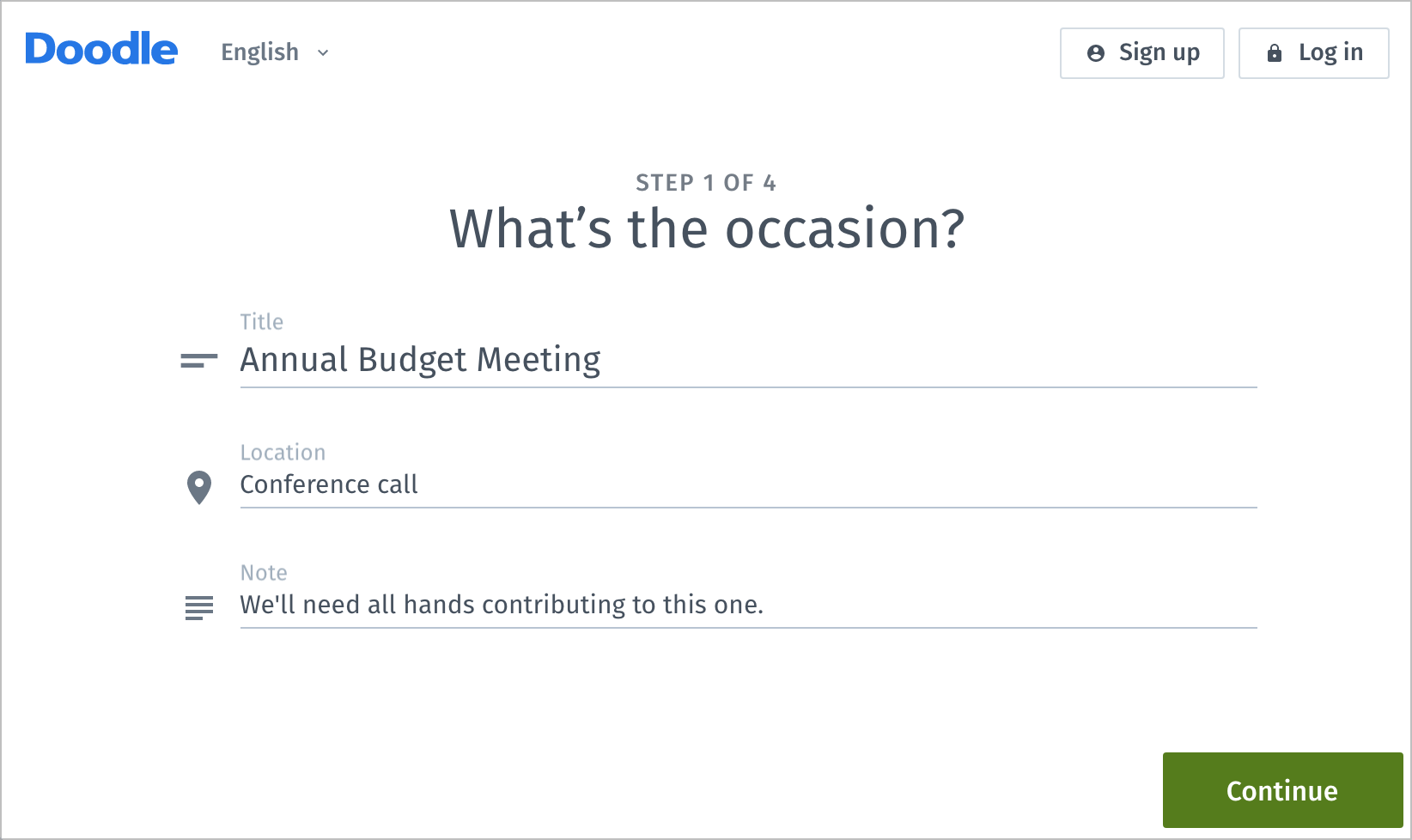
After you click the big red Create a Doodle button at the top of the Doodle Web page, you work your way through a four-step wizard. The first step merely asks for the title of your poll and an optional location and note.
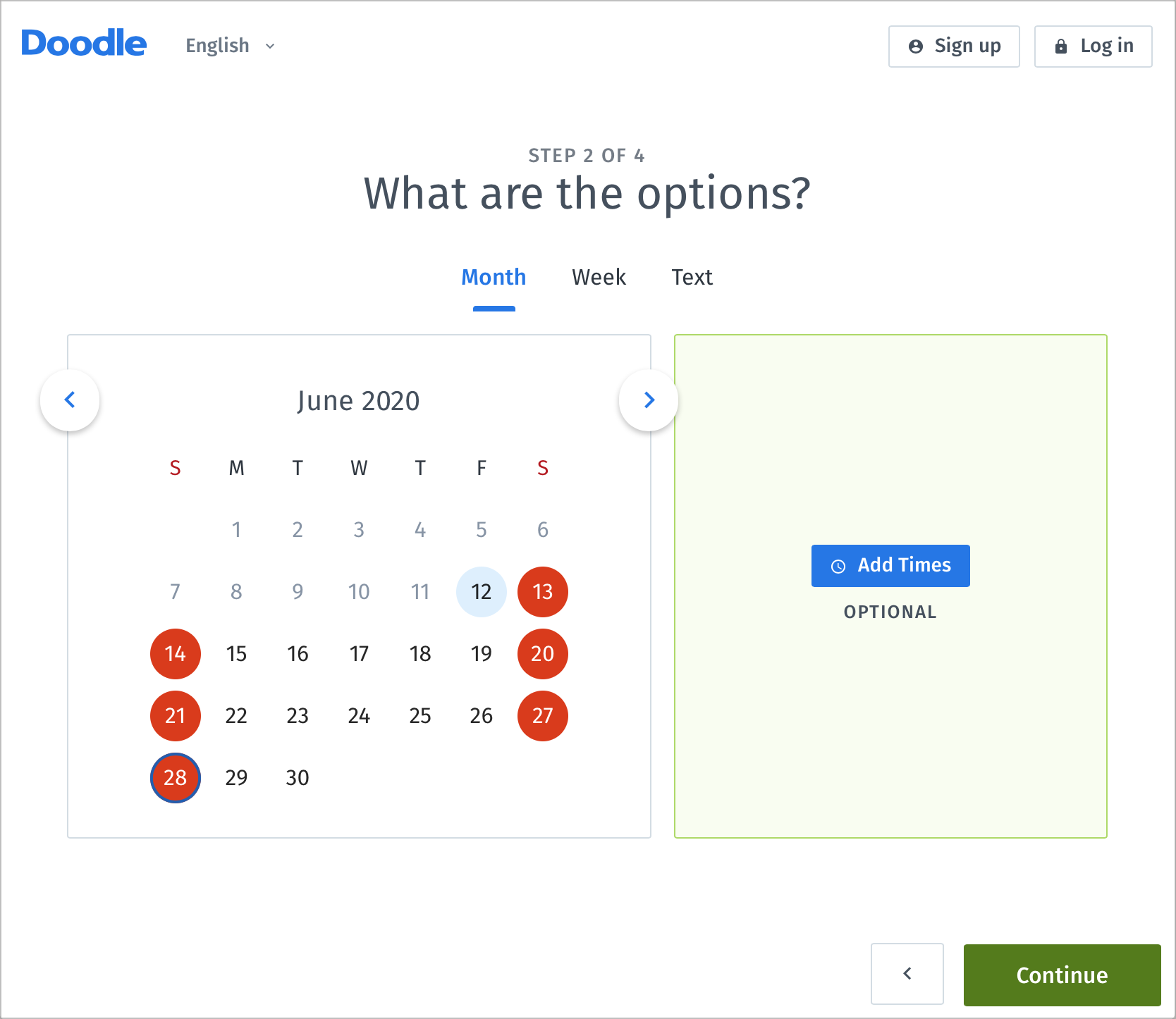
The second step is where all the magic happens. You have three choices here: Month, Week, and Text. In Month view, you get a calendar from which you can pick days and optionally add times. Month view is best for picking the best day for a picnic, for instance, and the time would be the same regardless of which day is chosen.
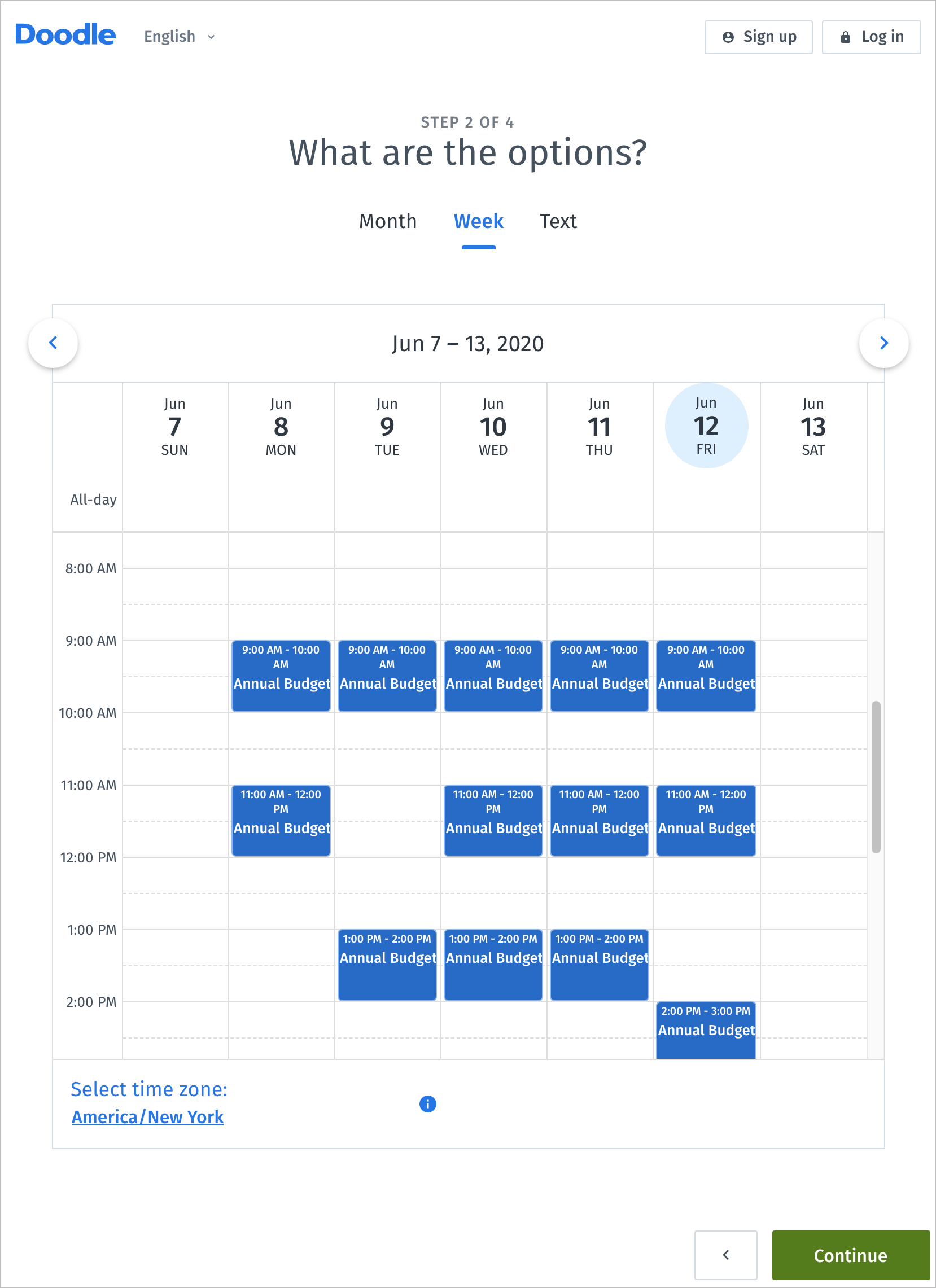
Week view is the most common way that people use Doodle, because it’s how you choose times for a meeting. Just drag a box out for each proposed time period. If you make the box too big or small, you can resize it from the bottom, and you can also drag boxes to different times. To delete a box, hover over it and click the X that appears in its upper-right corner. Note that if you’re creating a poll for an event you need to attend, it’s not worth including dates or times when you can’t make it.
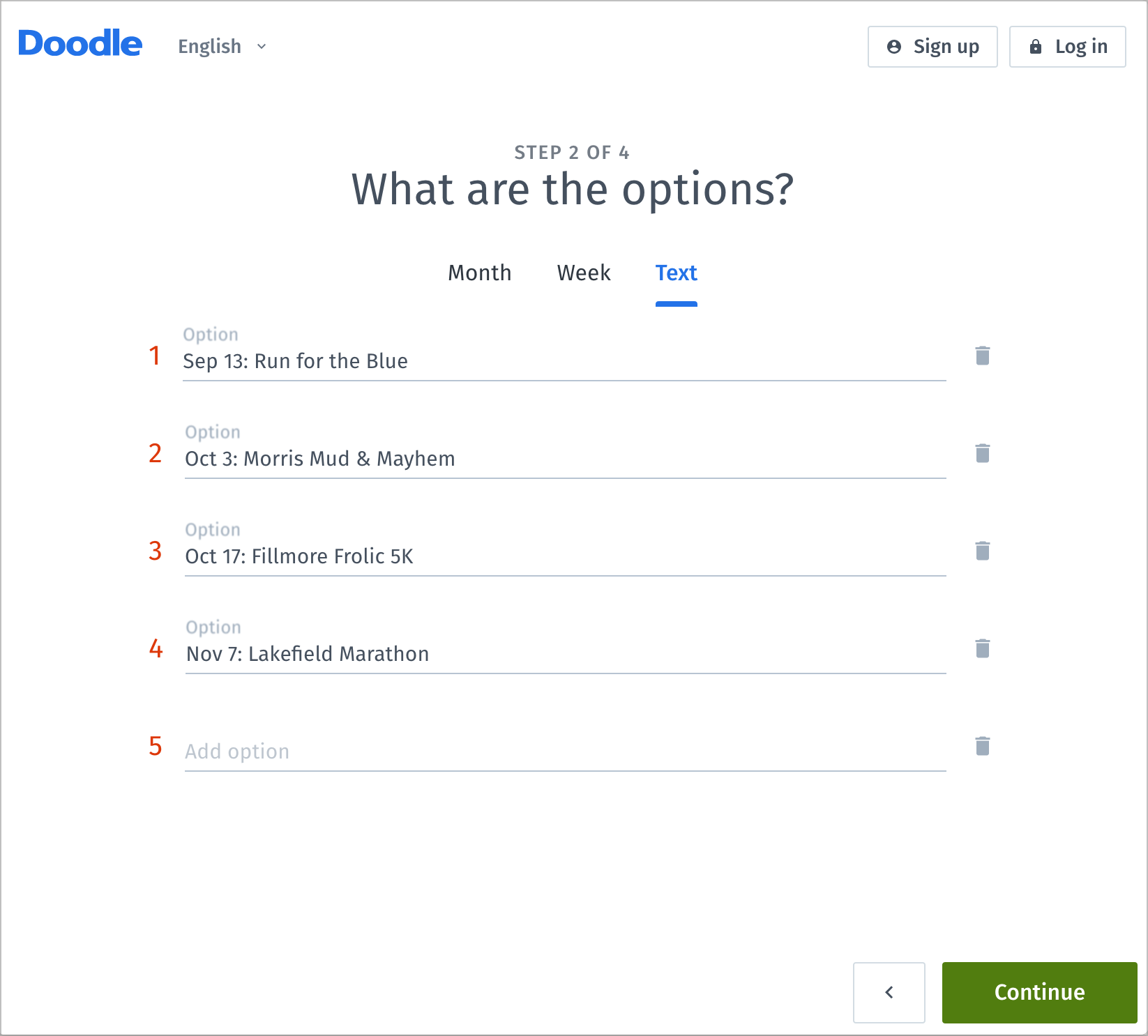
With a text poll, you can enter anything you want for the poll options. In the screenshot, we’re using Doodle as a volunteer signup sheet.
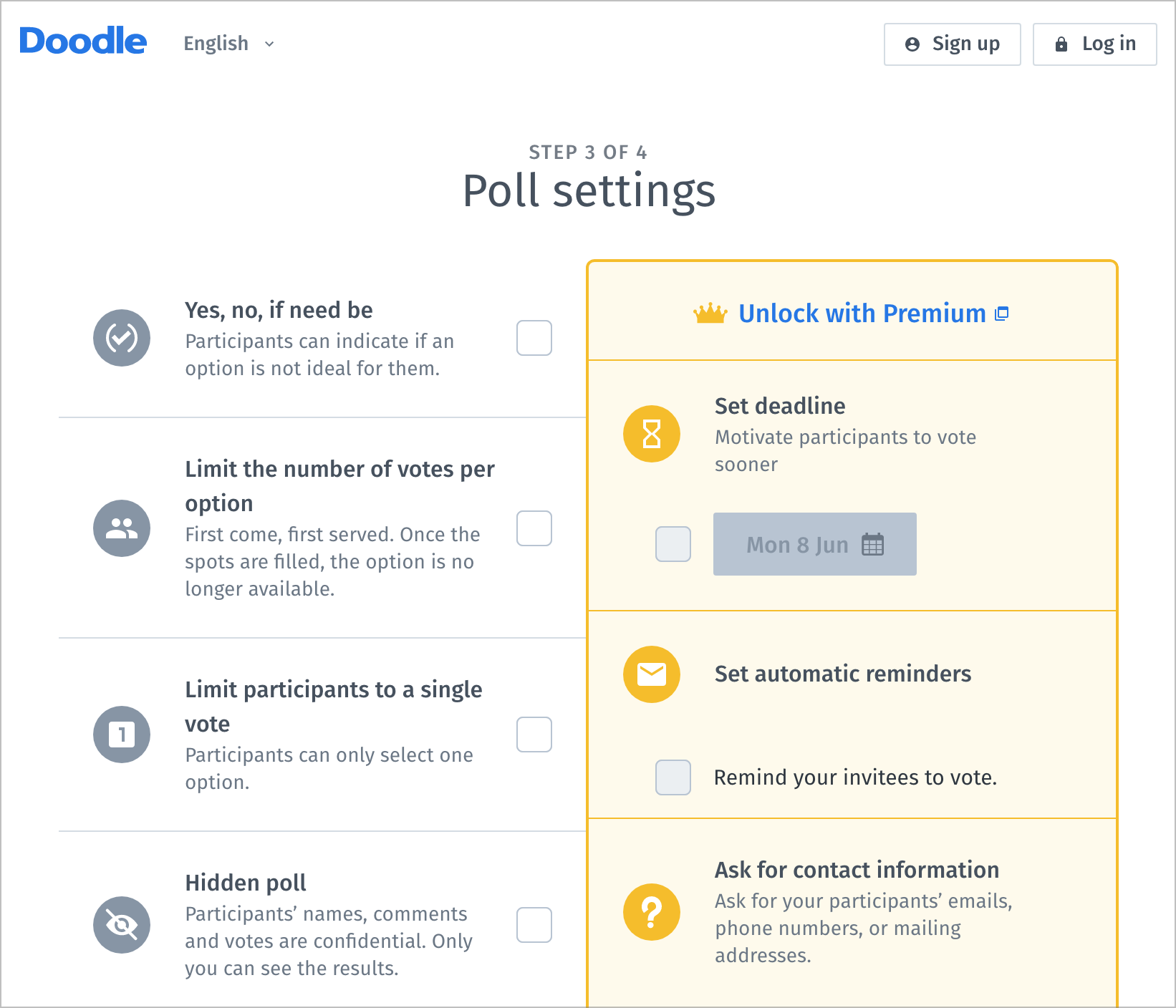
Once you click Continue, you move on to the Poll Settings screen, which provides four useful settings:
- Yes, no, if need be: Select this option if you want to allow your participants to have a “maybe” or “if it’s absolutely necessary” or “you can twist my arm” option. We’re fond of this option because many scheduling questions don’t have a simple Yes/No answer.
- Limit the number of votes per option: An example of where this option is helpful is if you want only so many people to bring a main course, salad, or dessert to a picnic—otherwise, the menu can get out of balance.
- Limit participants to a single vote: Employ this option to prevent people from signing up for multiple options.
- Hidden poll: By default, the results of Doodle polls are visible to everyone who has the link, which is usually good. Select this option to keep people from seeing each other’s votes.
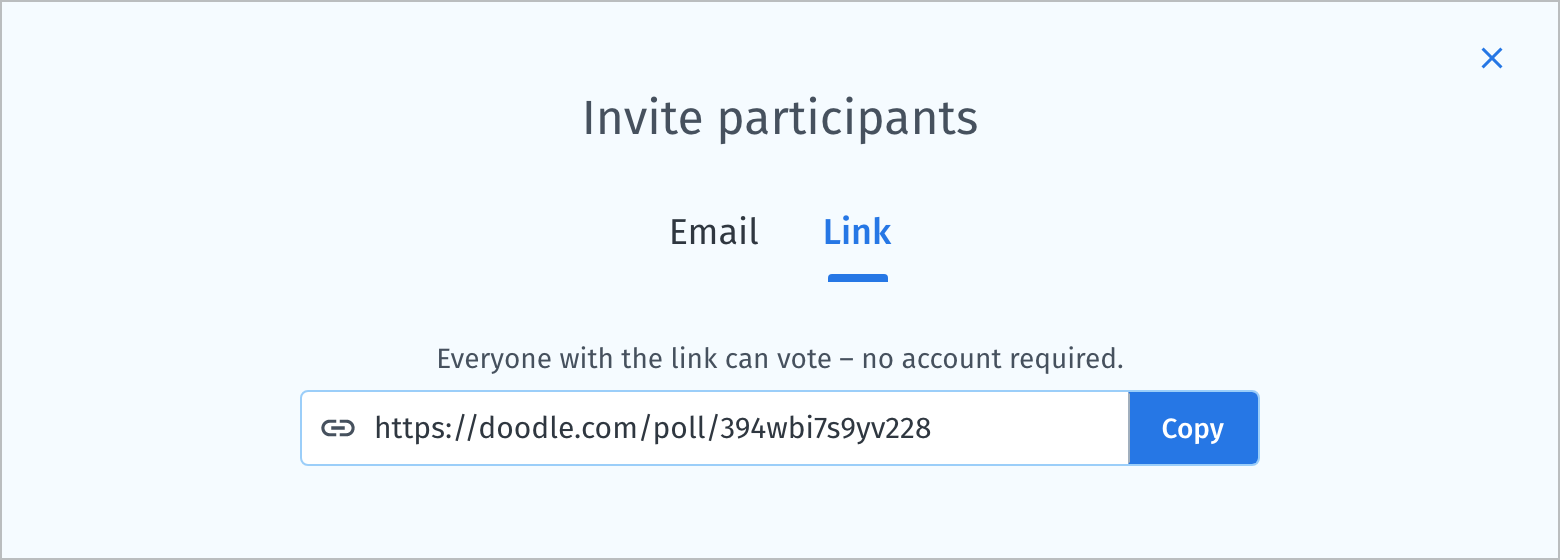
The final step just asks for your name and email address, after which Doodle displays your poll so you can share it and vote in it. Before you do anything else, click the Copy button in the Invite Participants box and paste it somewhere for later reference. If you have a Doodle account—free or paid—you can also have it send email, but we recommend sending the email yourself instead so you have complete control over the message.
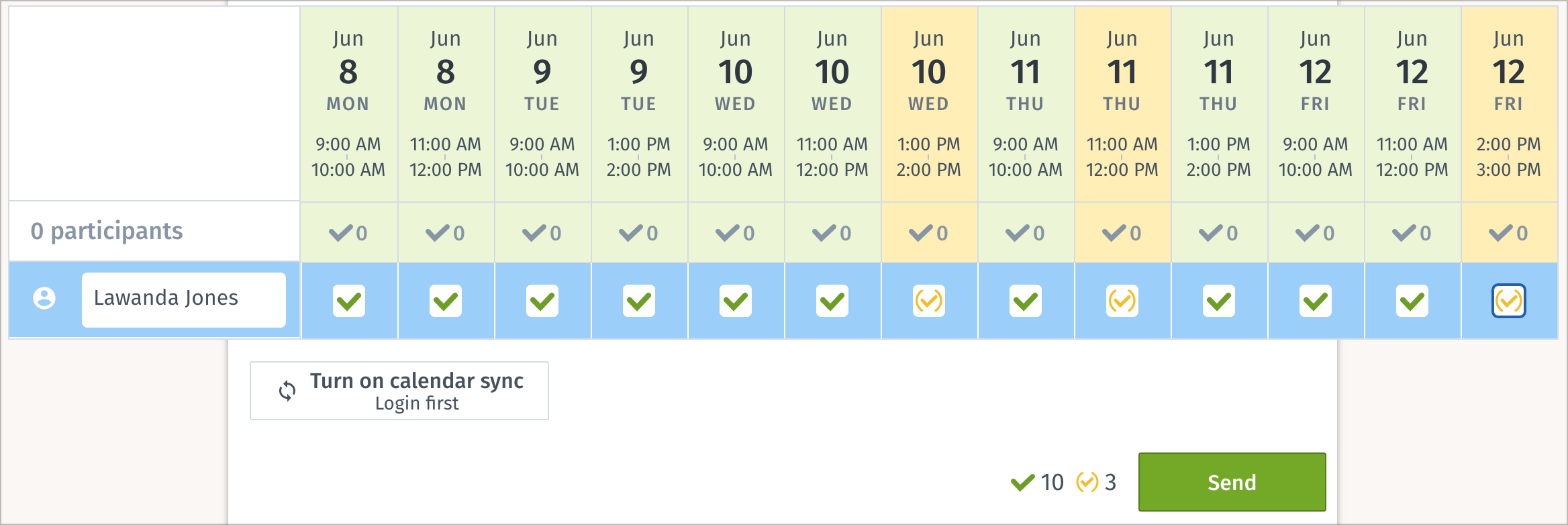
Now it’s your turn to vote. For each option, click once for Yes (a green checkmark) or twice for Maybe (a yellow checkmark). Leave a box blank to vote No. If you need to edit your votes afterward, you can do so (click the blue pencil icon that appears next to your name) if you were logged in to an account when you voted or if the Web page remembers you.
Solicit Votes
Remember that link you copied a minute ago? Now’s the time to send it out. The beauty of Doodle is that you can send it to as few or as many people as you want, in any way you want. You could message it to a group of friends, send it to the office email exploder, post it in your company’s Slack, publish it to a public mailing list, or even post it on Facebook or Twitter. Other people can share it as well, if you’re trying to cast a wide net.
Doodle polls don’t have any security beyond the obscurity of their URLs, so if your poll is at all confidential,make sure to tell people not to share it further.
Pick a Winner
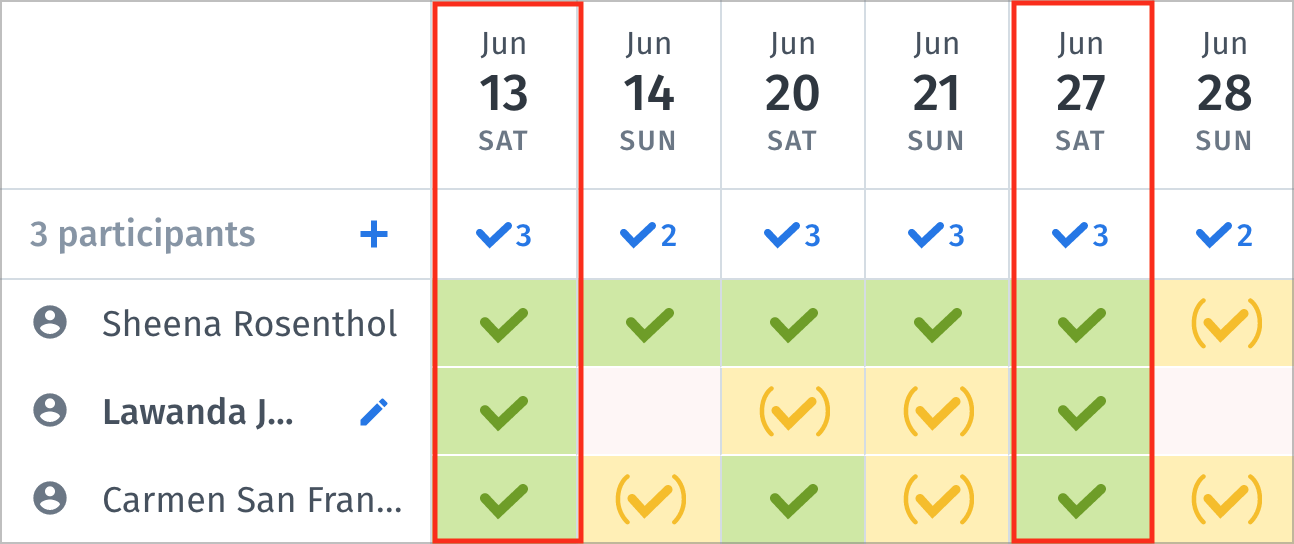
If you’ve set up an account, you’ll receive a notification whenever anyone votes in your poll. You can also load the link you shared at any time to see how the votes are progressing. In our Month poll, three people have voted, and you can see that June 13th and June 27th are the most popular work, so you get to choose.
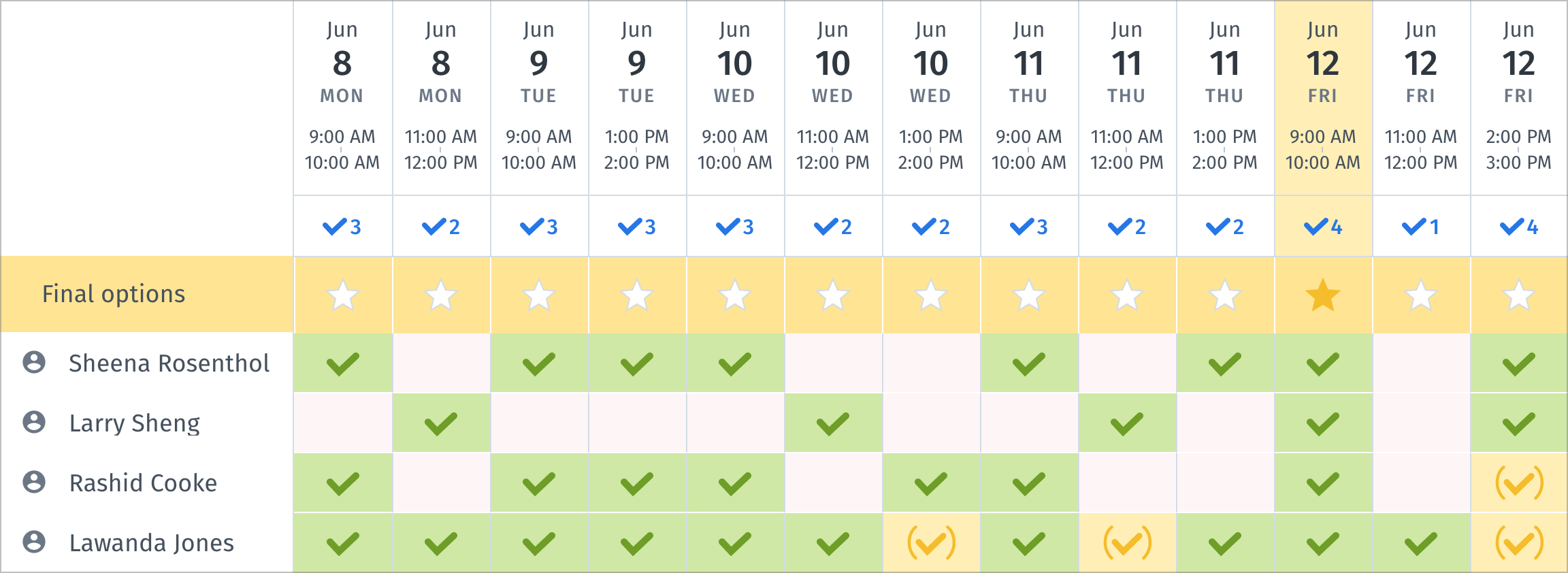
In the Week poll, it’s obvious that there’s only one option that works well for everyone, June 12th at 9 AM. However, you can see that June 12th at 2 PM is possible, in case something changes and you need a backup time.
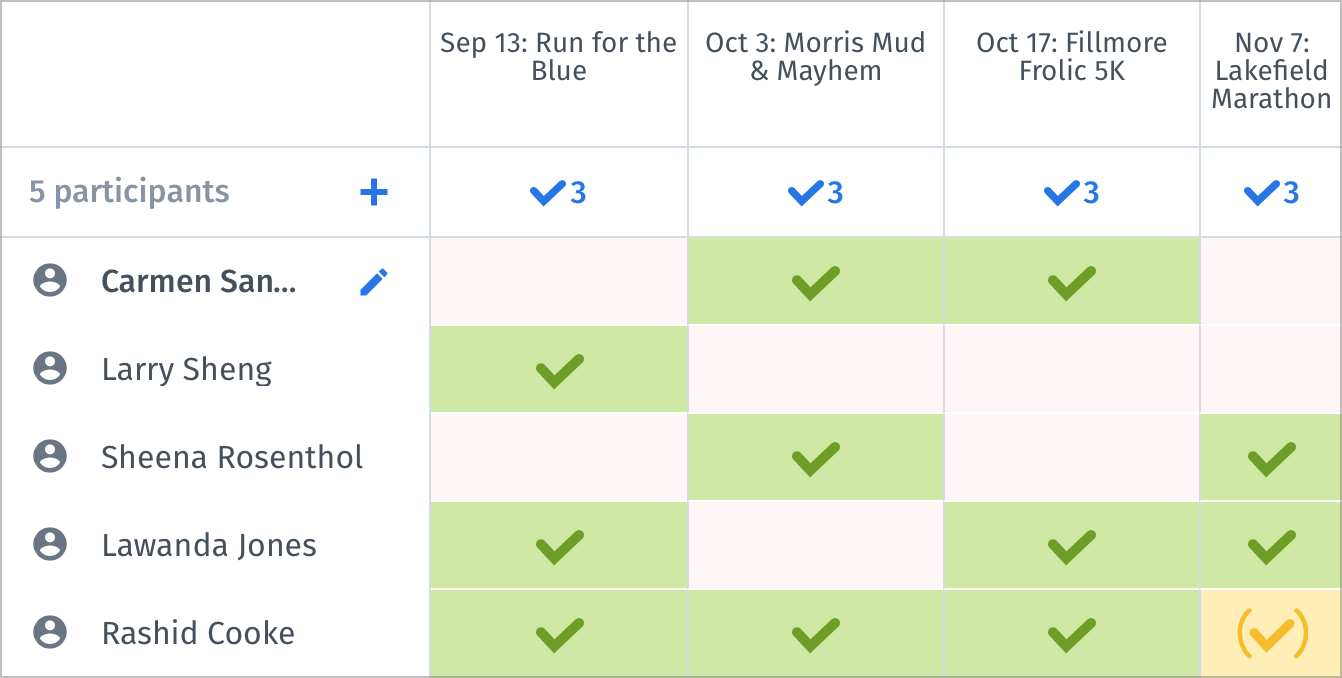
Finally, in our text poll looking for volunteers, there’s no “winning.” The poll results merely tell you who can work at which races, and if you only need three volunteers for each race, you’re all set. However, you can also see that you may need to line up another person in case Rashid Cookie ends up bailing on you.
Although the results are usually perfectly obvious, you can click a red Choose Final Option button if you’re the poll creator and are logged in or remembered. That identifies the best choice, although you can override it with a click, and closes the poll so no one else can vote. If you’re logged in and have connected your calendar, you can add it directly from the results page. We usually announce the final choice however we shared the poll link, and anyone who wants to see the voting results can load the poll again.
As you can imagine, Doodle’s Premium plans add quite a few more features, and they may be worthwhile if you end up using it regularly. However, for quick scheduling of group meetings or lightweight polling, you can stick with either the free account or use it without even logging in. Give it a try next time you need to poll a group!
AI Usage Transparency Report
Pre-AI Era · Written before widespread use of generative AI tools
AI Signal Composition
Score: 0.08 · Low AI Influence
Summary
Doodle is a free online tool for creating polls and scheduling meetings. It offers various features such as time polls, text polls, and calendar syncing.
Related Posts

When Chromium Mistakes Your VPN for a Local Network
Turning off Jamf Trust fixed the webinar, which normally would have sent me straight to its routing policies. This time the route was fine: Chromium was treating Jamf's ZTNA broker addresses as a local network, and an Edge and Chrome preference corrected it.
Clamshell iBook G3 Restoration, Part 1: From Broken Screen to Board-Level Repair
Part one of a Clamshell iBook G3 restoration: a broken screen, a charger detour, a blinking system folder, a full teardown, and the backlight connector mistake that paused the project.

Bromure Gives Codex a Room of Its Own
I installed Bromure Agentic Coding, watched it build the Linux VM, authenticated Codex, and followed a real Codex task through the workspace.

Claude Code Auto Mode Changes Approval Flow, Not the Safety Boundary
Claude Code Auto mode changes how approval decisions are handled. It does not expand the boundary of what the coding agent should be allowed to do.

Amnesia Stealer Shows the Next Stage of ClickFix on macOS
Amnesia Stealer shows how ClickFix-style social engineering is adapting on macOS, while a public malware sample gives defenders an opportunity to study the behavior behind the campaign.

Reporting on Microsoft 365 DLP Overrides with PowerShell
DLP overrides are not automatically bad. They are a business process that needs visibility. This walkthrough covers a Microsoft Purview DLP policy, a custom sensitive information type, user override behavior, and a PowerShell report that exports override events from Activity Explorer.

PowerBook 140 BlueSCSI Install: Cable Fixed, Battery-Bay Power, and Wi-Fi Setup
The PowerBook 140 project moved from preparing a BlueSCSI card in Basilisk II to installing the repaired internal SCSI cable, powering the BlueSCSI Pico externally from the battery bay, booting System 7.1, and fighting through DaynaPORT Wi-Fi setup.

Move Entra Users Off SMS and Voice Before Microsoft Retires Them
Microsoft is retiring Microsoft-provided SMS and voice authentication in Entra ID. The migration is not passkeys for everyone; it is removing weak telecom MFA and choosing supported replacement methods such as Microsoft Authenticator, FIDO2 keys, certificate-based authentication, OATH hardware tokens, or customer-managed telecom.

Fixing a Broken Apple Cinema Display Stand with a 3D Printed Leg
A 22-inch Apple Cinema Display arrived with a broken acrylic easel stand, so I used a 3D printed replacement leg instead of sending the monitor back.

macOS Tahoe 26.6.1 Fixes a High-Severity Screen Sharing Authentication Bypass
macOS Tahoe 26.6.1 fixes CVE-2026-65400, a high-severity Screen Sharing authentication issue where an attacker on the network may be able to authenticate without valid credentials.
