

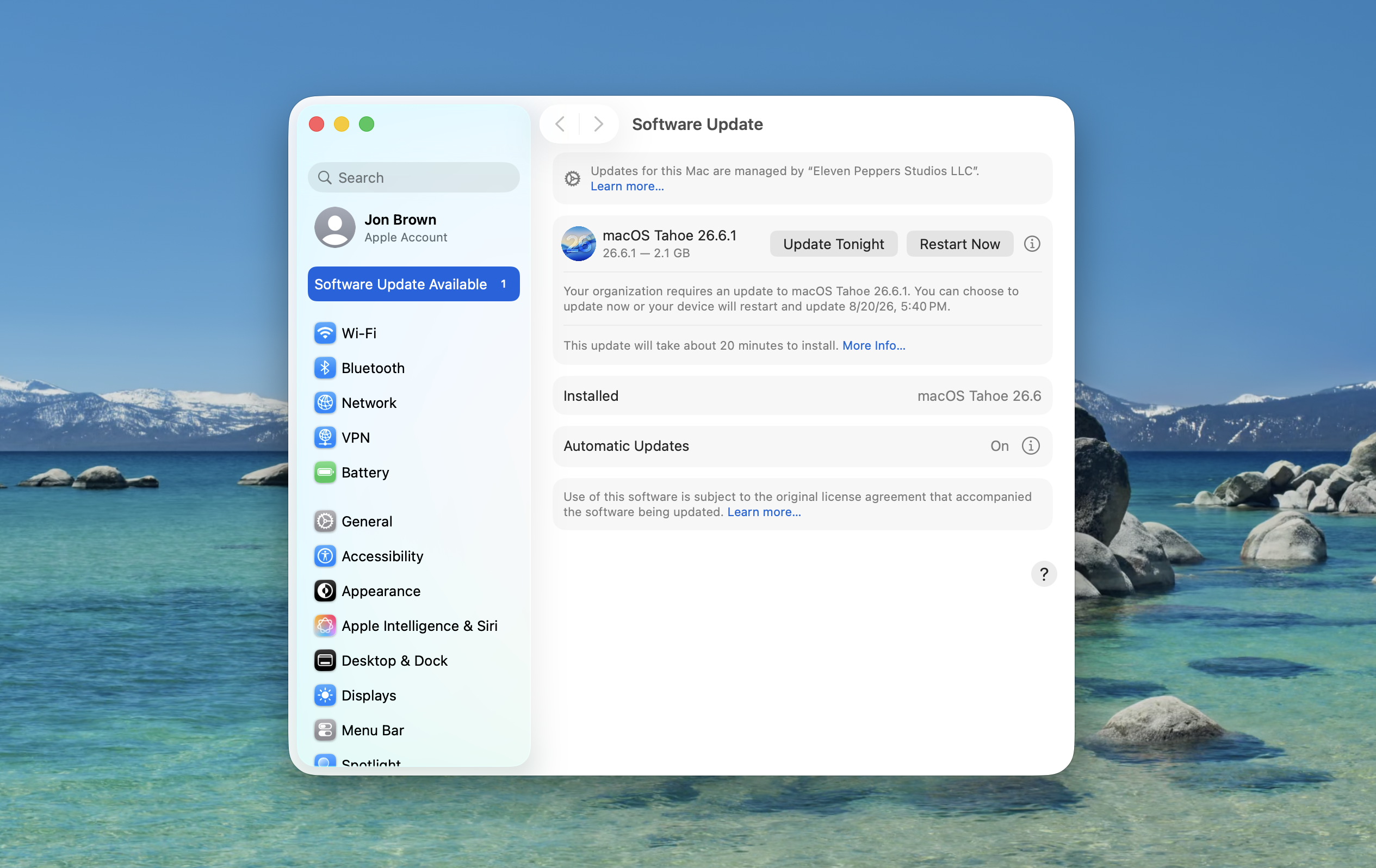
Apple released macOS Tahoe 26.6.1 on August 6, 2026 to fix CVE-2026-65400, a Screen Sharing vulnerability where an attacker on the network may be able to authenticate without valid credentials.
Screen Sharing sits directly in the remote access path for a Mac. This is Apple Screen Sharing, Apple Remote Desktop/Remote Management, and VNC-style access to the Mac desktop. It is not the same thing as sharing a window in Teams or Zoom.
Mr. Macintosh’s Tahoe 26.6.1 breakdown also puts the update in context with the larger 26.6 security cycle. Tony Young’s CVE counts show 155 CVEs patched in macOS Tahoe 26.6, 138 in macOS Sequoia 15.7.8, and 127 in macOS Sonoma 14.8.8. If a Mac is already on Tahoe 26.6, 26.6.1 is primarily about the new Screen Sharing authentication fix. If a Mac is behind that baseline, getting current also catches up on a much larger security release.
MacRumors reported that Apple also released macOS Sonoma 14.8.9 and macOS Sequoia 15.7.9 with the same Screen Sharing fix. Cult of Mac and MacDailyNews both focused on the Screen Sharing risk as well. Apple pushed a focused security update across supported macOS branches instead of waiting for the next normal feature release.
Apple shipped this as macOS Tahoe 26.6.1, a standard point security update, not as an Apple Rapid Security Response. It was released between larger macOS updates and focused on closing this Screen Sharing authentication issue.
The severity is high, even without confirmed exploitation
Apple’s advisory gives a short description: Screen Sharing, authentication without valid credentials, attacker on the network, fixed with improved state management. Apple credits Alfredo Pesoli through Bynario Atlas. It does not publish packet captures, affected function names, a proof of concept, or a full exploit chain.
Vulners lists CVE-2026-65400 with a CVSS 3.1 score of 7.1. Under the FIRST CVSS v3.1 severity scale, 7.0 through 8.9 is High. Vulners also listed EPSS as 0.00304 when I checked. CVSS describes severity. EPSS is an exploitation-probability signal. A low EPSS is useful context, but it does not make a high-severity authentication issue in a remote desktop service safe to ignore.
FIRST is explicit that CVSS measures severity, not full organizational risk. A 7.1 High score still has to be interpreted against the environment. A Mac with Apple Screen Sharing, Remote Management, or VNC-style access reachable from other systems carries a different risk than a Mac where those services are not exposed.
The exploit detail Apple published points to the authentication flow, not to weak passwords. “Improved state management” usually means the service had to handle connection state more carefully. A remote service has to know whether a client is unauthenticated, negotiating, challenged, authenticated, authorized, or connected. If a bug lets a connection cross that boundary in the wrong order, the password prompt may not be the real control anymore. Apple has not disclosed the exact state transition, but the risk is clear enough: the authentication boundary around Screen Sharing needed to be fixed.
As of August 8, 2026, I did not find a primary source saying CVE-2026-65400 was being exploited in the wild. Apple’s advisory does not say it is aware of active exploitation, I did not find the CVE in CISA’s Known Exploited Vulnerabilities catalog, and Tom’s Guide reported that there was no evidence of exploitation yet. The public record supports a narrow claim: no confirmed in-the-wild exploitation found, but the vulnerability is still high severity and the service is sensitive.
This is Apple Screen Sharing, not Teams or Zoom
The name can be confusing because “screen sharing” also describes what people do inside meeting apps. CVE-2026-65400 is not about sharing a PowerPoint in Teams or showing a browser window in Zoom. Apple’s advisory names the macOS Screen Sharing component, which is the built-in remote desktop service used by Apple’s Screen Sharing app, Apple Remote Desktop/Remote Management workflows, and VNC-compatible access paths.
That distinction changes the response. Meeting-app screen sharing does not become vulnerable because of this CVE. Macs that expose Apple’s remote desktop service are the systems to care about. In a business, those are usually support Macs, admin workflows, lab machines, conference-room or shared systems, and machines where Remote Management was enabled for troubleshooting and never reviewed again.
Apple’s Screen Sharing documentation describes the access plainly. When Screen Sharing is enabled, another computer on the network can view the Mac’s desktop and, depending on permissions, control it. Apple says the remote user can see what is on the screen, open, move, and close files and windows, open apps, and restart the Mac. This is interactive access to a business workstation.
If somebody can authenticate to that service without valid credentials, the concern is not theoretical. They may see email, documents, browser sessions, chats, customer information, internal portals, admin tools, certificate prompts, or whatever else is visible. If control is available, the risk moves from viewing to acting inside the user’s session.
This is not limited to Macs exposed directly to the internet. Apple’s wording is “attacker on the network.” That could be an office LAN, a support subnet, a lab, a conference network, a home network with another compromised device, or a VPN segment where too many systems can talk to each other. Public exposure is worse, but internal network reachability is enough to take the patch seriously.
Response timing
I would not put this into a normal monthly patch bucket for Macs that expose Apple Screen Sharing, Remote Management, or VNC-compatible access. The score is High, the affected service is remote desktop, and Apple shipped fixed builds across supported macOS branches. That is enough to move those Macs into an accelerated patch window.
For systems where the affected service is reachable, I would think in days, not weeks. Patch the current branch, plan for the restart, and confirm the Mac actually landed on the fixed version. If a Mac cannot be patched immediately, the temporary question is narrower: who can reach Apple Screen Sharing or Remote Management on that Mac until the update is installed?
If Apple later updates the advisory to say the vulnerability is being exploited, or if the CVE appears in CISA’s Known Exploited Vulnerabilities catalog, the response changes. At that point I would treat reachable Macs as incident-response priority: patch, isolate where necessary, and verify completion before treating the issue as closed.
Why Apple moved quickly
Apple rarely gives us the full internal reasoning behind release timing. The visible release pattern is still clear. The new 26.6.1 security note is focused on Screen Sharing, the impact is authentication without valid credentials, and the fix shipped across current supported macOS branches.
The Screen Sharing angle explains the urgency better than the version number does. A bug in a remote desktop service has a different blast radius than a cosmetic issue or a niche local crash. It affects a feature people may leave enabled for legitimate business reasons. It can matter on internal networks, not only public internet hosts. It also sits directly on an authentication boundary, which is one of the last places I want ambiguity.
MacRumors’ separate report about Apple testing iOS 26.6.1 is useful platform context, but it is separate from this CVE. The macOS advisory is about Screen Sharing on the Mac. The Reddit discussion around the MacRumors post made the same practical point, and MacDailyNews noted that no iOS, iPadOS, or watchOS updates shipped alongside this Mac-only patch. If iOS 26.6.1 ships later, it can have its own security context. CVE-2026-65400 is about macOS screen access.
Final thoughts
Apple fixed a High-severity authentication issue in the macOS remote desktop path. I would not describe it as actively exploited based on the sources available today. I also would not treat it like a routine point update on Macs where Screen Sharing, Remote Management, or VNC-compatible access is reachable.
If you have VNC or Remote Desktop enabled on any of your workstations, update them to the fixed build for their macOS branch, and verify the restart completed. For machines still behind 26.6, remember that this is not only the Screen Sharing fix; they are also behind the larger Tahoe 26.6 security baseline and part of a larger push to ensure every computer is regularly patched inline with risk mitigation and vulnerability management best practices.
Sources
About the security content of macOS Tahoe 26.6.1
Apple Releases macOS Tahoe 26.6.1 With Security Fixes
Apple Testing iOS 26.6.1 Update for iPhones
macOS Tahoe 26.6.1 Update! Everything you need to know.
About the security content of macOS Tahoe 26.6
macOS Tahoe 26.6.1 patches nasty Screen Sharing security hole
Apple releases macOS Tahoe 26.6.1 to patch critical Screen Sharing security flaw
About the security content of macOS Tahoe 26.6.1 - Vulners
Common Vulnerability Scoring System v3.1 Specification
NIST SP 800-40 Rev. 4: Guide to Enterprise Patch Management Planning
Rapid Security Responses in Apple operating systems
If you need to remove a Rapid Security Response
Turn Mac screen sharing on or off
Virtual Network Computing access and control with Remote Desktop
Enable remote management for Remote Desktop
Known Exploited Vulnerabilities Catalog
Update your Mac right now to block this major screen sharing flaw
Apple Releases macOS Tahoe 26.6.1 With Security Fixes - r/MacOS discussion
AI Usage Transparency Report
AI Era · Written during widespread use of AI tools
AI Signal Composition
Score: 0.3 · Moderate AI Influence
Summary
Apple released macOS Tahoe 26.6.1 to fix a Screen Sharing vulnerability (CVE-2026-65400) that allows an attacker on the network to authenticate without valid credentials.
Related Posts
Clamshell iBook G3 Restoration, Part 1: From Broken Screen to Board-Level Repair
Part one of a Clamshell iBook G3 restoration: a broken screen, a charger detour, a blinking system folder, a full teardown, and the backlight connector mistake that paused the project.

PowerBook 140 BlueSCSI Install: Cable Fixed, Battery-Bay Power, and Wi-Fi Setup
The PowerBook 140 project moved from preparing a BlueSCSI card in Basilisk II to installing the repaired internal SCSI cable, powering the BlueSCSI Pico externally from the battery bay, booting System 7.1, and fighting through DaynaPORT Wi-Fi setup.
Fixing a Broken Apple Cinema Display Stand with a 3D Printed Leg
A 22-inch Apple Cinema Display arrived with a broken acrylic easel stand, so I used a 3D printed replacement leg instead of sending the monitor back.
ClaudeChat Makes Snow Leopard Feel Useful Again
ClaudeChat-Snow-Leopard is interesting because it brings a modern Claude API workflow back to Mac OS X 10.6.8 with Objective-C, Cocoa, Keychain storage, screenshot uploads, and a native installer built for an older white MacBook.

LibrePods Turns AirPods Into an Interoperability Question
LibrePods is interesting because it turns AirPods into an interoperability question: what happens when open-source software implements Apple's private AirPods protocol so Android and Linux users can reach features normally reserved for Apple's ecosystem?

Check Encrypted HFS+ Drives Before macOS 28
Apple says macOS 28 will not support encrypted Mac OS Extended volumes, so older encrypted HFS+ external drives need to be identified, backed up, decrypted, converted, or reformatted before that upgrade.

AppleCare One Just Became a Better AppleCare Deal
AppleCare One looks more valuable after AppleCare+ price increases for Macs and iPads, especially for people with several Apple devices and older eligible hardware.
Why Apple's iPhone Financing Lock Change Matters for Business Buyers
Apple's U.S. carrier financing change makes locked versus unlocked iPhones an operational buying decision for small businesses, BYOD users, and Apple fleet planners.
Preparing a BlueSCSI Card for My PowerBook 145 with Basilisk II
A step-by-step walkthrough for preparing a BlueSCSI v2 PowerBook card image with Basilisk II: download the pieces, configure the emulator, boot a working classic Mac image, mount the target System 7.1 image, stage tools, and shut down cleanly before moving the image to the card.

How a Floppy Disk Turned My PowerBook 145 Around
A replacement adapter finally brought my PowerBook 145 back to life, but the storage bay had a stranger problem than I first thought: the drive inside was an IDE drive, not the SCSI storage this machine needs. The surprise was that 6 MB of RAM made a System 7.1 RAM Disk boot possible while I wait on a replacement cable and BlueSCSI.
