
AppleCare One was already a good idea. After Apple’s latest AppleCare+ price movement, it is worth another look.
MacRumors reported that AppleCare+ plans for Macs and iPads became more expensive, while AppleCare One continues to start at $19.99 per month in the United States. That matters because AppleCare One is not priced by device class. It covers up to three Apple devices for one monthly price, and additional devices can be added for $5.99 per month each.
That makes AppleCare One the more interesting AppleCare story right now. It is not just another warranty add-on. It is Apple turning device protection into a multi-device subscription. For someone with one iPhone, AppleCare+ may still be the simpler decision. For someone with an iPhone, Mac, iPad, Apple Watch, AirPods, or a mix of work and personal Apple hardware, AppleCare One changes the math. The plan becomes less about whether one device deserves protection and more about whether your active Apple device life should be covered as a group.
Why AppleCare One matters
Apple introduced AppleCare One in July 2025 as a U.S. AppleCare plan for covering multiple Apple products together. Despite the similar name, this is not Apple One, Apple’s software services bundle for products like iCloud, Apple Music, Apple TV+, Apple Arcade, and Apple Fitness+. AppleCare One is part of the AppleCare family: hardware service, support, repair coverage, and device protection.
The basic price is $19.99 per month for up to three devices, with extra devices at $5.99 per month each.
AppleCare One includes the core AppleCare+ benefits: accidental damage repairs, priority technical support, access to Apple-certified service, battery coverage when the battery falls below Apple’s threshold, and extended hardware coverage. Apple also expanded theft and loss protection in AppleCare One beyond the iPhone. Under AppleCare One, theft and loss can apply to iPhone, iPad, and Apple Watch, subject to Apple’s fees, deductibles, limits, and requirements.
The big shift is that AppleCare One can cover devices you already own. Apple says most devices less than four years old and in good working condition can be added to the plan. Headphones have a shorter window: less than one year old. That age limit is where “old” becomes a real cutoff: a five-year-old Mac or iPad may still be useful, but it is outside Apple’s stated AppleCare One age window. Even inside the window, Apple may require a diagnostic check, photos, or an Apple Store inspection before allowing the device onto the plan.
That is the part that makes AppleCare One different from the AppleCare most people are used to.
Historically, AppleCare was tied closely to the purchase moment. You bought a new Mac, iPhone, iPad, or Watch, and AppleCare+ was part of that decision. If you skipped it and the purchase window closed, you generally moved on without it. AppleCare One softens that old boundary. It gives people a way to build coverage around the devices they actually still use, not only the device they just bought.
The news is the pricing spread
The MacRumors value argument is straightforward: AppleCare+ pricing for some Macs and iPads moved up, but AppleCare One did not.
MacRumors gave the example of an iPhone 17 Pro, an M5 MacBook Air, and an iPad mini with A17 Pro. Separate AppleCare+ plans with theft and loss where applicable could cost up to $26.97 per month for those devices. AppleCare One remains $19.99 per month for three devices, which would save $6.98 per month in that example.
That is not an abstract savings claim. It is exactly the type of household or small-business device mix where AppleCare One starts to make sense. The more your AppleCare+ costs are spread across multiple products, the more valuable a flat multi-device plan becomes.
This is also why the plan is more interesting after a price increase. Apple did not need to change AppleCare One for it to become more valuable. AppleCare+ moving around it was enough.
This is AppleCare becoming a service
The better way to think about AppleCare One is as ongoing support, not just warranty extension.
Apple’s standard one-year limited warranty covers defects in materials and workmanship. That is useful, but it is narrow. It is not accidental damage coverage. It is not priority support for every support problem. It is not theft and loss protection. It is not a plan you manage across a group of devices.
AppleCare+ has always filled that gap for a single product. AppleCare One fills it for an Apple setup.
That is valuable because most people do not live with one Apple device anymore. They have a phone, a Mac, a watch, maybe an iPad, maybe AirPods, maybe a family device that still gets used every day. Small businesses have the same problem in a slightly different form: a handful of devices that are not a formal fleet, but still matter when something breaks.
In that world, AppleCare One is easier to understand than a stack of separate AppleCare decisions. It lets you ask one better question: which devices would be painful or expensive to replace, repair, or support if they failed this month?
How setup is supposed to work
Apple says customers can start AppleCare One from an iPhone, iPad, or Mac, or at an Apple Store. Apple also links the Get Coverage flow from apple.com/applecare.
After AppleCare One exists, Apple’s support page for adding and removing devices says devices are managed from Settings by going to General, then AppleCare & Warranty, then the AppleCare One Devices section. Devices can also be managed online through an Apple Account. That “after the plan exists” language matters because the older-device feature is not the same as open enrollment. AppleInsider’s setup coverage describes the same pattern from user experience: start with a device that can start or upgrade into AppleCare One, then add older eligible devices that appear in the flow.
The device states are the important part. A device that appears as Ready to Add can be added by following Apple’s prompts. A device that appears as Action Needed may need a device check. If a device does not appear where expected, Apple points users toward account association, pairing, eligibility, and the Not Eligible for Plan area.
The device check can be more involved than people expect, and the bring-it-to-the-store path is real. Apple says older devices may need a remote device check, photos, or an Apple Store inspection before they can be added. Apple’s AppleCare privacy notice also says eligibility can involve account status, device age, country registration, service history, lost or stolen status, diagnostics, and in some cases a physical in-store assessment. For an iPhone or iPad, Apple may require a remote device check, photos taken with another iPhone or iPad, or an Apple Store inspection. For a Mac, the process starts from an iPhone or iPad associated with the same Apple Account, and the Mac needs to be connected and sufficiently charged. For Apple Watch, the paired iPhone is part of the check.
This is not Apple opening a free-for-all for old damaged hardware. It is Apple letting older eligible devices into a paid support plan after it can verify age, account, condition, and device state.
I tried the Get Coverage flow
I do not currently have AppleCare One, and I am not buying a new Apple device this week. That made this a good time to test the practical question behind the news: if AppleCare One is more valuable now, can I just go enroll older devices already in my Apple Account?
I went to Apple’s AppleCare page, clicked Get Coverage, signed in, and got this:
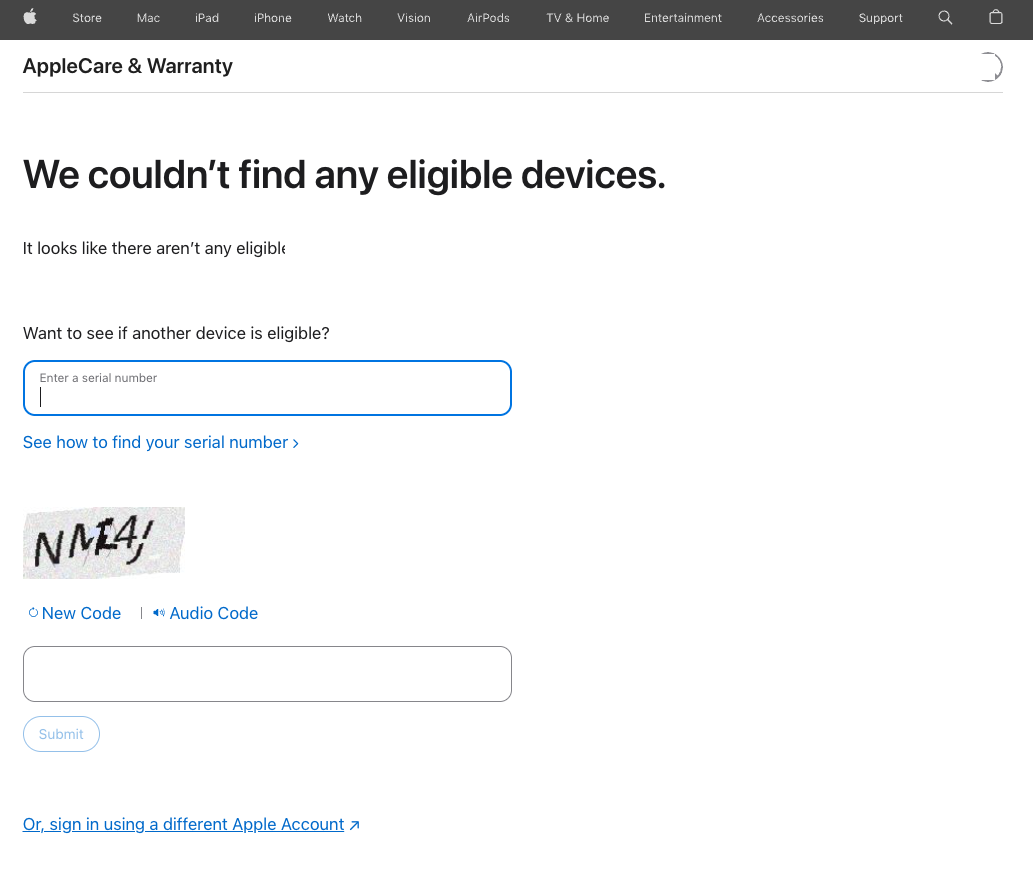
That result is worth understanding, but it should not be confused with the larger AppleCare One news. It does not mean AppleCare One is a bad product. It means the start path matters.
One of my devices still showed limited warranty coverage in AppleCare & Warranty:
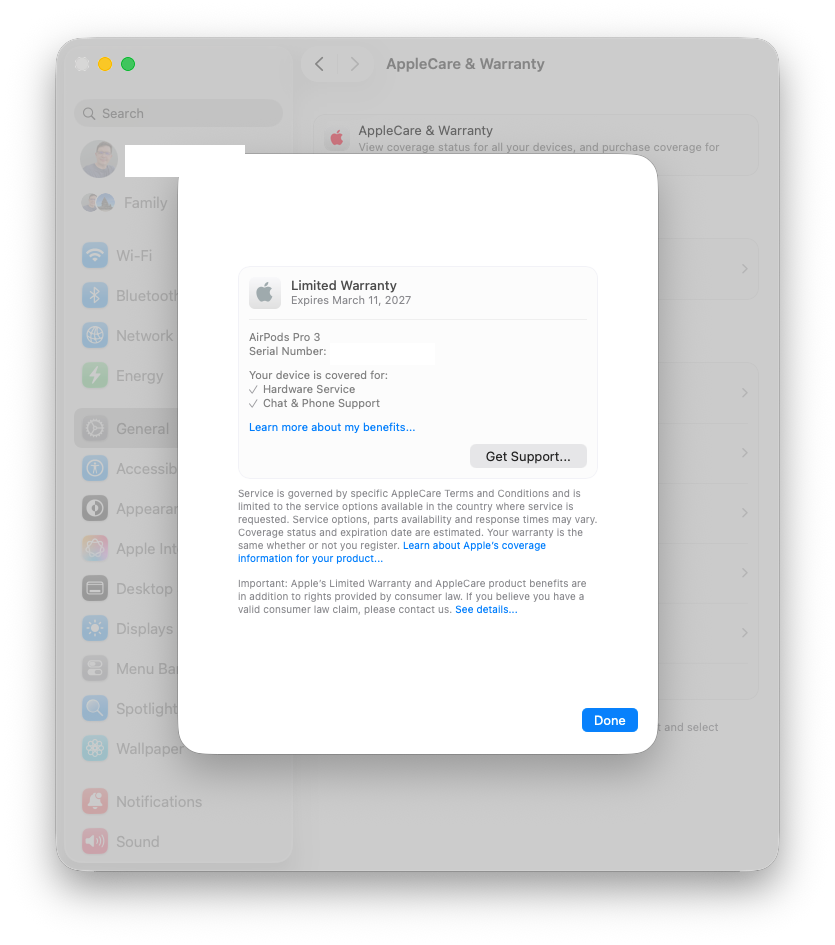
But when I checked the device, Apple’s message said it was not eligible for a new AppleCare plan and may be eligible to add to an AppleCare One plan:
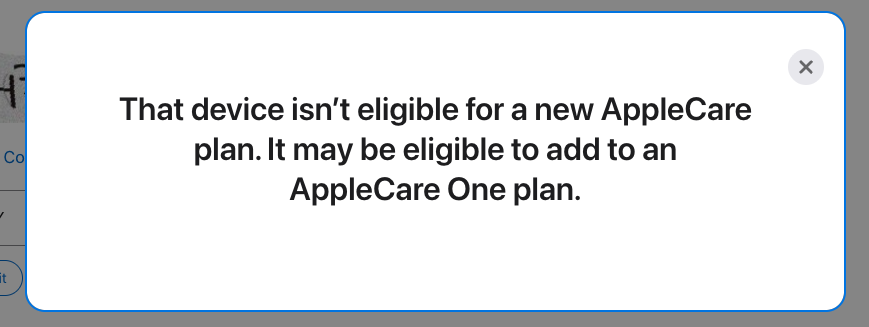
A device may be eligible to add to AppleCare One after you have a plan, but that does not automatically mean it can start a new AppleCare One plan by itself. That distinction has shown up for other users too: an Apple Community thread about devices without existing coverage includes the same practical answer, that a user generally needs a new eligible device or active AppleCare+ path before older devices can be added.
My takeaway from the test is simple: if you are buying a new Apple device, check AppleCare One during the purchase or post-purchase window. If you already have AppleCare+ on a device, compare the upgrade path. If you have no AppleCare plan and only older devices, do not assume the Get Coverage flow will let you start AppleCare One from that list.
Who should look at AppleCare One now
AppleCare One is most compelling for people with several current Apple devices and at least one clean entry point into the plan. That could be a new purchase, an active AppleCare+ plan, or an existing AppleCare One plan where you are deciding which older devices to add.
For a household, the best case is a mix of daily-use devices where separate AppleCare+ plans are starting to look expensive. For a small business, it is the same logic applied to continuity. If a Mac, iPad, iPhone, or Apple Watch is part of how work gets done, predictable service and support can matter more than squeezing every device into the cheapest possible coverage option.
It is not automatically worth it for everyone. If you only have one covered device, AppleCare+ may be cleaner. If your extra devices are old, low value, lightly used, or unlikely to pass Apple’s checks, AppleCare One may not save much. “Old” has two meanings here: too old for Apple’s stated eligibility window, or old enough that Apple wants proof the device is still in good condition. The first case is a hard value problem. The second case may mean Action Needed, photos, diagnostics, support contact, or a store inspection before the device can join the plan. If you are outside the United States, AppleCare One is still not generally available.
But after the AppleCare+ price increases reported this week, AppleCare One deserves a fresh comparison. The plan’s value is strongest when the first three covered devices would otherwise carry separate AppleCare+ costs, and when at least one of those devices benefits from theft and loss coverage.
The practical advice
The next time you buy an Apple device, do not treat AppleCare as a reflex yes-or-no checkbox. Price AppleCare+ against AppleCare One.
If you already have AppleCare+ on one or more devices, check whether AppleCare One would consolidate the coverage at a better monthly cost. If you have older Apple devices still in use, check whether they are young enough, associated with your Apple Account, in good condition, and able to pass Apple’s device check.
The news is that AppleCare One looks better because AppleCare+ got more expensive around it. The practical opportunity is that AppleCare One can turn AppleCare from a single-device purchase decision into ongoing coverage for the Apple hardware you actually depend on.
That is the value of the plan. It is not magic enrollment for every old device. It is a better AppleCare structure for people who have enough Apple hardware, enough repair risk, and the right path into the plan.
Sources
- MacRumors: AppleCare One is Now Even More Valuable
- MacRumors: AppleCare+ for Macs and iPads Just Got More Expensive
- MacRumors: AppleCare Guide
- Apple Newsroom: Apple introduces AppleCare One
- Apple: AppleCare
- Apple: Apple One
- Apple Support: Add or remove a device from your AppleCare One plan
- AppleInsider: What to do if some devices need extra steps to get covered with AppleCare One
- Apple Community: Unable to purchase new AppleCare for devices without existing coverage
- Apple One-Year Limited Warranty
- Apple Support: About the warranty coverage for your Apple device
- Apple Legal: AppleCare & Privacy
- Apple Legal: AppleCare terms and conditions
- Apple Legal: Service fees and deductibles
AI Usage Transparency Report
AI Era · Written during widespread use of AI tools
AI Signal Composition
Score: 0.26 · Moderate AI Influence
Summary
AppleCare One is a multi-device subscription plan that covers up to three Apple devices for one monthly price, with additional devices costing $5.99 per month each. It includes accidental damage repairs, priority technical support, access to Apple-certified service, battery coverage, and extended hardware coverage.
Related Posts
Clamshell iBook G3 Restoration, Part 1: From Broken Screen to Board-Level Repair
Part one of a Clamshell iBook G3 restoration: a broken screen, a charger detour, a blinking system folder, a full teardown, and the backlight connector mistake that paused the project.

PowerBook 140 BlueSCSI Install: Cable Fixed, Battery-Bay Power, and Wi-Fi Setup
The PowerBook 140 project moved from preparing a BlueSCSI card in Basilisk II to installing the repaired internal SCSI cable, powering the BlueSCSI Pico externally from the battery bay, booting System 7.1, and fighting through DaynaPORT Wi-Fi setup.
Fixing a Broken Apple Cinema Display Stand with a 3D Printed Leg
A 22-inch Apple Cinema Display arrived with a broken acrylic easel stand, so I used a 3D printed replacement leg instead of sending the monitor back.

macOS Tahoe 26.6.1 Fixes a High-Severity Screen Sharing Authentication Bypass
macOS Tahoe 26.6.1 fixes CVE-2026-65400, a high-severity Screen Sharing authentication issue where an attacker on the network may be able to authenticate without valid credentials.

ClaudeChat Makes Snow Leopard Feel Useful Again
ClaudeChat-Snow-Leopard is interesting because it brings a modern Claude API workflow back to Mac OS X 10.6.8 with Objective-C, Cocoa, Keychain storage, screenshot uploads, and a native installer built for an older white MacBook.

LibrePods Turns AirPods Into an Interoperability Question
LibrePods is interesting because it turns AirPods into an interoperability question: what happens when open-source software implements Apple's private AirPods protocol so Android and Linux users can reach features normally reserved for Apple's ecosystem?

Check Encrypted HFS+ Drives Before macOS 28
Apple says macOS 28 will not support encrypted Mac OS Extended volumes, so older encrypted HFS+ external drives need to be identified, backed up, decrypted, converted, or reformatted before that upgrade.
Why Apple's iPhone Financing Lock Change Matters for Business Buyers
Apple's U.S. carrier financing change makes locked versus unlocked iPhones an operational buying decision for small businesses, BYOD users, and Apple fleet planners.

Preparing a BlueSCSI Card for My PowerBook 145 with Basilisk II
A step-by-step walkthrough for preparing a BlueSCSI v2 PowerBook card image with Basilisk II: download the pieces, configure the emulator, boot a working classic Mac image, mount the target System 7.1 image, stage tools, and shut down cleanly before moving the image to the card.
How a Floppy Disk Turned My PowerBook 145 Around
A replacement adapter finally brought my PowerBook 145 back to life, but the storage bay had a stranger problem than I first thought: the drive inside was an IDE drive, not the SCSI storage this machine needs. The surprise was that 6 MB of RAM made a System 7.1 RAM Disk boot possible while I wait on a replacement cable and BlueSCSI.
