

Even beyond its often controversial behavior in the 2020 US presidential election, Facebook continually makes news headlines for its numerous privacy and security problems. Most notable, of course, were the 50 million Facebook profiles gathered for Cambridge Analytica for the 2016 election. Closer to home, the company pushed a VPN service in the Facebook iOS app that collected all your mobile data traffic for Facebook. After pressure from Apple, Facebook pulled the VPN but reused it for the Facebook Research program, which paid users as young as 13 for their data. Apple caused that to be shut down too.
Facebook has also silently shared user data with other tech giants, received confidential health data from other apps without users’ informed consent, and stored hundreds of millions of Facebook and Instagram passwords in an unencrypted form, among much else. The criticisms of Facebook go on and on.
Because of this, many have encouraged Facebook users to delete their accounts. That even includes the billionaire co-founder of the WhatsApp messaging service, which Facebook bought in 2014. If you’re done with Facebook, you’re welcome to deactivate or even delete your account. Facebook provides instructions for both actions. Deactivating your account just makes you invisible on Facebook, whereas deleting your account may eventually (up to 3 months) result in most of the data being removed.
The problem is that Facebook can be useful. It may be the only connection you have with certain friends or family members, and many informal groups use Facebook for meetup logistics. For many, losing access to Facebook would hurt real-world relationships and activities. Plus, lots of companies have Facebook pages, and taking those down might result in a loss of business from customers who would find out about the firm only through Facebook. What to do?
If you’re a business, the most sensible approach is to keep your Facebook page but avoid relying on it. Remember, Facebook is not your friend. Back in 2018, Facebook said it would be prioritizing posts from friends and family over public content, which is a nice way of saying that Facebook is deprecating business-related posts. So make sure you have a Web site that you control, and make sure that customers can easily find it and contact you through it. It’s also a good idea to offer customers multiple ways to contact you, particularly via email.
On a personal level, there are two ways to think about privacy on Facebook: limiting the information you share with other people on Facebook and limiting the information that you’re willing to provide to Facebook. If Facebook doesn’t have data about you, it can’t sell it to the highest bidder, let it be harvested by hackers, or use it in ways you might find creepy.
Facebook’s Privacy Checkup walks you through many of Facebook’s privacy settings:
-
On the Mac, sign in to the Facebook website, click the down-pointing arrow button on the top-right corner of the page, click Settings & Privacy, and click Privacy Checkup.
-
In Facebook’s iOS app, tap the hamburger button in the bottom-right corner, scroll down to and expand Settings & Privacy, tap Privacy Shortcuts, and then tap “Review a few important privacy settings.”
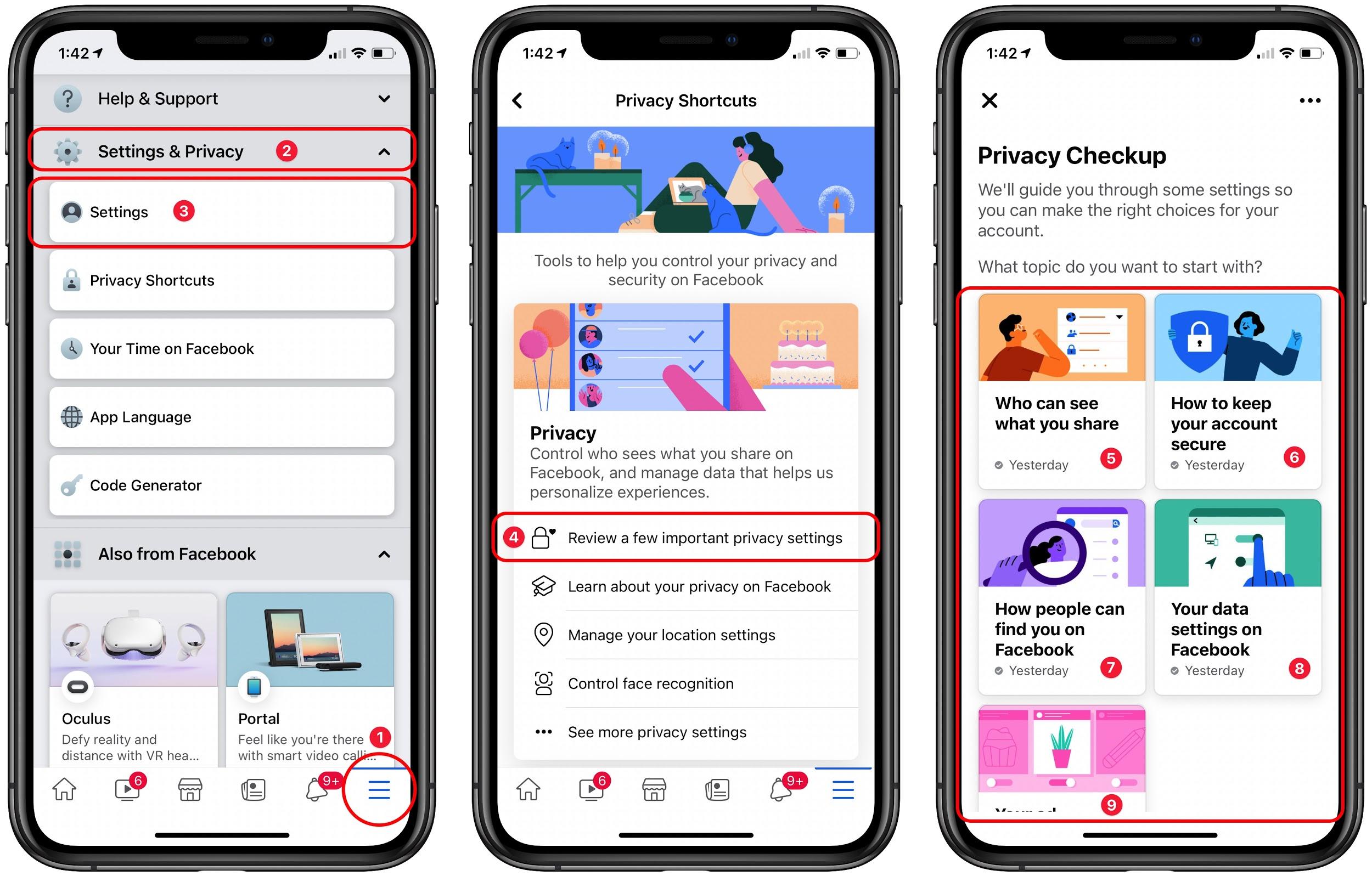
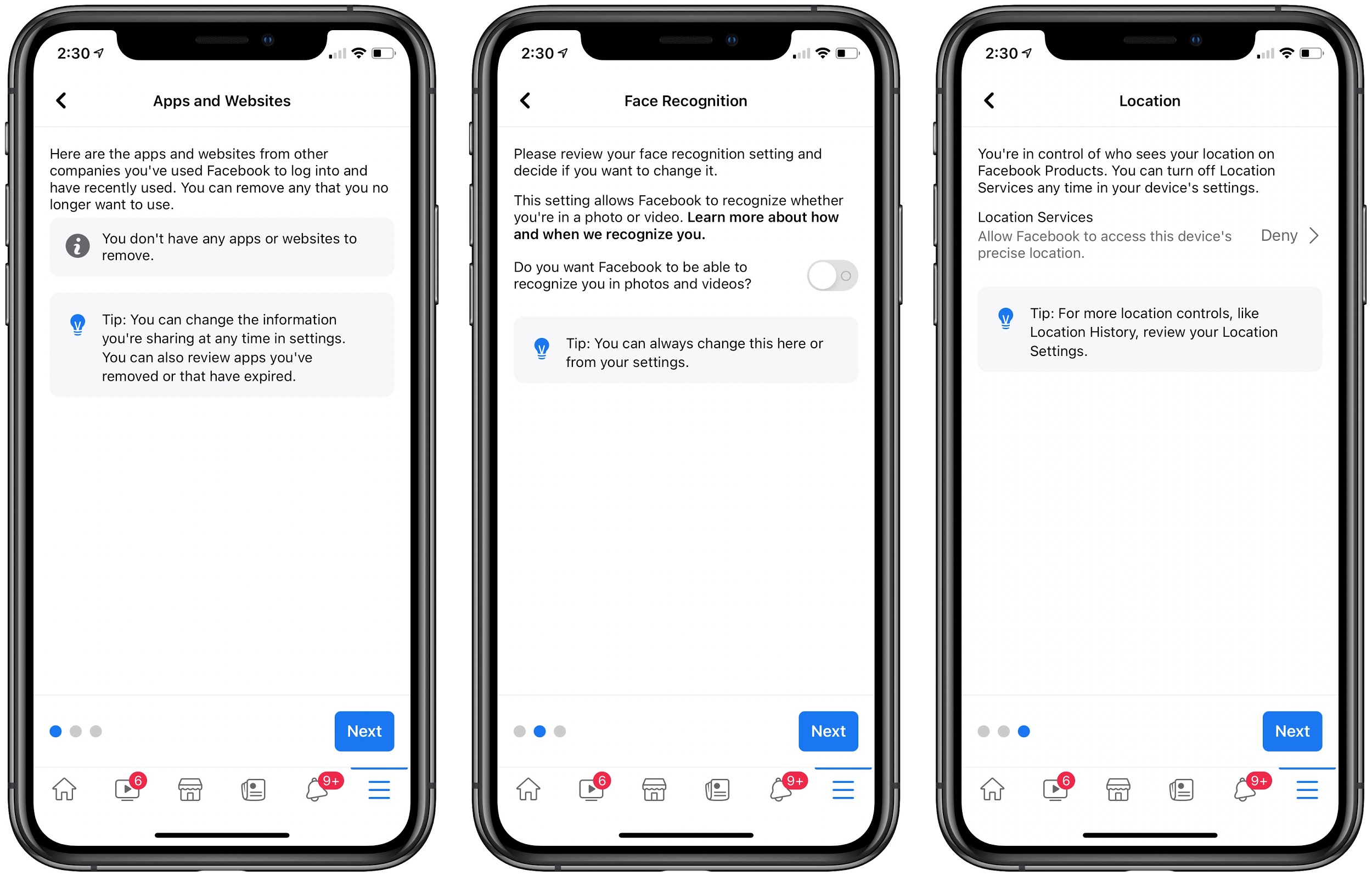
For each of the five tiles in the Privacy Checkup, work through the steps to make sure you’re comfortable with the settings. Although all of them are important, pay special attention to “Your data settings on Facebook,” which lets you control what apps could leak data about you, whether Facebook can use facial recognition to identify you in photos and videos, and if Facebook can know your precise location.
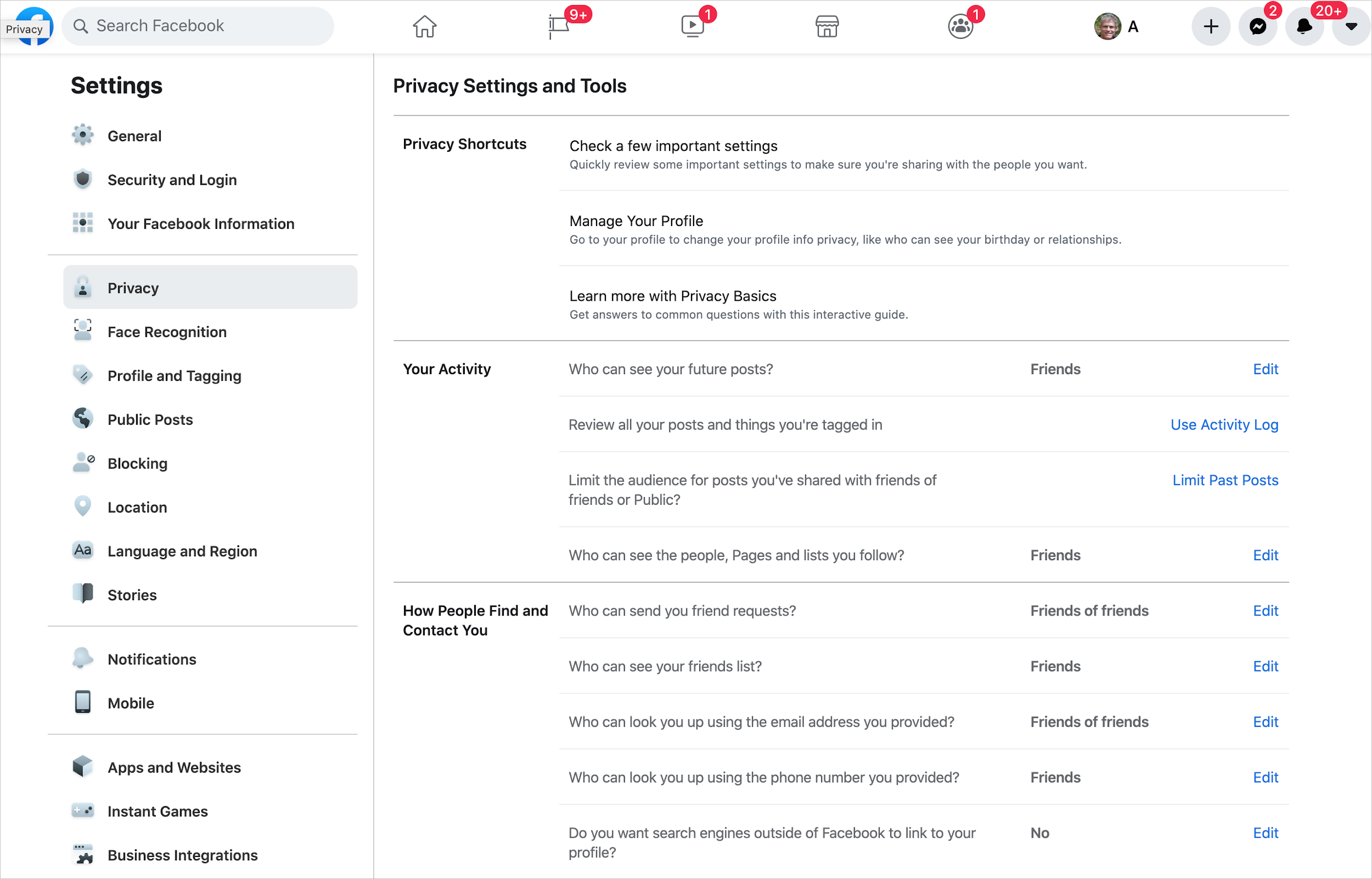
If you don’t want to go through the entire Privacy Checkup just to check a single setting, look at Facebook’s Privacy Settings and Tools in the overall Settings collection (accessible from that dropdown menu on the Mac—choose Settings & Privacy > Settings > Privacy, or from the iOS app’s hamburger button—tap Settings & Privacy > Settings > Privacy Settings). This page also provides a link to help you review the posts you’re tagged in, removing those that you don’t want on your timeline.
Beware that you could also be sharing information about everyone you know—Facebook loves to know who you know, even if they don’t have Facebook accounts. You can prevent this, but doing so requires two steps, one on Facebook’s Manage Your Invites and Uploaded Contacts page and another on Messenger’s Manage Your Uploaded Contacts page. Just delete them all. Otherwise, you’re giving away your contacts’ personal information without their permission.
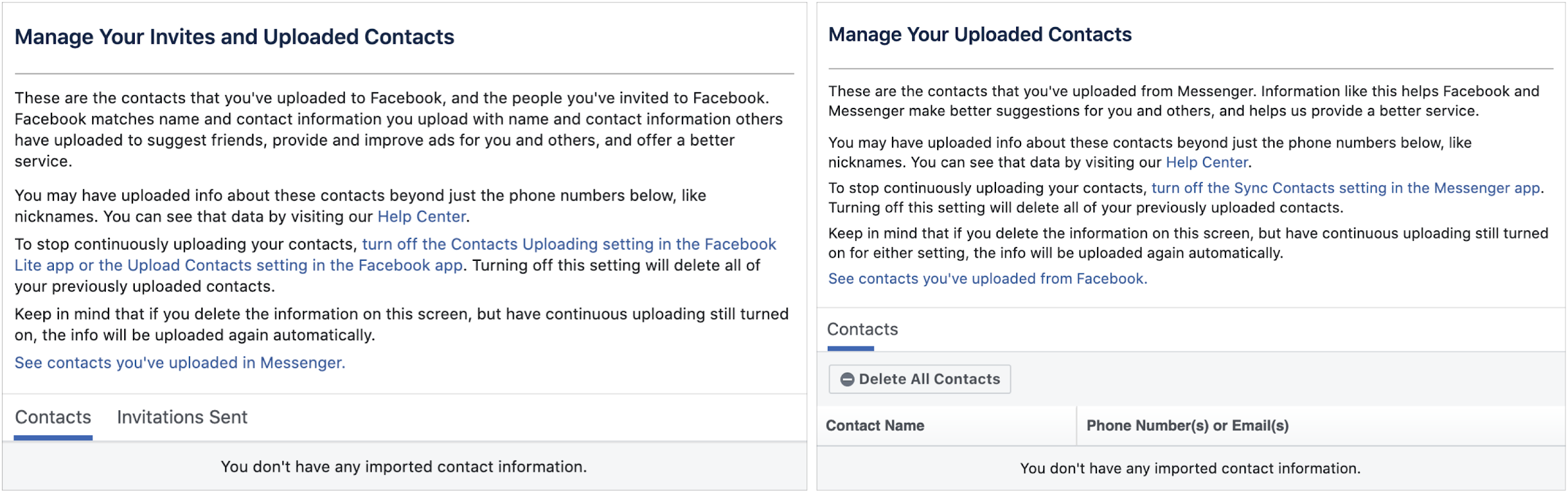
To ensure that contact uploading doesn’t happen again, in the Facebook iOS app, tap the hamburger button, scroll down, and then tap Settings & Privacy > Settings > Upload Contacts (at the bottom) and make sure the switch is off. In the Messenger app, tap your avatar in the upper-left corner, tap Phone Contacts > Upload Contacts, and make sure it’s off.
Also, in the iPhone Facebook app, tap the hamburger button again and then Settings & Privacy > Settings > Location, and turn off all the settings. Facebook doesn’t need to know everywhere you go.
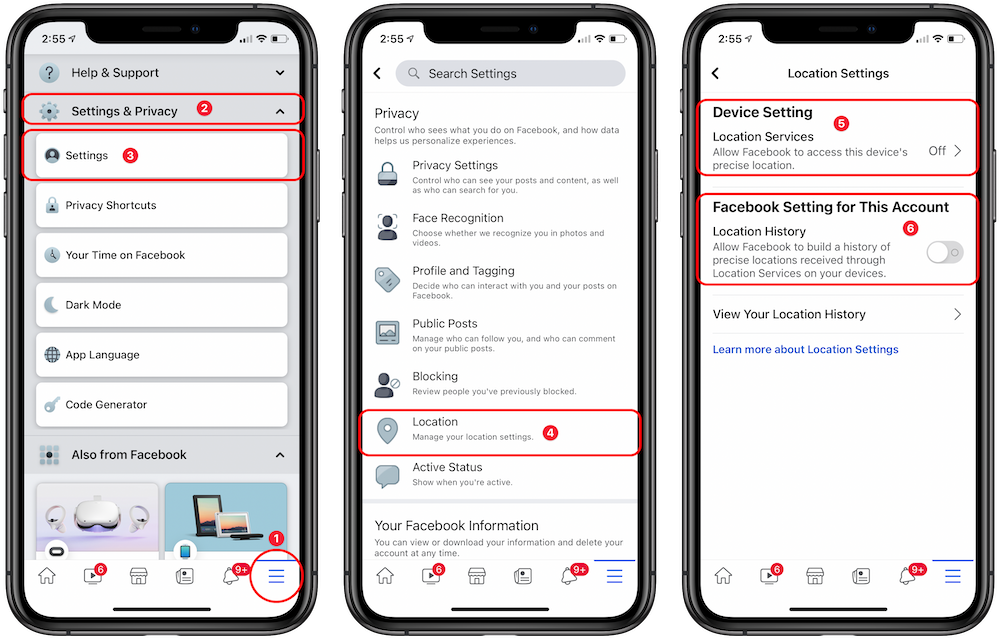
If you’re perturbed by the way Facebook’s iOS app is trying to capture your contacts and locations, you could delete it from your devices and rely instead on the Facebook website, which can’t access as much information about you. To make it easier to open, in Safari, visit facebook.com, tap the Share button, and then tap Add to Home Screen in the share sheet.
Let us leave you with one thought. Always assume that anything you post to Facebook or allow Facebook to have access to could end up in the hands of companies who want to exploit you or on the front page of your local newspaper… or the New York Times. Nothing on Facebook is ever private—Facebook has shown that it isn’t trustworthy or reliable—and the best way to ensure confidential or embarrassing information doesn’t leak inadvertently is to avoid posting it to Facebook in the first place.
AI Usage Transparency Report
Pre-AI Era · Written before widespread use of generative AI tools
AI Signal Composition
Score: 0.05 · Low AI Influence
Summary
Facebook's numerous privacy and security problems have led to many users considering deleting their accounts. However, Facebook can be useful for staying connected with friends and family, and businesses may rely on it for customer engagement. To maintain some level of control over your data, consider using the Privacy Checkup tool and adjusting settings such as data sharing, facial recognition, and location tracking.
Related Posts

Clamshell iBook G3 Restoration, Part 1: From Broken Screen to Board-Level Repair
Part one of a Clamshell iBook G3 restoration: a broken screen, a charger detour, a blinking system folder, a full teardown, and the backlight connector mistake that paused the project.

Bromure Gives Codex a Room of Its Own
I installed Bromure Agentic Coding, watched it build the Linux VM, authenticated Codex, and followed a real Codex task through the workspace.

Claude Code Auto Mode Changes Approval Flow, Not the Safety Boundary
Claude Code Auto mode changes how approval decisions are handled. It does not expand the boundary of what the coding agent should be allowed to do.

Amnesia Stealer Shows the Next Stage of ClickFix on macOS
Amnesia Stealer shows how ClickFix-style social engineering is adapting on macOS, while a public malware sample gives defenders an opportunity to study the behavior behind the campaign.

Reporting on Microsoft 365 DLP Overrides with PowerShell
DLP overrides are not automatically bad. They are a business process that needs visibility. This walkthrough covers a Microsoft Purview DLP policy, a custom sensitive information type, user override behavior, and a PowerShell report that exports override events from Activity Explorer.

PowerBook 140 BlueSCSI Install: Cable Fixed, Battery-Bay Power, and Wi-Fi Setup
The PowerBook 140 project moved from preparing a BlueSCSI card in Basilisk II to installing the repaired internal SCSI cable, powering the BlueSCSI Pico externally from the battery bay, booting System 7.1, and fighting through DaynaPORT Wi-Fi setup.

Move Entra Users Off SMS and Voice Before Microsoft Retires Them
Microsoft is retiring Microsoft-provided SMS and voice authentication in Entra ID. The migration is not passkeys for everyone; it is removing weak telecom MFA and choosing supported replacement methods such as Microsoft Authenticator, FIDO2 keys, certificate-based authentication, OATH hardware tokens, or customer-managed telecom.

Fixing a Broken Apple Cinema Display Stand with a 3D Printed Leg
A 22-inch Apple Cinema Display arrived with a broken acrylic easel stand, so I used a 3D printed replacement leg instead of sending the monitor back.

macOS Tahoe 26.6.1 Fixes a High-Severity Screen Sharing Authentication Bypass
macOS Tahoe 26.6.1 fixes CVE-2026-65400, a high-severity Screen Sharing authentication issue where an attacker on the network may be able to authenticate without valid credentials.

Three Mac Update Helpers That Fit Below a Patch Platform
Latest, Applite, and an all-in-one macOS update script each solve a different part of lightweight Mac maintenance: app update visibility, Homebrew-backed app management, and command-line package updates that can be wrapped carefully for small teams or basic MDM.
