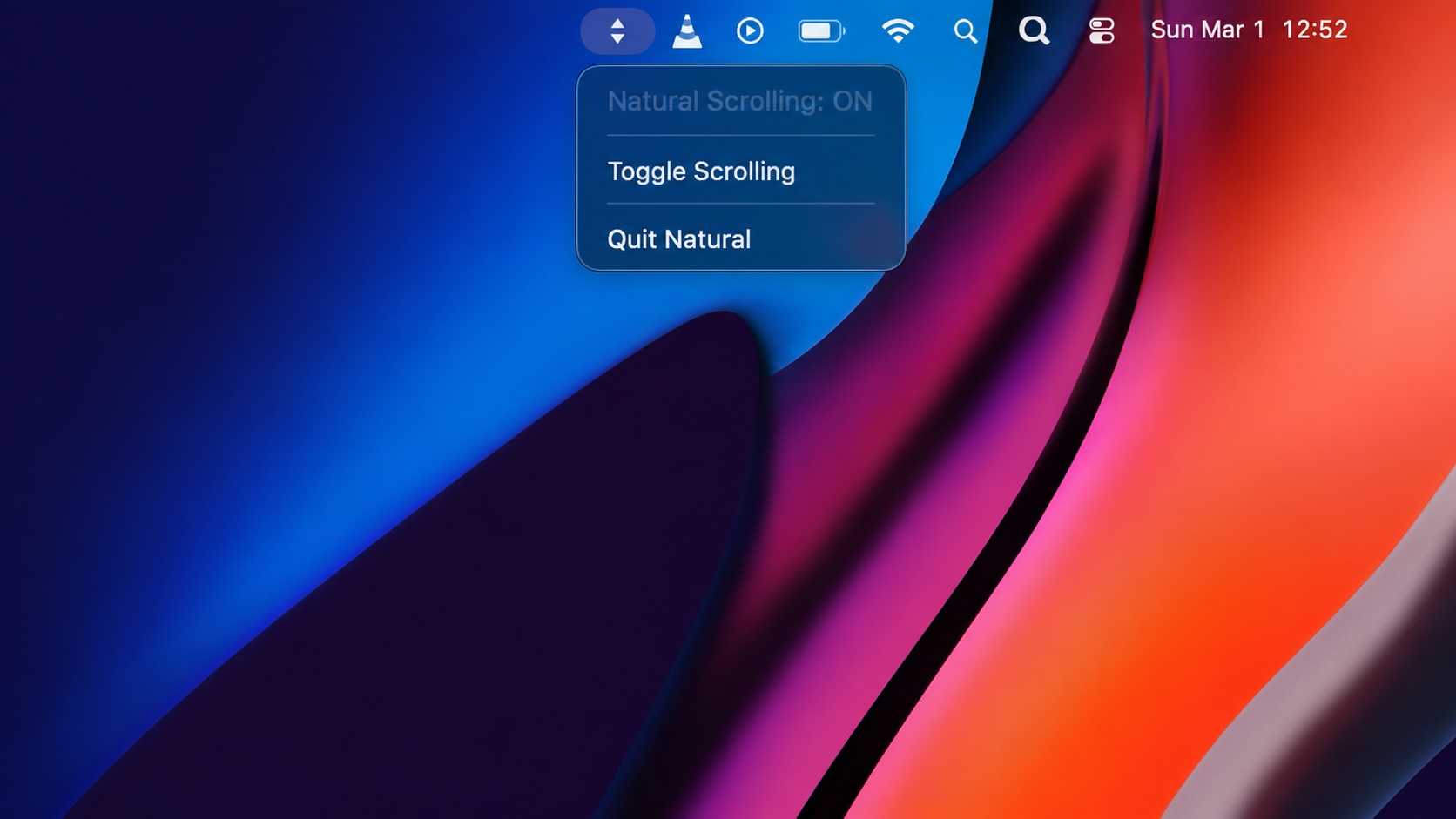

I switch between mouse input devices often enough that the macOS natural scrolling setting becomes more annoying than it should be. The setting is there, but it is buried in System Settings, and changing it can feel like a context switch when the only thing I want is for the mouse or trackpad to feel right.
Natural is a small menu bar app built around that one job. It puts a natural scrolling toggle in the menu bar, adds a keyboard shortcut, and keeps the feature surface intentionally narrow. The project describes itself as a one-feature utility: click the icon, choose Toggle Scrolling, and the change applies without logging out.
I love this because its a small app that is useful useful because it removes friction.
What the app changes
Natural reads and writes the global macOS scroll direction preference:
defaults read -g com.apple.swipescrolldirection
defaults write -g com.apple.swipescrolldirection -bool true
defaults write -g com.apple.swipescrolldirection -bool false
The project says it uses Apple’s private PreferencePanesSupport.framework to apply the change immediately, with a notification fallback if that framework is not available. The app is not just a wrapper around a preference write. It is trying to make the toggle feel immediate.
Even though this app takes this approach, Natural still persists the preference with defaults write, but the instant-apply behavior is the piece is something to keep an eye on since it could break in future releases. The app is Apple silicon first which is also important since there are still many Intel Macs in production enviornments today. Compatibility is listed for macOS 13 Ventura through macOS 26 Tahoe, with Tahoe tested and Ventura, Sonoma, and Sequoia expected to work.
The local install path
The repository install path is short:
git clone https://github.com/davidalecrim1/natural
cd natural
npm install
make install
That is accurate, but only if the development toolchain is already in place. My first run exposed the missing prerequisite immediately:
npm install
zsh: command not found: npm
Natural is not currently a simple signed DMG download workflow in the way a non-technical user might expect. The README says the app builds locally and copies Natural.app to /Applications. That means the installer experience is really a developer build path.
I installed Node with Homebrew:
brew install node
After that, I made the mistake of jumping straight back to make install without rerunning npm install. The result was another clear failure:
npm run tauri build -- --bundles app

> natural@0.5.0 tauri
> tauri build --bundles app

sh: tauri: command not found
make: *** [_build] Error 127
The important lesson is that Tauri was not supposed to be installed with Homebrew as a standalone formula. It is installed into the project dependency tree by npm install. When npm install failed the first time, the local tauri command never existed for the make install target to call.
The right recovery path was:
cd ~/Downloads/natural

node --version
npm --version

npm install
make install
If the build then complains about Rust or Cargo, that is a separate prerequisite. Tauri’s prerequisite documentation is explicit about the stack: macOS development needs Xcode or Xcode Command Line Tools, Tauri is built with Rust, and Node/npm are needed when the app uses a JavaScript frontend toolchain.
For a fresh Mac, I would check the full chain before trying the build:
node --version
npm --version
rustc --version
cargo --version
xcode-select -p
If the Xcode Command Line Tools are missing:
xcode-select --install
If Rust is missing, install it through rustup, restart Terminal or source the environment, then retry:
source "$HOME/.cargo/env"
cd ~/Downloads/natural
make install
What it looks like after install
Once the app is installed, the interface is exactly as small as the README promises. The menu bar item shows the current state, a command to toggle scrolling, launch-at-login control, and Quit.
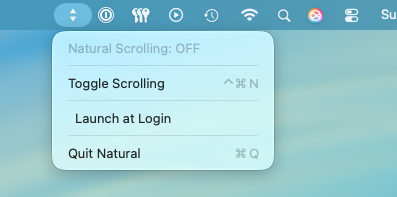
When the setting is enabled, the menu updates to show Natural Scrolling: ON and the launch-at-login option can be checked.
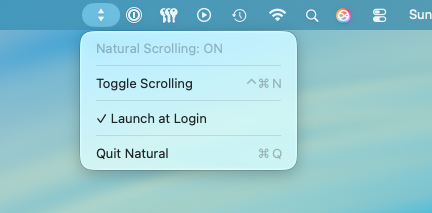
The app has one visible preference and one keyboard shortcut, Cmd-Control-N.
How I would evaluate it before recommending it
Because this is locally built, Gatekeeper behavior is different from downloading a signed, notarized vendor build. That is not automatically bad. It just changes the trust question. I am trusting the source I built, the dependencies I installed, and the local build environment.
If you were going to deploy it the easiest method would be to use a utility like QuickPKG to convert this to a Package that can be deployed by an MDM.
Conclusion
The install experience is easy to understand for Mac Admins but not so straight forward for casual Mac Users. Remember, Node/npm must be present before npm install, Tauri arrives through the project dependencies, Rust/Cargo must exist for the Tauri build, and Xcode Command Line Tools may be required for the local compile.
I love the simplicity of the tool, it toggles a known macOS preference, exposes the toggle in the menu bar, provides a keyboard shortcut, and keeps launch-at-login visible. If you need to toggle from using a trackpad to a mouse and need to change scrolling directions on the fly this app is for you!
Sources
AI Usage Transparency Report
AI Era · Written during widespread use of AI tools
AI Signal Composition
Score: 0.27 · Moderate AI Influence
Summary
Natural is a small menu bar app that toggles natural scrolling on macOS, providing a convenient and immediate solution for users who frequently switch between pointing devices.
Related Posts

When Chromium Mistakes Your VPN for a Local Network
Turning off Jamf Trust fixed the webinar, which normally would have sent me straight to its routing policies. This time the route was fine: Chromium was treating Jamf's ZTNA broker addresses as a local network, and an Edge and Chrome preference corrected it.

Amnesia Stealer Shows the Next Stage of ClickFix on macOS
Amnesia Stealer shows how ClickFix-style social engineering is adapting on macOS, while a public malware sample gives defenders an opportunity to study the behavior behind the campaign.
Apple Software Updates Need a Blueprint Before the MDM Commands Fade
Apple software update management is moving away from command-first MDM workflows. Jamf Blueprints and Declarative Device Management give Mac admins a better place to express update intent, scope, enforcement, and visibility.

Contour Brings Schema Checks to Mac Admin Configuration Work
Contour is a MacAdmins configuration toolkit that brings schema validation, repeatable generation, normalization, and AI-agent-safe command discovery to Apple configuration profiles, DDM declarations, PPPC, Santa, mSCP, Background Task Management, notifications, support app profiles, and osquery schema lookup.

Three Mac Update Helpers That Fit Below a Patch Platform
Latest, Applite, and an all-in-one macOS update script each solve a different part of lightweight Mac maintenance: app update visibility, Homebrew-backed app management, and command-line package updates that can be wrapped carefully for small teams or basic MDM.

Why Mac Performance Monitor Belongs in the Mac Admin Toolbox
Mac Performance Monitor belongs in the Mac admin toolbox because it records local performance history, helps Help Desk review slow-Mac reports after the moment has passed, and keeps process telemetry on the Mac instead of sending it to a cloud service.

Jamf Moves Platform SSO Into the Enrollment Gate
Jamf's attended Simplified Setup for Platform SSO changes Mac enrollment by making identity registration part of Setup Assistant before the MDM profile is installed.

ClickLock Shows Why Terminal Paste Is a Mac Security Boundary
ClickLock Stealer shows why Mac security teams should watch for Terminal paste lures, fake AppleScript password prompts, command-line Keychain access, LaunchAgent persistence, and Jamf Protect alerts that can route suspected Macs into Jamf Pro response groups.
Deploying DDM OS Reminder 4.0.0 in Jamf
DDM OS Reminder 4.0.0 is deployed as two separate pieces in Jamf: a managed preferences profile and a one-time installer script that creates the reminder script, starter script, and LaunchDaemon heartbeat on the Mac.
Using Mac Health Check 4.0.0 for Self-Service Compliance and Reporting
Mac Health Check 4.0.0 gives MDM administrators a Self Service workflow for showing managed Mac health, generating local JSON, and optionally feeding Splunk reporting.
