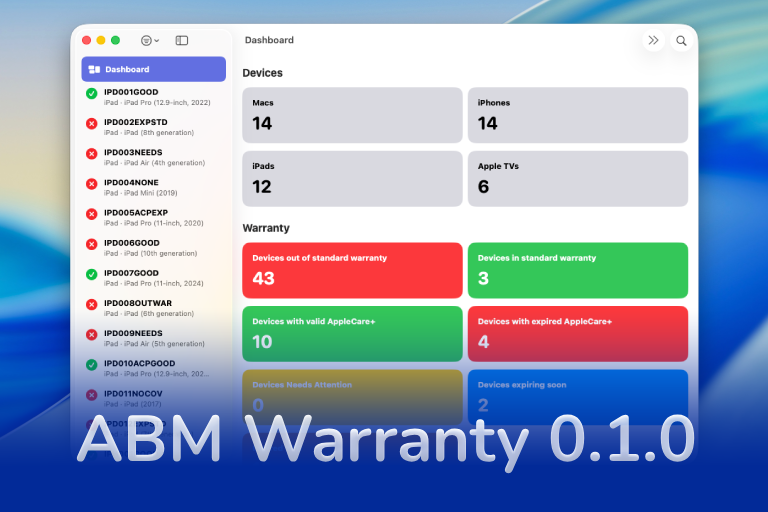

Introducing ABM Warranty for macOS
A smarter, faster way to understand and manage warranty coverage across your organization.
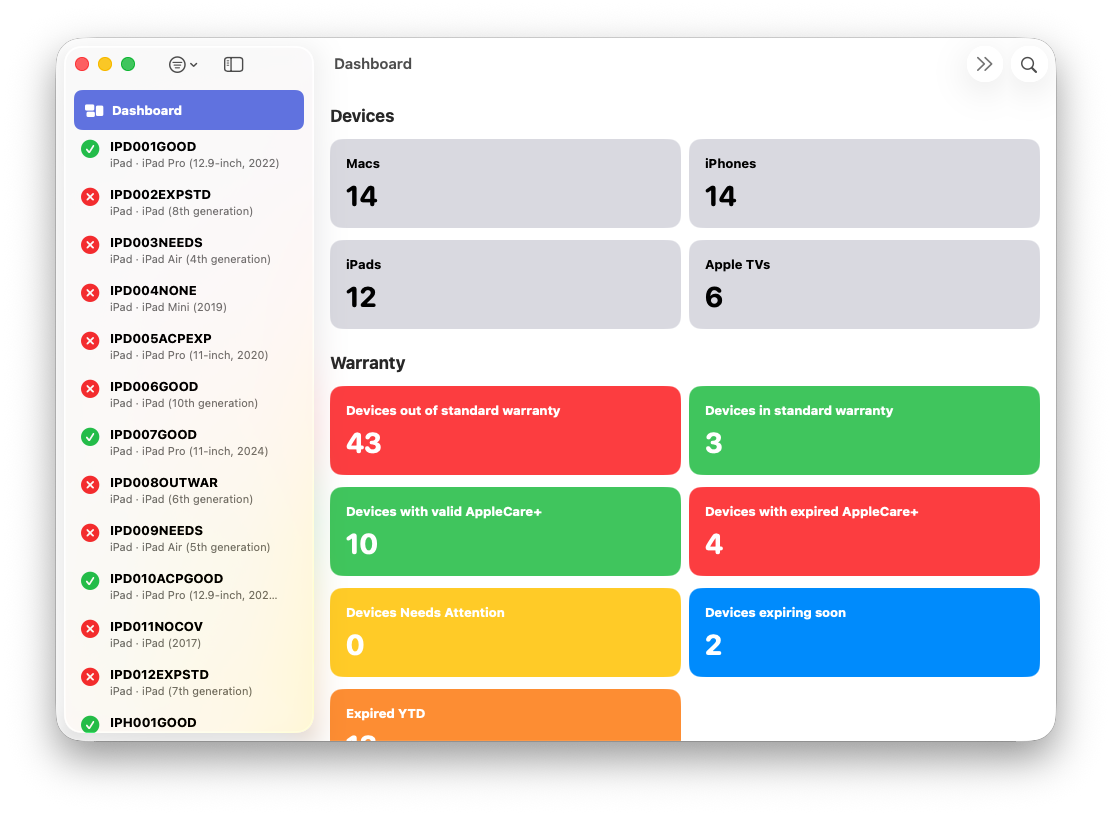
If you manage Apple devices at scale, you already know that Apple Business Manager (ABM) provides warranty data — but in practice, it’s extremely limited. It doesn’t provide workflow-friendly insights, it doesn’t surface actionable coverage states, and it doesn’t help you wrangle the ever-growing complexity of AppleCare+ renewals across hundreds or thousands of devices.
That gap is exactly why I built ABM Warranty, a new macOS app — now available in the Mac App Store:
➡️ Download on the Mac App Store
This tool brings a truly enterprise-grade warranty dashboard to ABM, powered entirely by the official ABM API, wrapped in a clean macOS 15 “Tahoe” interface.
Why Build This Tool?
As an Apple device admin myself, I’ve lost count of how many times I needed answers like:
- Which devices are about to expire?
- Which ones are eligible for AppleCare+ renewal?
- How many are already out of coverage and need to be replaced?
- How many Macs, iPhones, or iPads are in each warranty state?
- Which devices have multiple overlapping AppleCare+ events in their history?
ABM technically has this data — but it’s buried, and not consumable at scale.
ABM Warranty solves that by pulling structured, rich warranty data directly from Apple’s backend using your organization’s ABM API key.
How It Works
1. Create an API Key in Apple Business Manager
To connect ABM Warranty to your environment, you’ll need a Client ID, Key ID, and the PEM private key downloaded from ABM.
In ABM (Apple Business Manager):
- Go to Settings → Apps and Books → Access
- Select Generate API Key
- Download the
.pemkey file - Copy your Key ID, and Client ID
This is the same API authentication flow Apple documents for their Business APIs.
2. Install ABM Warranty
➡️ Download on the Mac App Store
The app runs on macOS 12 or later, and is optimized for macOS 15.
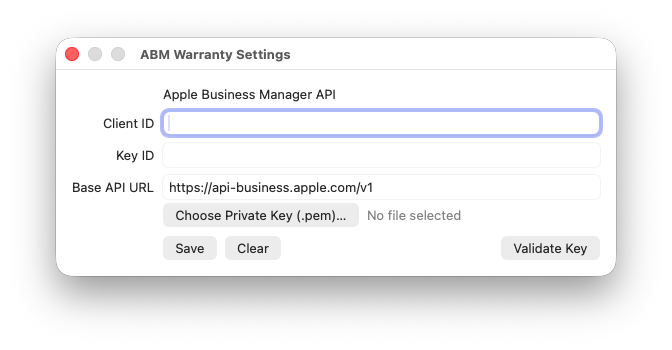
3. Configure Credential Settings
Open Settings within ABM Warranty and enter:
- Client ID
- Key ID
- Base URL (defaults to Apple’s production API endpoint)
- PEM File (select the private key downloaded from ABM)
Once credentials are saved, you can immediately fetch device inventory and coverage details.
What’s Included in v0.1.0
ABM Warranty v0.1.0 is a feature-complete, stable foundation for future expansion. Here’s what’s inside:

Support Indie Development
These apps are built in my free time.
I build and maintain these tools as an indie developer outside of client work and day-to-day responsibilities. If you find these apps useful and want to help fund continued development, updates, support, and new releases, you can sponsor the work directly.
Monthly support helps me keep shipping improvements, maintain compatibility, and invest more time into building practical software for the Apple admin and consultant community.
✅ Full Apple Business Manager API Integration
- Secure JWT authentication using your ABM private key
- Fetches device inventory (Mac, iPhone, iPad, Apple TV)
- Fetches all AppleCare coverage records per device
- Fully paginated API support
✅ Coverage Intelligence
Automatically detects:
- In Warranty
- Out of Warranty
- Needs Attention (expired ≤ 12 months — historically reviewable)
- AppleCare+ active
- AppleCare+ expired
- Standard warranty active/expired
- Effective coverage window
- Overlapping coverage events
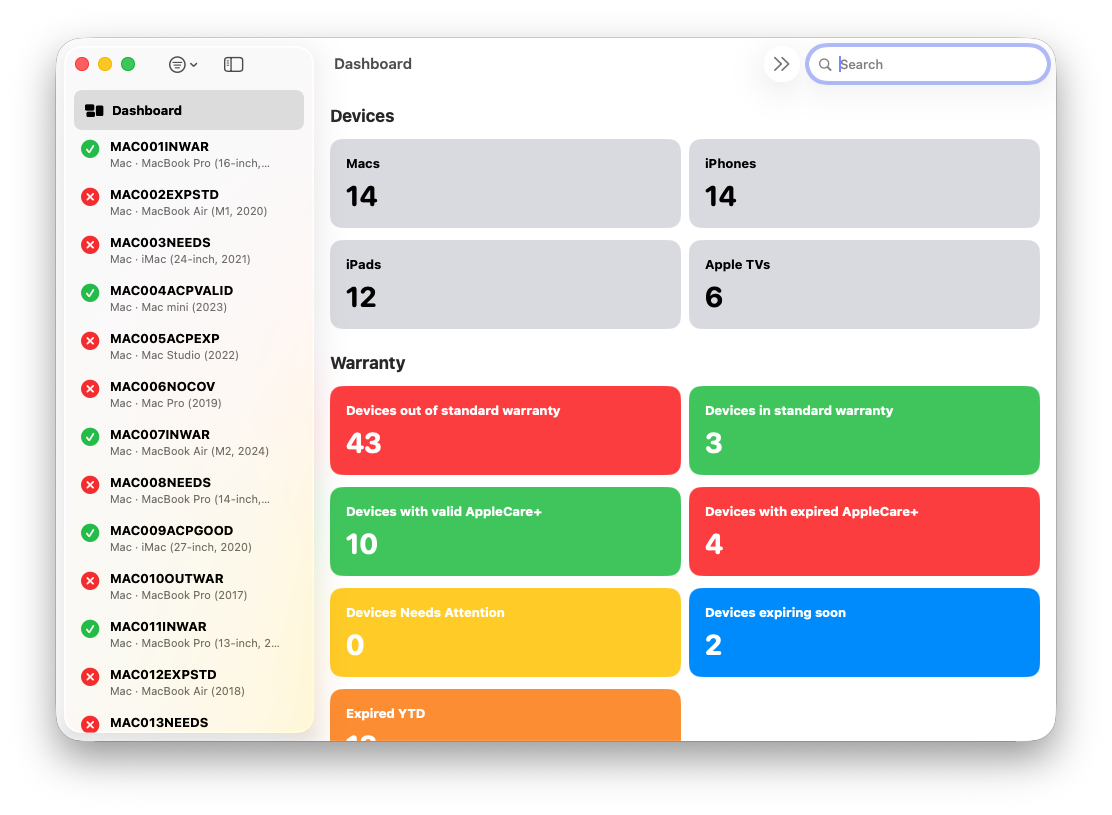
✅ Device & Coverage Dashboard
A visual overview of your entire fleet:
- Macs / iPhones / iPads / Apple TVs
- Standard warranty metrics
- AppleCare+ metrics
- Needs Attention
- Expiring Soon (0–30 days)
- Out of Standard Warranty
- Expired AppleCare+
Everything is one click away, filtered instantly.
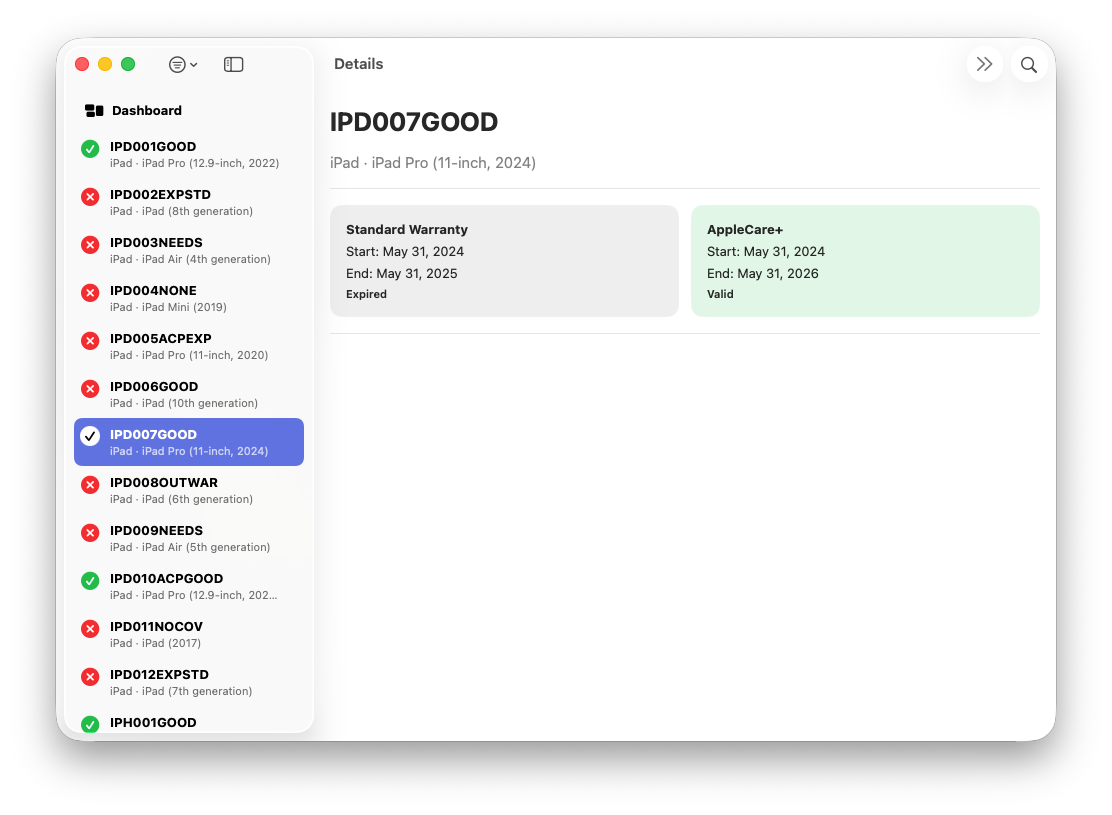
✅ Detailed Per-Device Coverage View
- Coverage tiles (standard + AppleCare+)
- Full coverage history in tile format
- Selectable text (copy/paste friendly)
- Clean, Tahoe-style UI
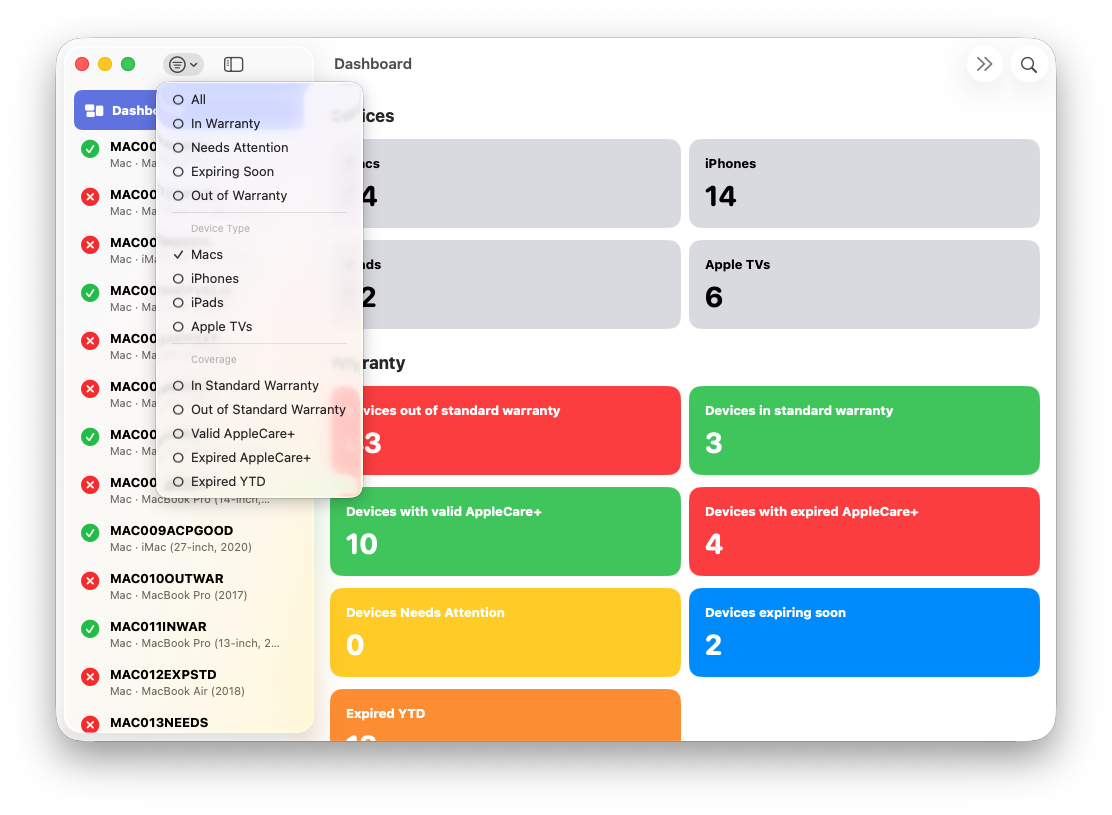
✅ Sidebar Search, Filters, and Sorting
- Search by serial, make, or model
- System-level filters
- Coverage-level filters
- Sorting by serial number
✅ CSV Export
Export any filtered list to a CSV file for reporting or archival purposes.
Roadmap – What’s Coming in v0.2.0?
I’m already collecting feedback, and here are the major features planned:
🚀 Enhanced Auth & Deployment (JAMF)
- Ability to pull API credentials and PEM cert from JAMF-managed preferences
- Support for reading the private key directly from Keychain
- Improved automatic certificate selection UI
🔧 Coverage Expansion
- Dedicated filters for YTD Expired
- More granular renewal forecasting
- Better visualization of multi-event AppleCare histories
🏫 Apple School Manager Support
ASM shares much of the same API structure as ABM, and early work is underway to support both.
🎨 Additional UI Enhancements
- Improved layout constraints
- More refined Tahoe-style materials
- Multi-column detail view options
And of course:
💬 I want your feedback!
What would you like to see in v0.2.0 or later?
What challenges do you have managing warranties across your Apple fleet?
Resources
- Apple Business Manager User Guide
- Apple Platform Deployment
- ➡️ Download on the Mac App Store
- Apple Business Manager API Test
Ready to take your Apple IT skills and consulting career to the next level?
I’m opening up free mentorship slots to help you navigate certifications, real-world challenges, and starting your own independent consulting business.
Let’s connect and grow together — Sign up here
AI Usage Transparency Report
AI Era · Written during widespread use of AI tools
AI Signal Composition
Score: 0.35 · Moderate AI Influence
Summary
ABM Warranty is a new macOS app that brings a truly enterprise-grade warranty dashboard to Apple Business Manager, powered entirely by the official ABM API.
Related Posts

When Chromium Mistakes Your VPN for a Local Network
Turning off Jamf Trust fixed the webinar, which normally would have sent me straight to its routing policies. This time the route was fine: Chromium was treating Jamf's ZTNA broker addresses as a local network, and an Edge and Chrome preference corrected it.

Amnesia Stealer Shows the Next Stage of ClickFix on macOS
Amnesia Stealer shows how ClickFix-style social engineering is adapting on macOS, while a public malware sample gives defenders an opportunity to study the behavior behind the campaign.
Apple Software Updates Need a Blueprint Before the MDM Commands Fade
Apple software update management is moving away from command-first MDM workflows. Jamf Blueprints and Declarative Device Management give Mac admins a better place to express update intent, scope, enforcement, and visibility.

Contour Brings Schema Checks to Mac Admin Configuration Work
Contour is a MacAdmins configuration toolkit that brings schema validation, repeatable generation, normalization, and AI-agent-safe command discovery to Apple configuration profiles, DDM declarations, PPPC, Santa, mSCP, Background Task Management, notifications, support app profiles, and osquery schema lookup.

Three Mac Update Helpers That Fit Below a Patch Platform
Latest, Applite, and an all-in-one macOS update script each solve a different part of lightweight Mac maintenance: app update visibility, Homebrew-backed app management, and command-line package updates that can be wrapped carefully for small teams or basic MDM.
Natural Makes the macOS Scroll Direction Toggle Less Buried
Natural is a small macOS menu bar utility that makes the natural scrolling toggle easy to reach, but building it from source also shows why open-source desktop utilities need clear prerequisite checks before they become recommended tools.

Why Mac Performance Monitor Belongs in the Mac Admin Toolbox
Mac Performance Monitor belongs in the Mac admin toolbox because it records local performance history, helps Help Desk review slow-Mac reports after the moment has passed, and keeps process telemetry on the Mac instead of sending it to a cloud service.

Jamf Moves Platform SSO Into the Enrollment Gate
Jamf's attended Simplified Setup for Platform SSO changes Mac enrollment by making identity registration part of Setup Assistant before the MDM profile is installed.

ClickLock Shows Why Terminal Paste Is a Mac Security Boundary
ClickLock Stealer shows why Mac security teams should watch for Terminal paste lures, fake AppleScript password prompts, command-line Keychain access, LaunchAgent persistence, and Jamf Protect alerts that can route suspected Macs into Jamf Pro response groups.
Deploying DDM OS Reminder 4.0.0 in Jamf
DDM OS Reminder 4.0.0 is deployed as two separate pieces in Jamf: a managed preferences profile and a one-time installer script that creates the reminder script, starter script, and LaunchDaemon heartbeat on the Mac.
